© 2026 FSCharter
Nov 02, 2026

Improvements

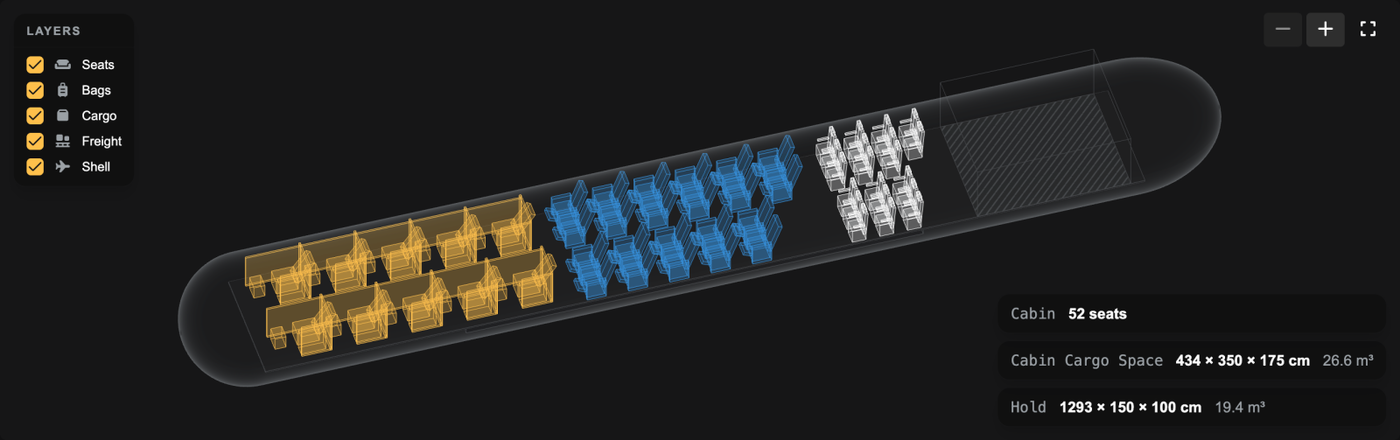
Cabin cargo space is now drawn and listed when seats are removed (FSC-4219, FSC-4239)

Previously, an aircraft with seats removed showed "Cabin 0 seats" in the 3D view, and the floor left free for cargo wasn't drawn or listed anywhere. The 3D view now draws the cabin cargo space inside the cabin, and the "Aircraft Layout" tab lists it on its own "Cabin Cargo Space" line with its dimensions and volume.

Above: A CRJ700 with some economy seats removed, showing the cabin cargo space at the back of the cabin and its own "Cabin Cargo Space" line (434 × 350 × 175 cm, 26.6 m³).

The Antonov An-225 can now be maintained, slotted and parked (FSC-4222, FSC-4228)

Previously, the An-225 (7,425.6 m²) was larger than every Service Centre, slot and stand, so it could never get a C or D check, fly route-backed jobs or park on a stand. The Large Service Centre, Huge Domestic Slot, Huge International Slot and Huge Stand have been enlarged to 8,000 m². Existing ones have been enlarged too.

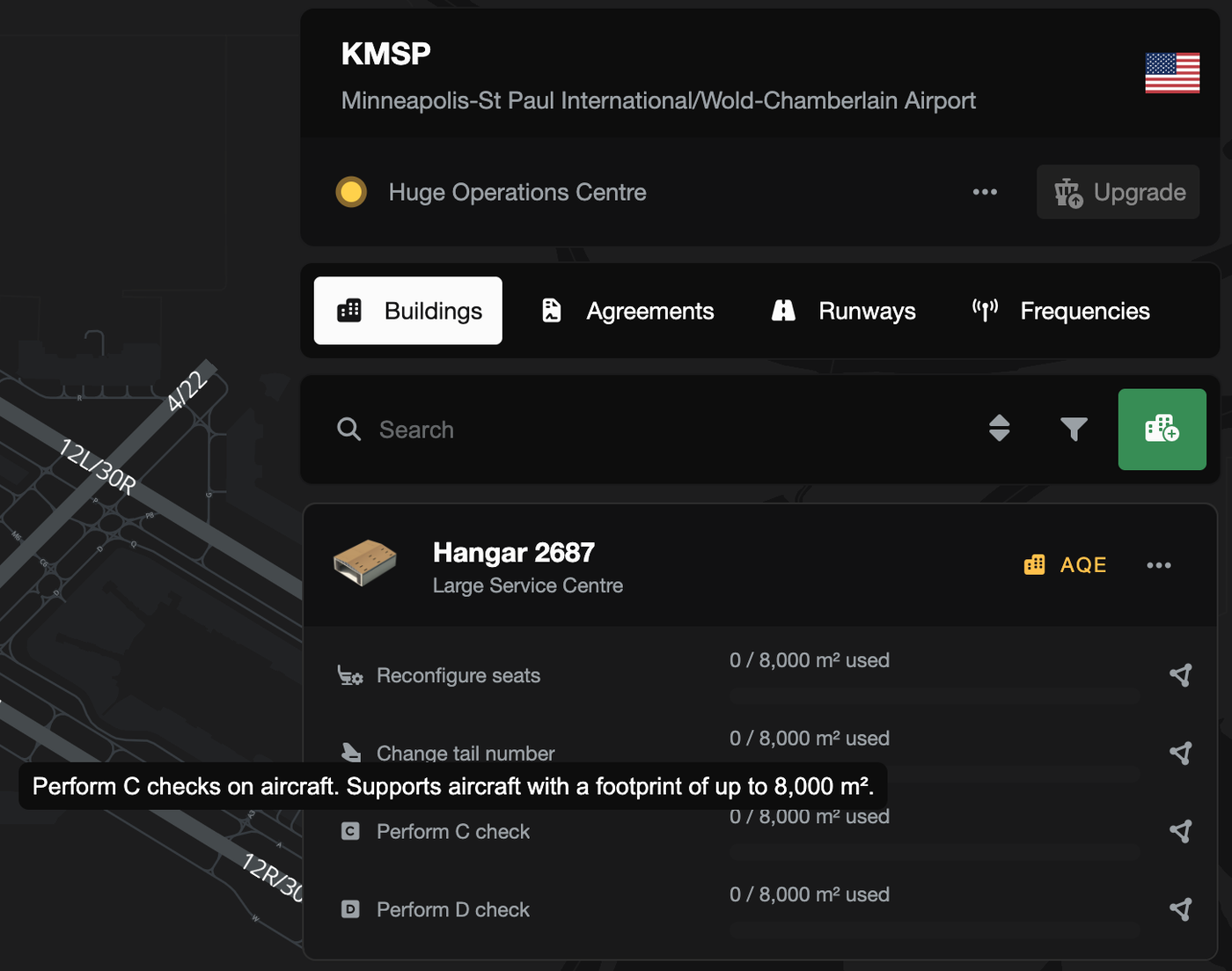
Above: A Large Service Centre at KMSP, now 8,000 m², with "Perform C check" supporting aircraft up to 8,000 m².

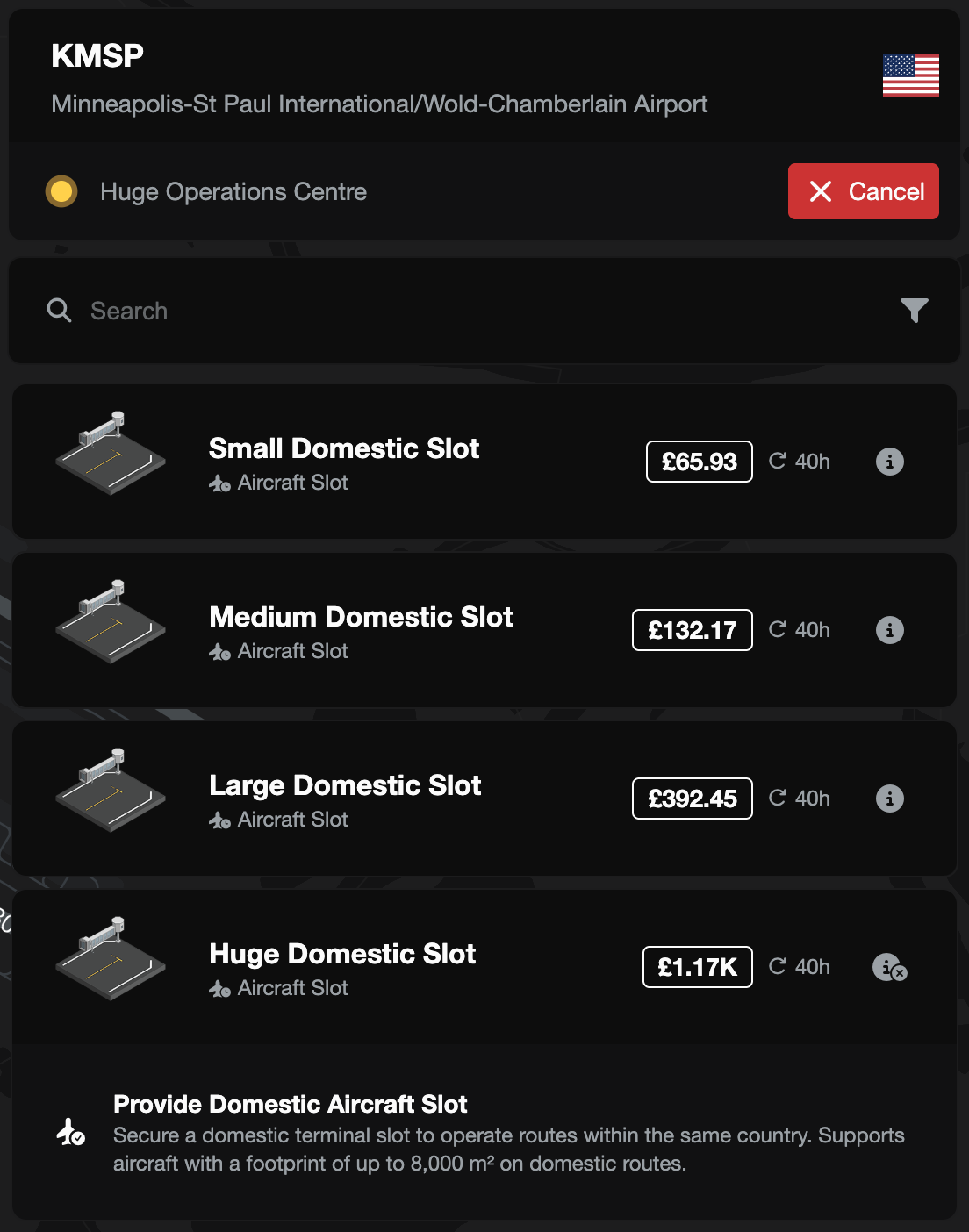
Above: The "Huge Domestic Slot", which now supports aircraft with a footprint of up to 8,000 m².

Mixed charter routes now count each commodity (FSC-4227)

In "Create Charter", a route carrying several commodities previously showed a single count under one name (e.g. "25 mail bags" for 8 passengers, 11 mail bags and 6 parcel sacks). The route now shows a count for each commodity where there is room, and hovering over it lists every commodity on the route.

Above: A mixed route showing 8 economy passengers, 11 mail bags and 6 parcel sacks as separate counts.

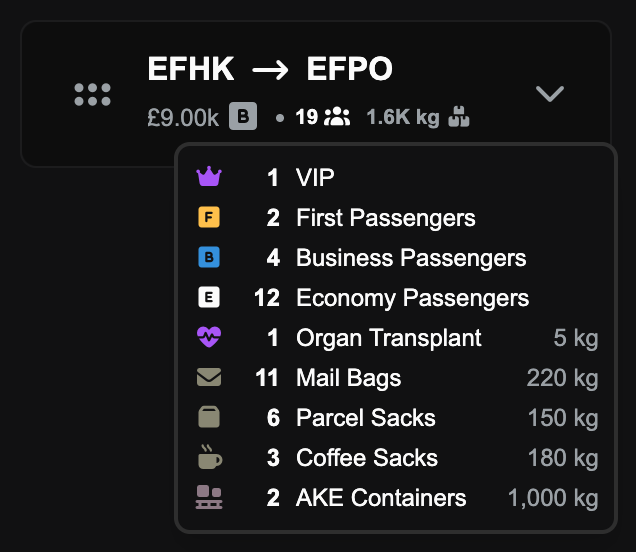
Above: Hovering over a busy mixed route lists every commodity on it, with the weight of each cargo type.

The public API specification is now available (FSC-4223)

The public API's OpenAPI specification at https://v2.fscharter.net/api/v1/openapi.json previously returned a 404. It is now published, so anyone building on the API can read it.

Bug Fixes

Passengers who booked a cabin are now seated before upgrades (FSC-4183)

Previously, on routes with cabin upgrades, a large upgrading group could take a cabin's seats before a smaller group who had booked that cabin, leaving the booked group off the flight. Each cabin now seats the groups who booked it first, then upgrades by booked class (business before economy).

Passengers returned to the pool are no longer priced at an upgraded class (FSC-4218)

Previously, a passenger group that was upgraded on a route job went back to the pool still marked with its upgraded cabin, so the next company could be offered an economy booking priced as first class. Groups now return to the pool priced at the class they booked.

The job revenue breakdown now shows a restriction penalty once (FSC-4221)

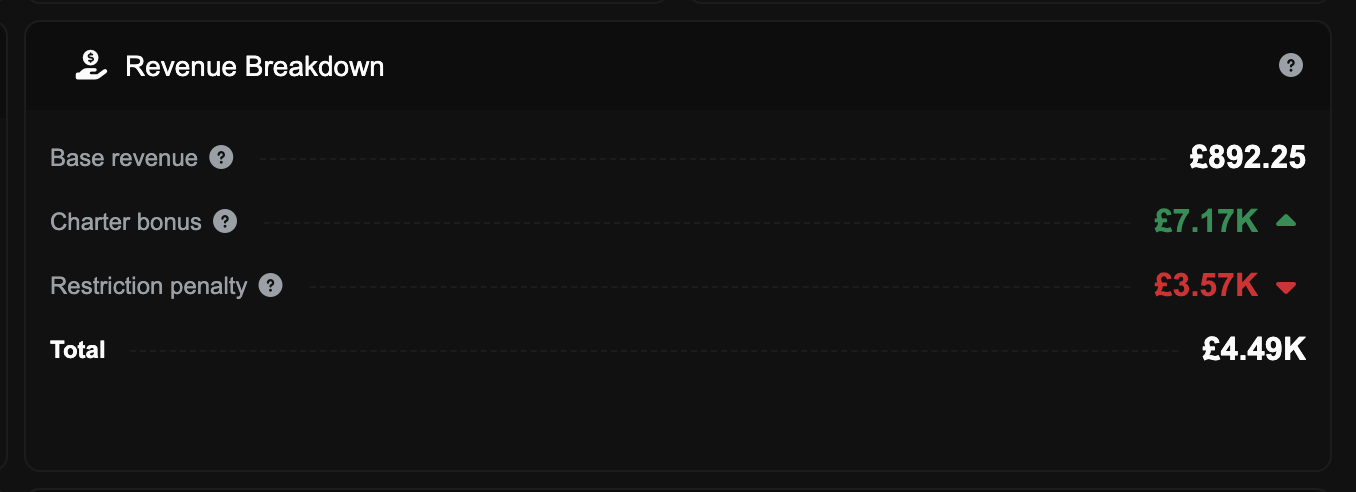
Previously, on a charter with a restriction breach, the "Revenue Breakdown" on a job's "Financials" tab showed the restriction loss twice (once as an "Exclusivity" penalty) and inflated the base revenue to match. The penalty now appears once, and the breakdown ends with a "Total" line. The amount paid for the job was always correct.

Above: A charter's "Revenue Breakdown" showing the restriction penalty once, with the "Total" line at the bottom.

New personal access tokens now appear on the "API Access" tab (FSC-4224)

Previously, after creating a personal access token, the "API Access" tab in your profile still showed "No Tokens Issued". New tokens now appear in the list straight away.

Above: A new token, "My flight tracker", listed on the "API Access" tab as soon as it is created.

A saved hire "Limit Location" is now kept (FSC-4220)

Previously, a saved Country or Airport "Limit Location" showed as "No Limit" when the aircraft's "Hire" tab was reopened, and the tab opened with an unsaved changes prompt. The saved limit now shows, and the prompt only appears after a change.

Oct 29, 2026

Bug Fixes

Passengers are no longer seated below the class they booked (FSC-4215)

Previously, on multi-leg charters and jobs with a relocation leg, business and first class passengers could be counted and drawn in a lower cabin when their own cabin was full, and accepting a route job could give passengers upgrades the route doesn't allow. Passengers are now only ever seated in the class they booked or higher, and a job that can't seat everyone this way is rejected on acceptance. Each leg of a multi-leg job is now seated on its own, so its passenger weight is based on the busiest leg rather than every leg added together.

Every passenger in a group is now shown on the seat map (FSC-4214)

Previously, the in-flight seat map could leave members of a group off the map (e.g. 87 of 97 passengers drawn on a BAe 146), either when the whole group sat in one cabin or when an upgraded group only partly fitted the higher cabin. The class counts on the job and leg screens could also count a whole upgraded group in its higher cabin, showing more first class passengers than the aircraft has first class seats. Every passenger is now drawn in their own seat, and the class counts on new and in-progress jobs match the seats passengers actually occupy.

VIP fares are no longer cut by cargo or freight on the same leg (FSC-4213)

Previously, a VIP group lost 75% of its fare through the exclusivity factor whenever cargo or freight shared the leg. Passengers and cargo are now counted separately, so cargo and freight in the hold no longer affect a VIP fare. A VIP fare still drops to a quarter if another passenger group shares the leg.

Oct 28, 2026

New Features

A 3D view of your cabin and hold (FSC-4192)

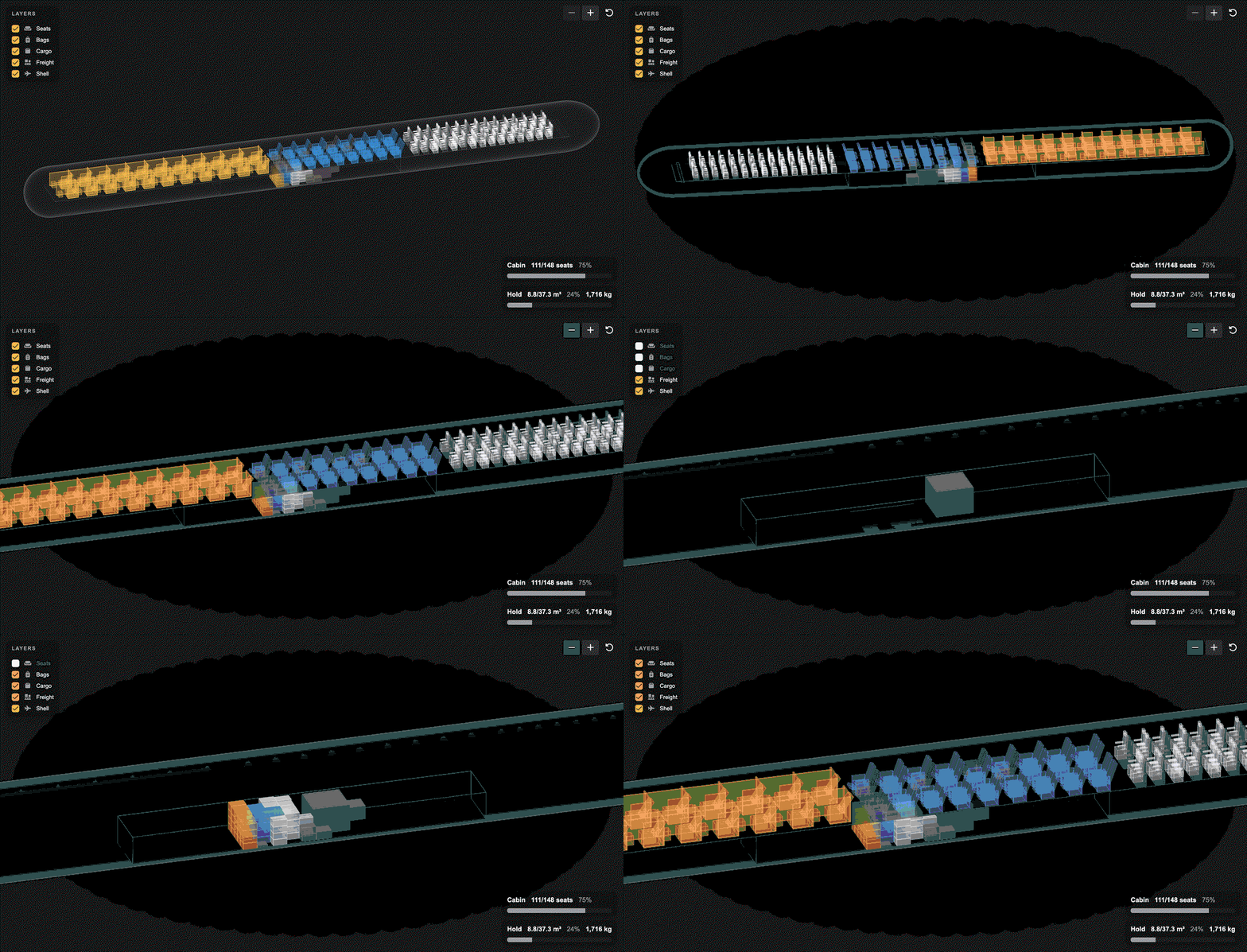
Every aircraft loadout screen now shows the aircraft in 3D, with the cabin and the hold together. You can rotate the view, zoom in and hover over seats or items for more information. You can also switch seats, bags, cargo and freight on and off to see each layer on its own.

Above: An A320 carrying first, business and economy passengers, bags, cargo and a freight container.

Above: Hover over an item or stack for more information.

Cargo can now be transported in the hold (FSC-4172)

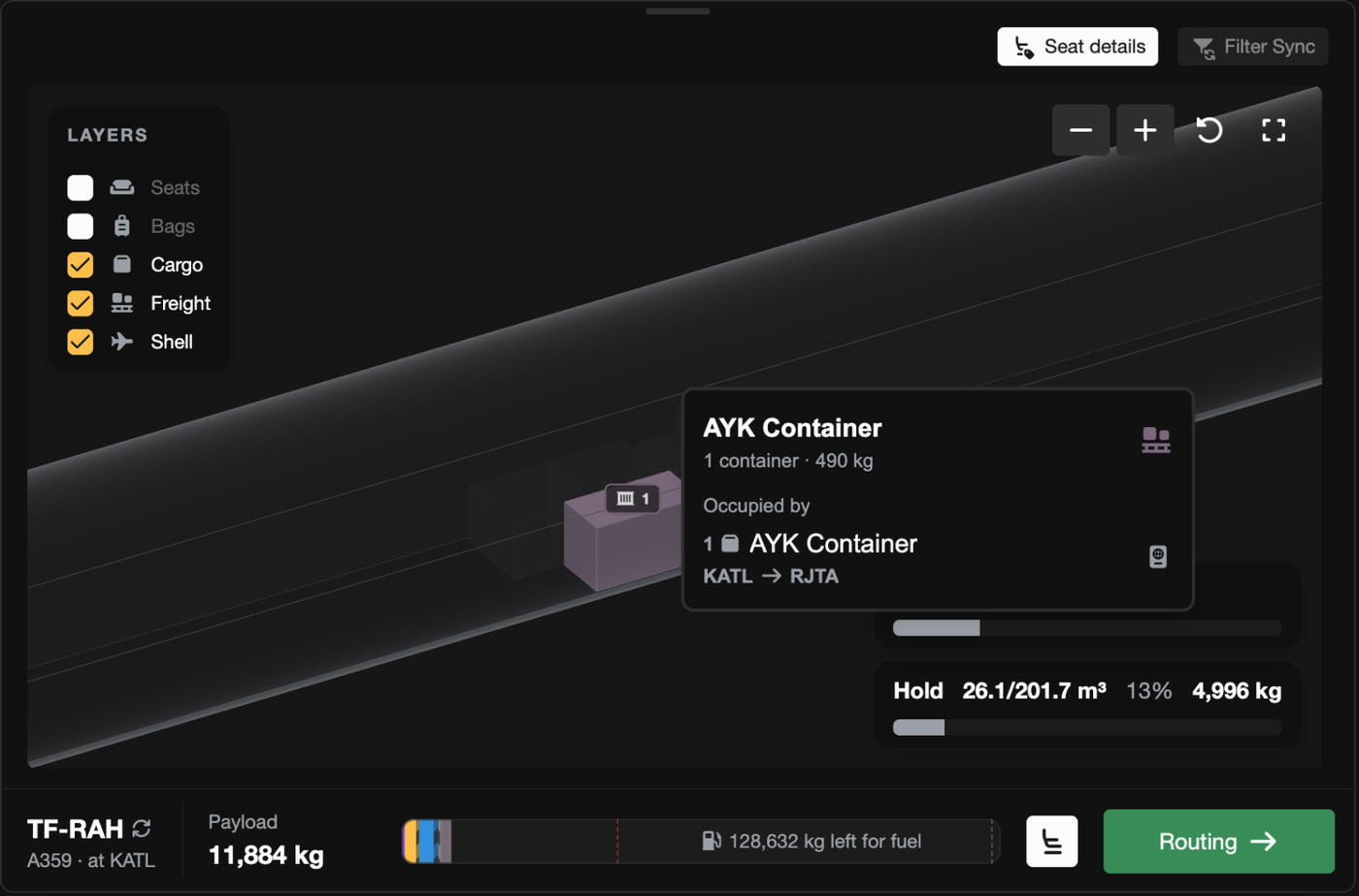
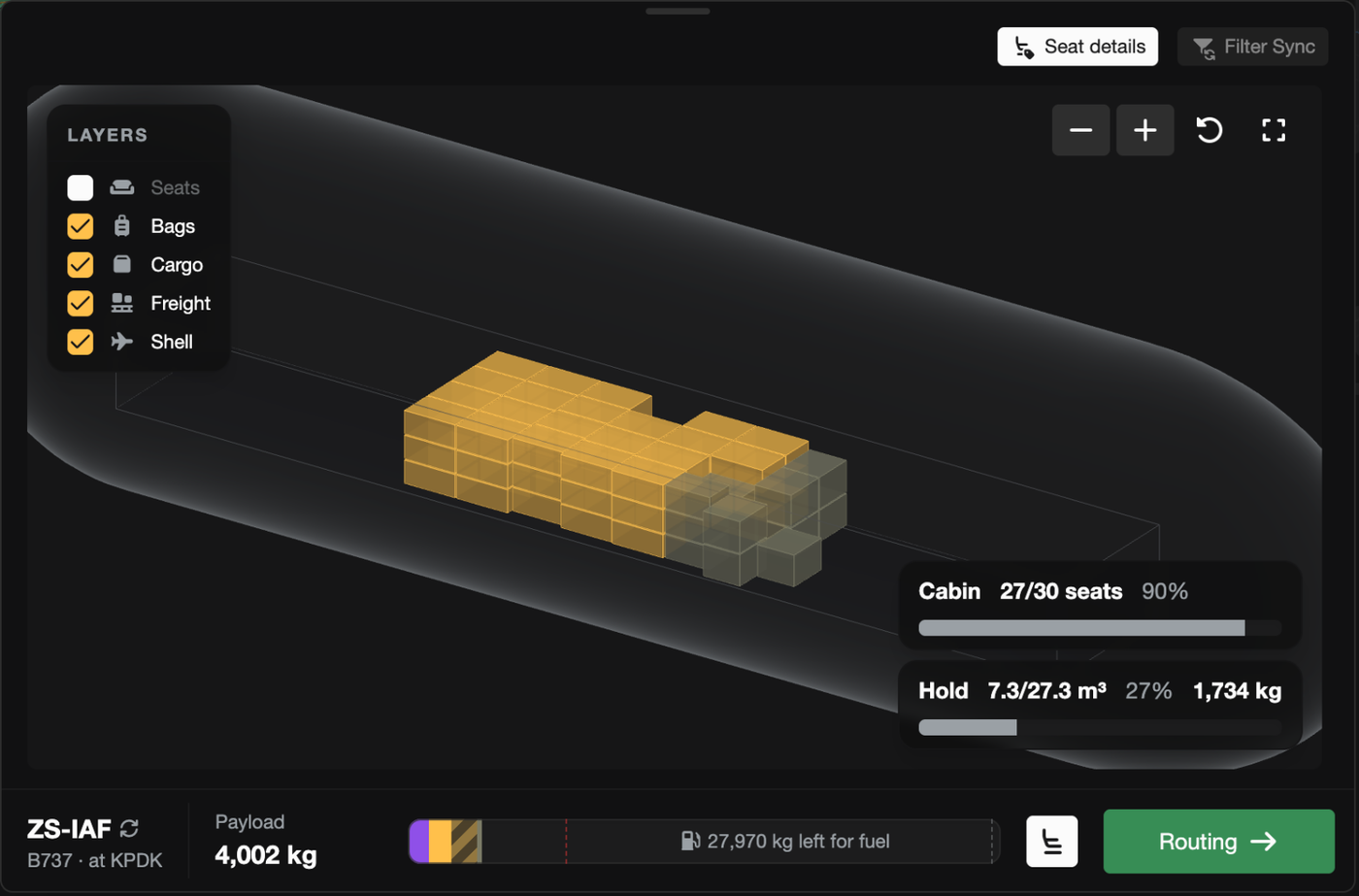
Previously, standard cargo was only permitted to travel in the cabin, which meant that many narrowbodies (737, A320, MD-82, CRJ, E190) could not earn from cargo revenue when every seat was occupied. Now cargo (and high value cargo) can travel in the hold (or the cabin cargo space if you have seats removed). Routes now also stop loading cargo at the aircraft's payload limit, so a full route no longer loads more than the aircraft can structurally lift.

Above: A 737 carrying mail and parcels into the hold beside passenger bags (the seat layer is switched off so the hold is visible).

Better understanding of cargo dimensions and restrictions (FSC-4192)

The loadout page has been reworked to give you more information when items aren't loaded onto the aircraft. When accepting a job, there is now a "Not loading" list, grouped by the reason the cargo would be left behind (e.g. too tall, no hold, no room left, over weight limits). By default the list only shows items that must be carried on the route, so you can easily see why a job can't be accepted. You can also toggle "Show left behind" to see all cargo left at the airport (including cargo you don't need to carry).

Above: The "Not loading" list displaying why a non-required pallet can't be loaded onto the aircraft (it is 4 cm too tall for this hold).

An overhauled "Create Charter" mode (FSC-4192)

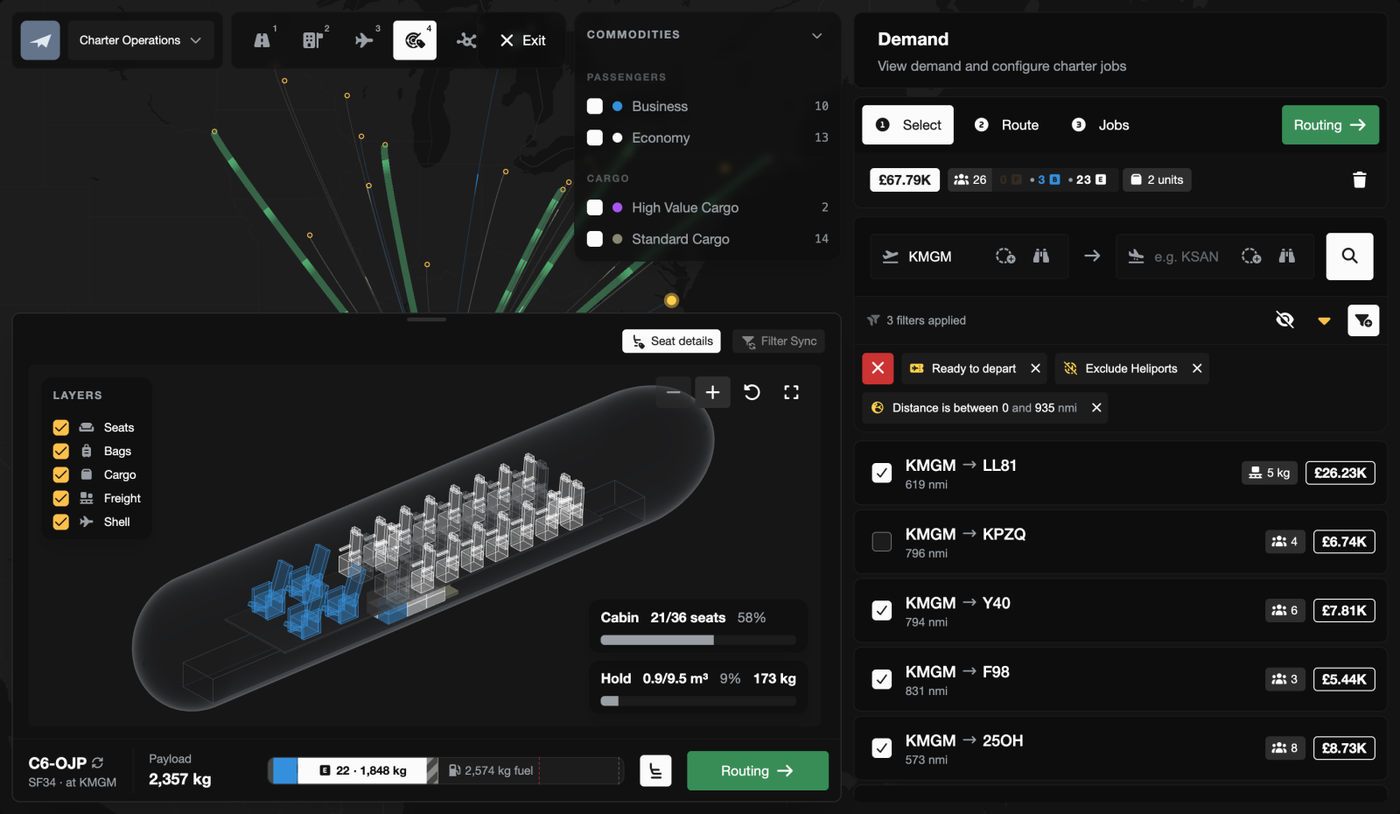
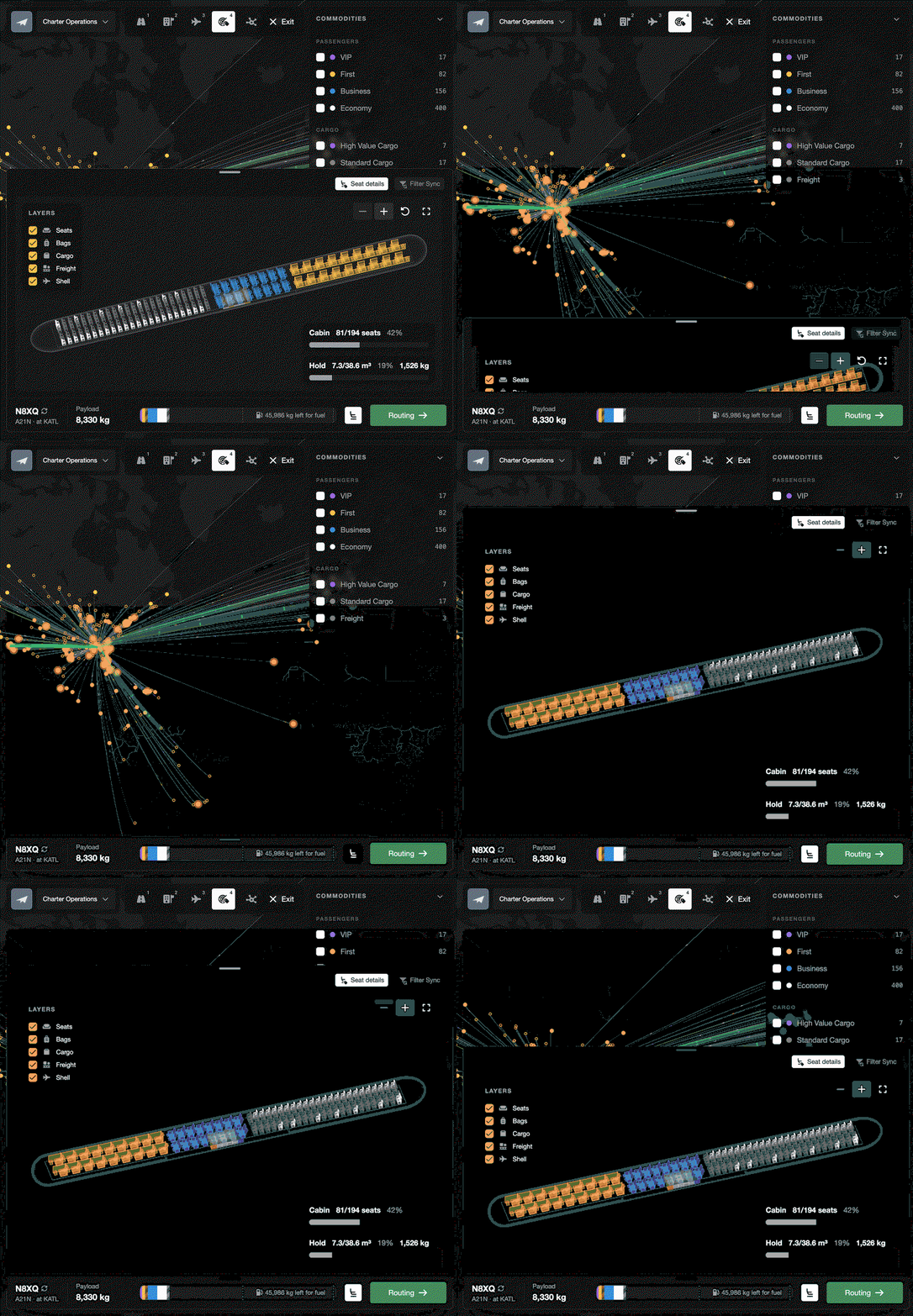
The "Create Charter" mode in the Operations Cockpit has been overhauled. The aircraft loadout, which used to be squeezed into a narrow side panel, now sits in a dock along the bottom of the map that can be dragged taller or folded away, and includes the new 3D view. A bar along the bottom of the dock always shows the current payload and the next step. Cargo is loaded as soon as demand is selected, so you can see what will be carried before any jobs are created. If something is blocking the charter (e.g. passengers without a seat), the bar turns red and the next step button becomes "Errors", which takes you straight to the problem. Releasing a plan now waits for the load check to finish, so a plan that physically can't be flown can no longer be released.

Above: The new "Create Charter" dock below the map, shown with a Saab 340, with the current payload and next step in the bar along the bottom.

Above: The dock being folded away and dragged taller (shown with an A321neo).

Above: A CRJ900 that can't seat every passenger, with the passengers listed under "Cannot Board", the bar in red and the next step button showing "Errors".

Fokker F27 and 17 more aircraft added (FSC-4201)

18 new aircraft have been added, including 13 dedicated freighters. Freighters have no seats, so they carry freight in the hold only.

  • Fokker F27 Mk 500
  • Fokker F28 Mk 2000
  • Fokker F28 Mk 3000
  • Cessna CitationJet
  • Airbus Helicopters H225 Super Puma
  • Boeing 747-200F
  • Boeing 747-400F
  • Boeing 747-8F
  • Boeing 747 LCF (Dreamlifter)
  • Boeing 757-200PF
  • Boeing 767-300F
  • Boeing 777F
  • McDonnell Douglas MD-11F
  • Airbus A300-600F
  • Airbus A300 Beluga
  • Airbus Beluga XL
  • Antonov An-124
  • Antonov An-225

Improvements

The hold is now shown on the "Aircraft Layout" tab (FSC-4195)

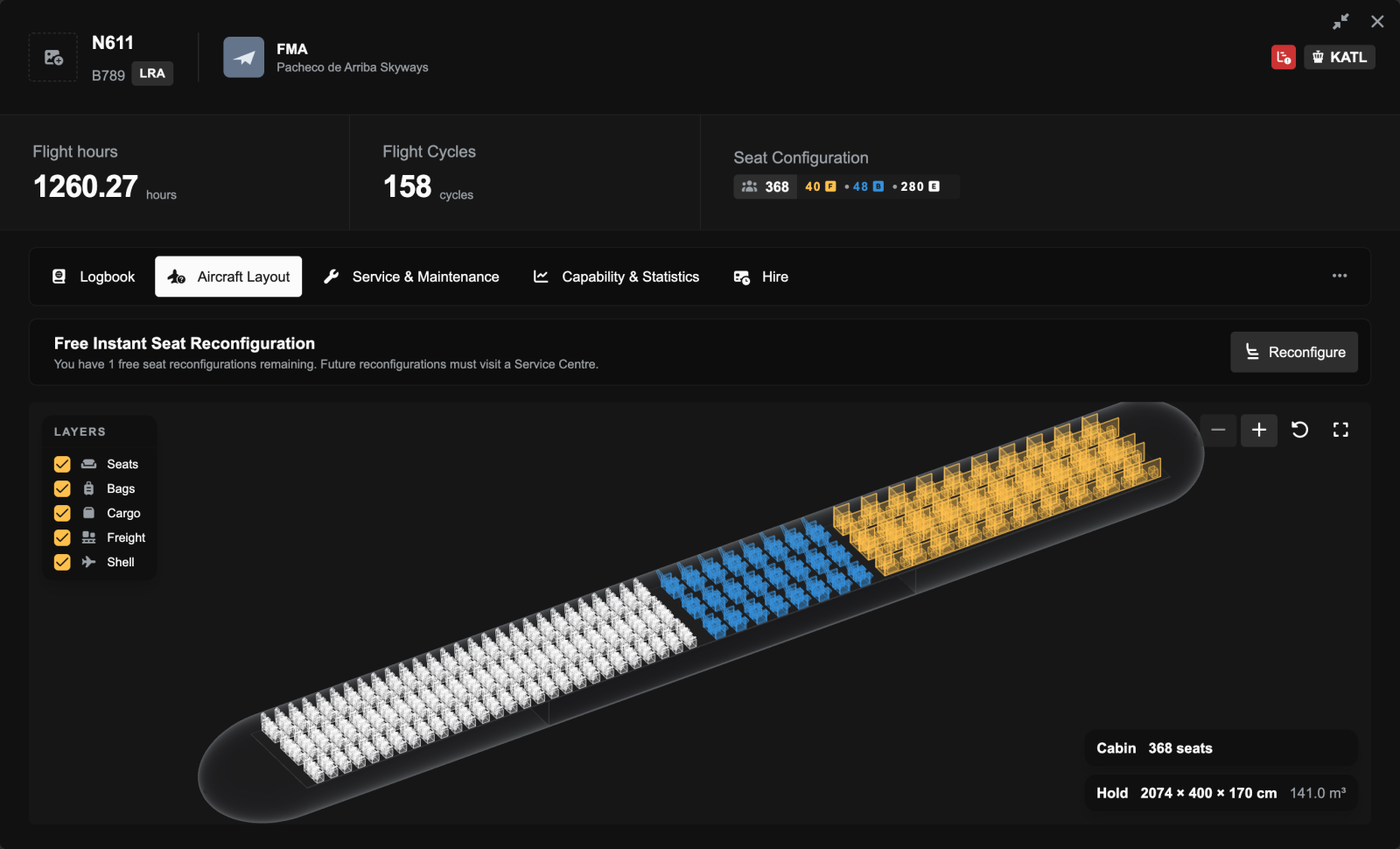
The "Aircraft Layout" tab in the aircraft dialog previously only showed the cabin. It now shows the hold as well, so you can check what an aircraft can carry before buying it or accepting a job.

Above: The "Aircraft Layout" tab for a 787-9, showing the cabin and the hold together with the hold's dimensions.

Fuel estimates are now based on trip distance (FSC-4198)

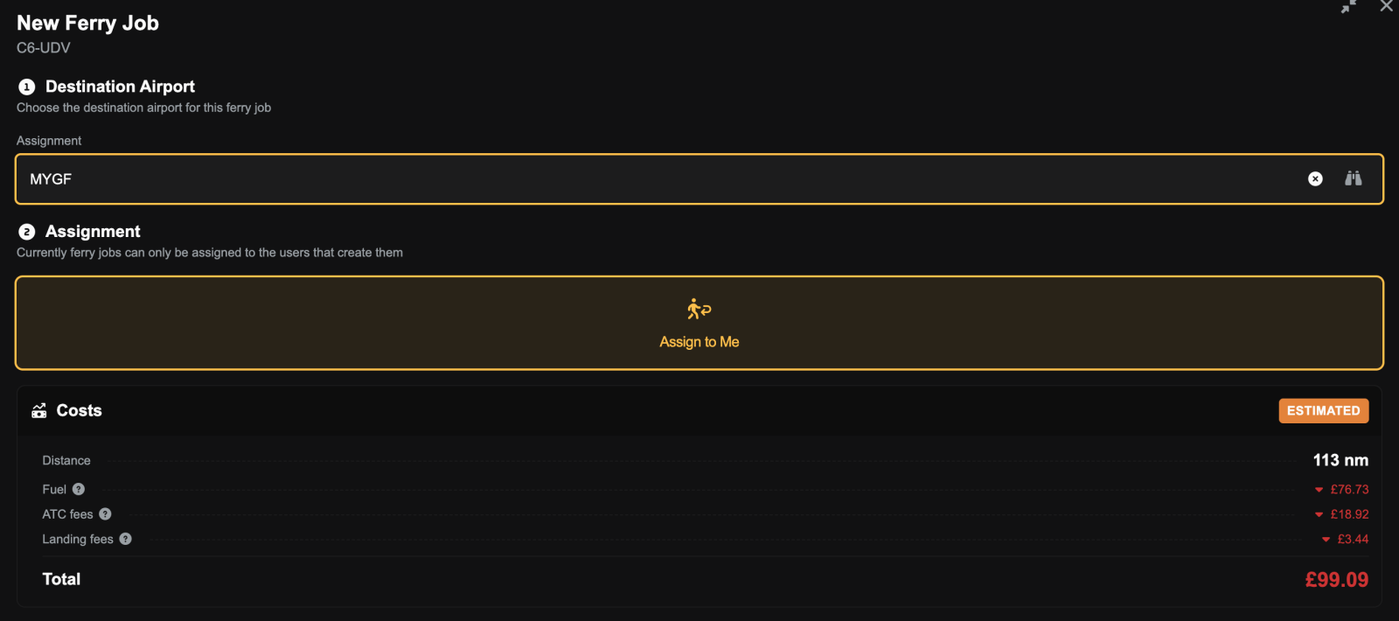
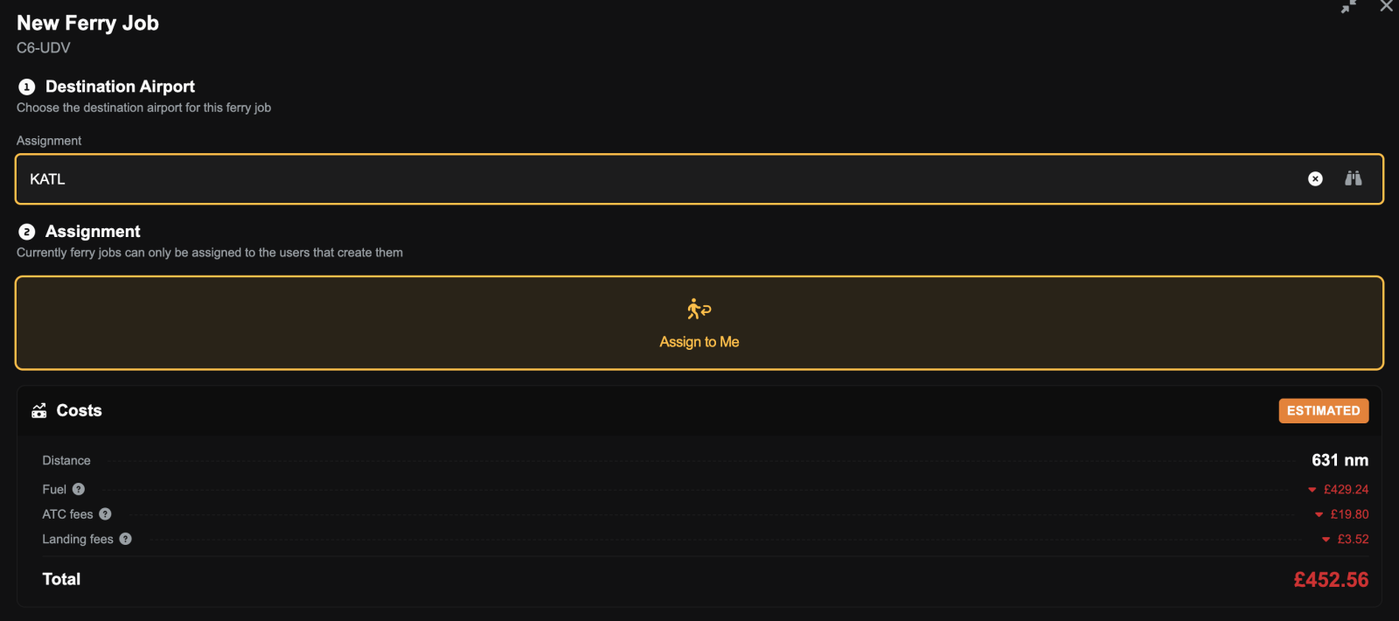
For aircraft with no flight history, a job's "Financials" tab and the ferry cost estimate previously assumed a full tank of fuel regardless of distance, which made long flights look more profitable than they are. The estimate now calculates the fuel the trip will actually burn, using the aircraft type's published fuel burn until the aircraft has its own history.

Above: The ferry fuel estimate for a 113 nm trip in an aircraft with no flight history (£76.73).

Above: The same aircraft on a 631 nm trip, with the estimate rising to £429.24.

Boeing 757-200 weights updated (FSC-4204)

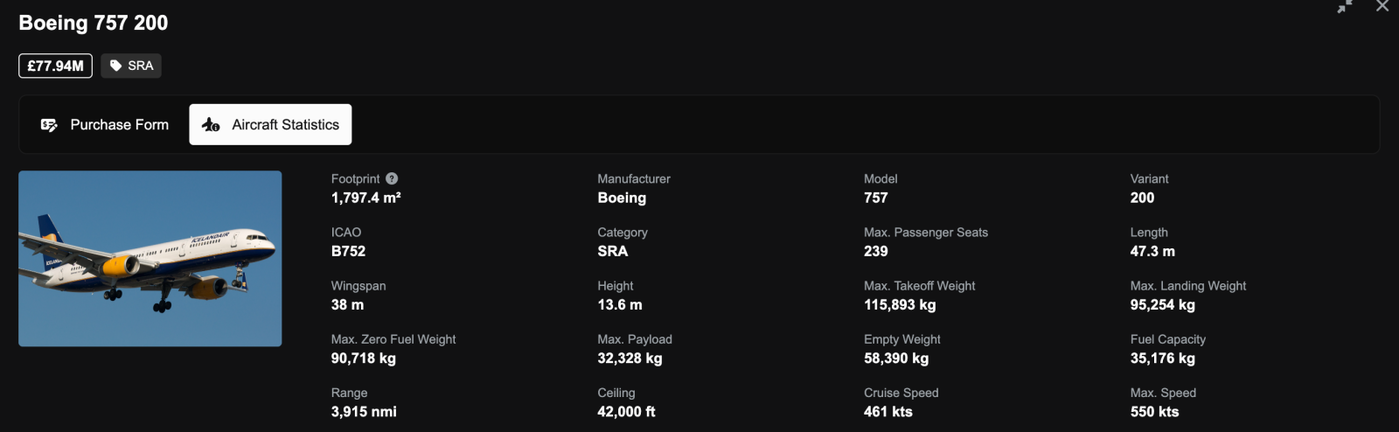
The 757-200's weights and price have been updated to match its type certificate. It can now carry slightly more payload, and its resale value is around 3% higher. Landing and parking fees increase in line with its heavier weights.

Above: The 757-200's updated weights and price in the aircraft shop.

Clearer reasons when an aircraft has no hold or cabin cargo space (FSC-4193)

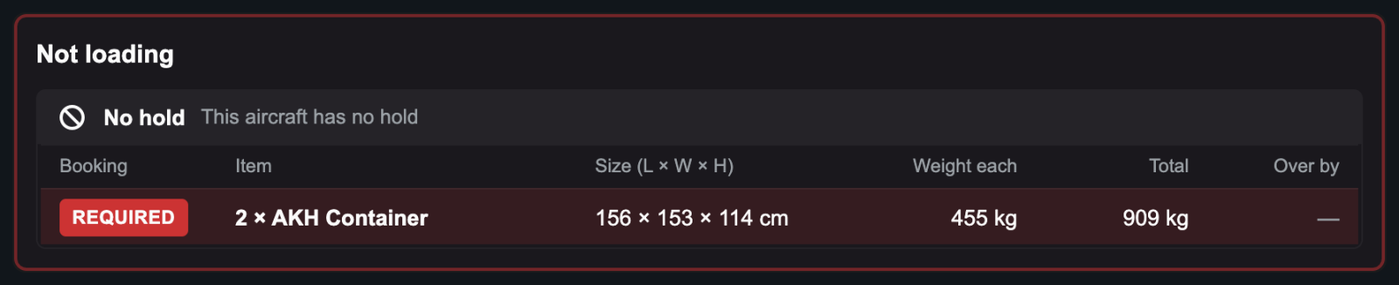
Aircraft with no hold, or with every seat fitted, were previously rejected with confusing dimensions (e.g. "the hold is 0 cm high"). The reason now simply states that the aircraft has no hold or no cabin cargo space.

Above: An aircraft with no hold now displays a reason instead of 0 cm dimensions.

Bug Fixes

Correct cargo weights are now sent to the sim and SimBrief on mixed legs (FSC-4173)

When a leg carried more than one type of cargo, the plugin and SimBrief received the wrong payload weight. Each type of cargo is now sent with its own weight.

The in-sim delivery speed gauge now shows the correct speed (FSC-4171)

During a flight, the in-sim delivery speed gauge could show unrealistic speeds (e.g. 1,367 kts on a 137 kt flight). It now shows your actual average speed so far.

Seat layouts with every class removed can now be saved (FSC-4167)

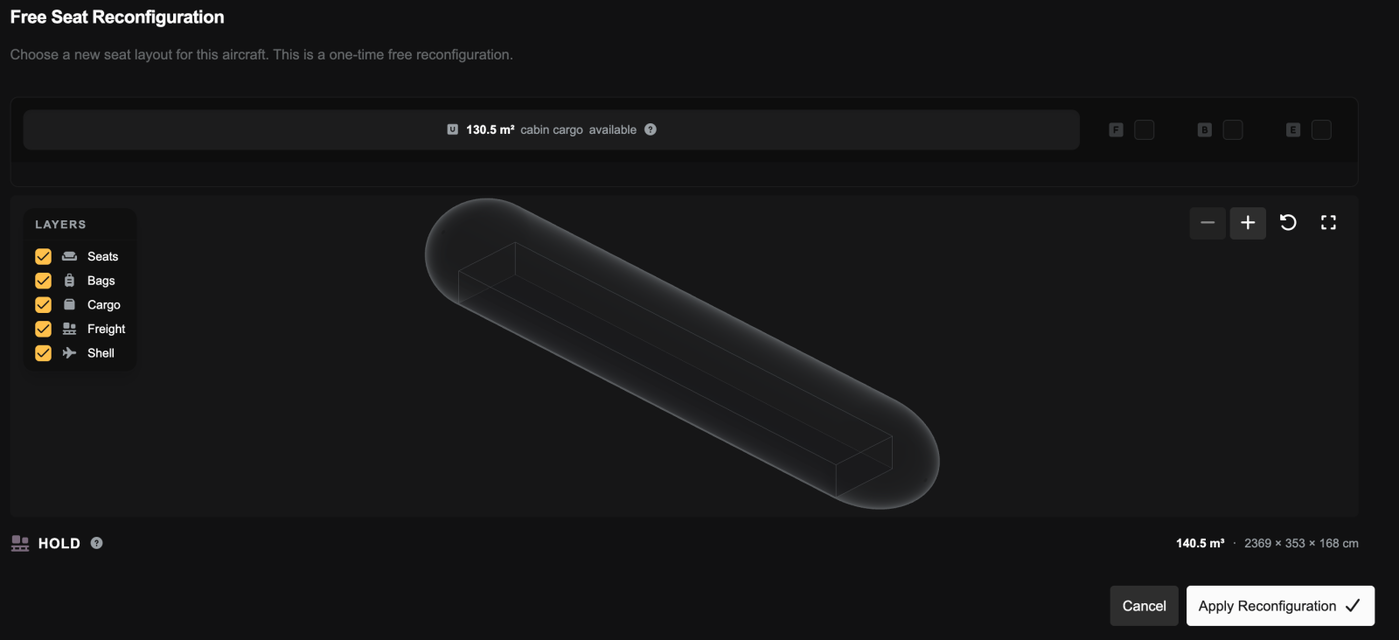
Turning off every cabin class disabled "Apply Reconfiguration", and turning a class back on didn't enable it again. A zero-seat layout can now be saved, and the dialog header shows the new seat layout straight away without refreshing the page.

Above: A 767 with every class turned off, with "Apply Reconfiguration" still available and the whole cabin free for cargo.

"Create Charter" now checks first and business class seat capacity (FSC-4178)

A plan could previously be released with more first or business class passengers than the aircraft could seat in that class or higher, and the job was then rejected on acceptance. "Create Charter" now lists these passengers under "Cannot Board" and won't allow the plan to be released until they fit.

Above: Passengers without a first class seat listed under "Cannot Board", which stops the charter from being released.

Cabin cargo space checks now account for stacking (FSC-4175)

The loader stacks small cabin cargo, but the checks for whether cargo would fit counted each item laid flat. This meant "Create Charter" hid demand that would have fit, and hiring failed with "Selected cargo requires X sqm". These checks now count cargo stacked, the same way it's loaded.

Cargo-only routes are no longer offered to aircraft that can't carry them (FSC-4180, FSC-4188)

A route carrying only cargo could be offered to an aircraft with a full cabin and no hold, and the job was then rejected on acceptance. "Available Aircraft" also checked a route's cargo against the wrong demand. It now only lists aircraft with space for the cargo the route actually loads.

Route baggage weights are now based on the route's distance (FSC-4174)

Every route stored its baggage weight as if the flight was less than 1 nm long, so some aircraft were listed for long routes they were too heavy to fly. Routes now store baggage weights for their actual distance.

Routes no longer exceed the aircraft's payload limit (FSC-4205)

The route loading preview weighed collaborative passengers' bags lighter than would be actually loaded, so a full route could be around 800 kg over its payload limit. Both now use the same weights.

Route cargo and freight minimums are now enforced through the API (FSC-4181)

A route job accepted through the API could carry 1 kg of freight against a 2,000 kg minimum. Accepting a job now always checks the route's cargo and freight minimums.

Oct 21, 2026

New Features

See which pricing strategies changed a ticket price (FSC-4156)

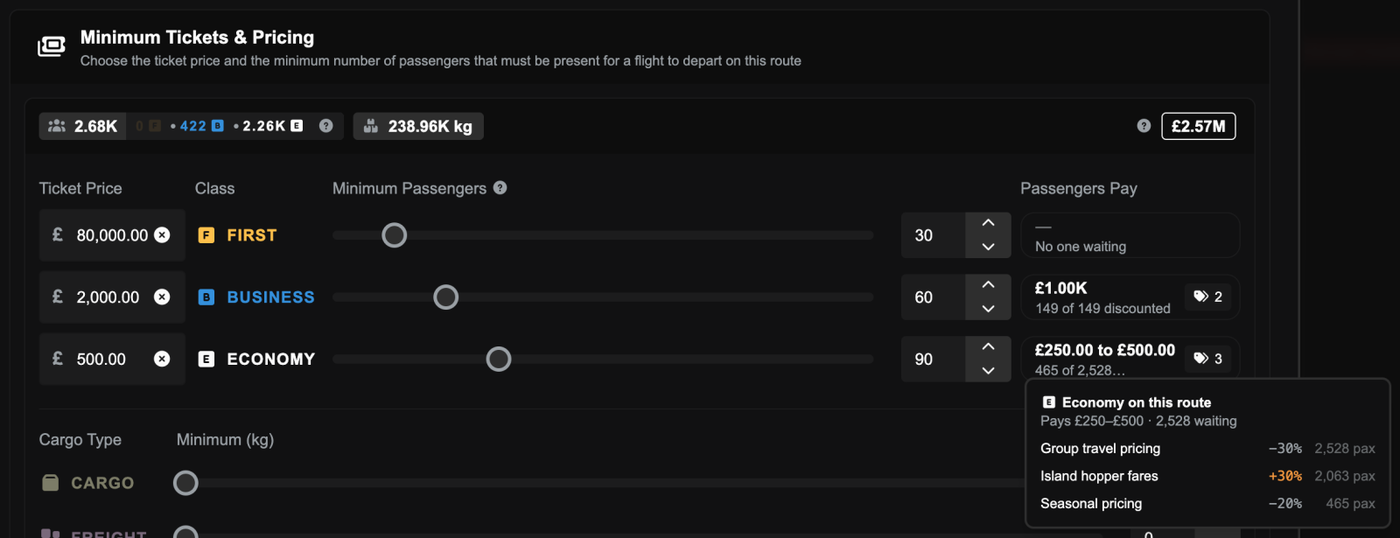
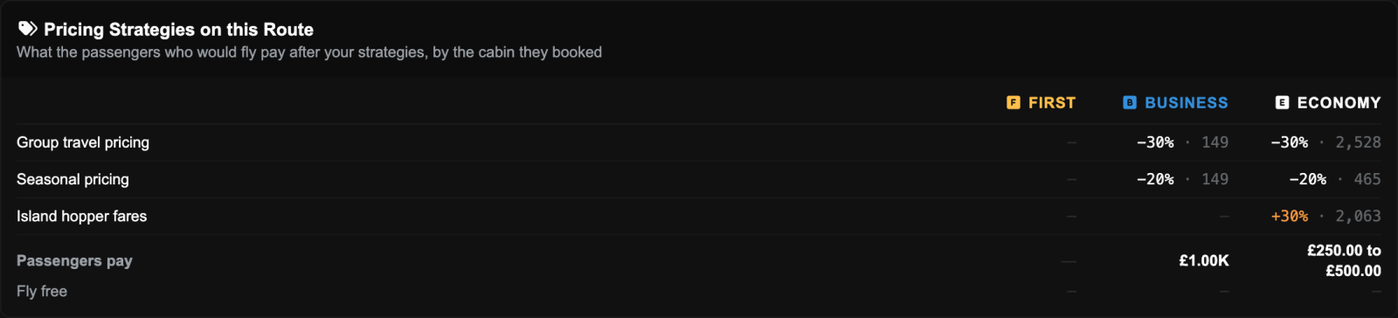
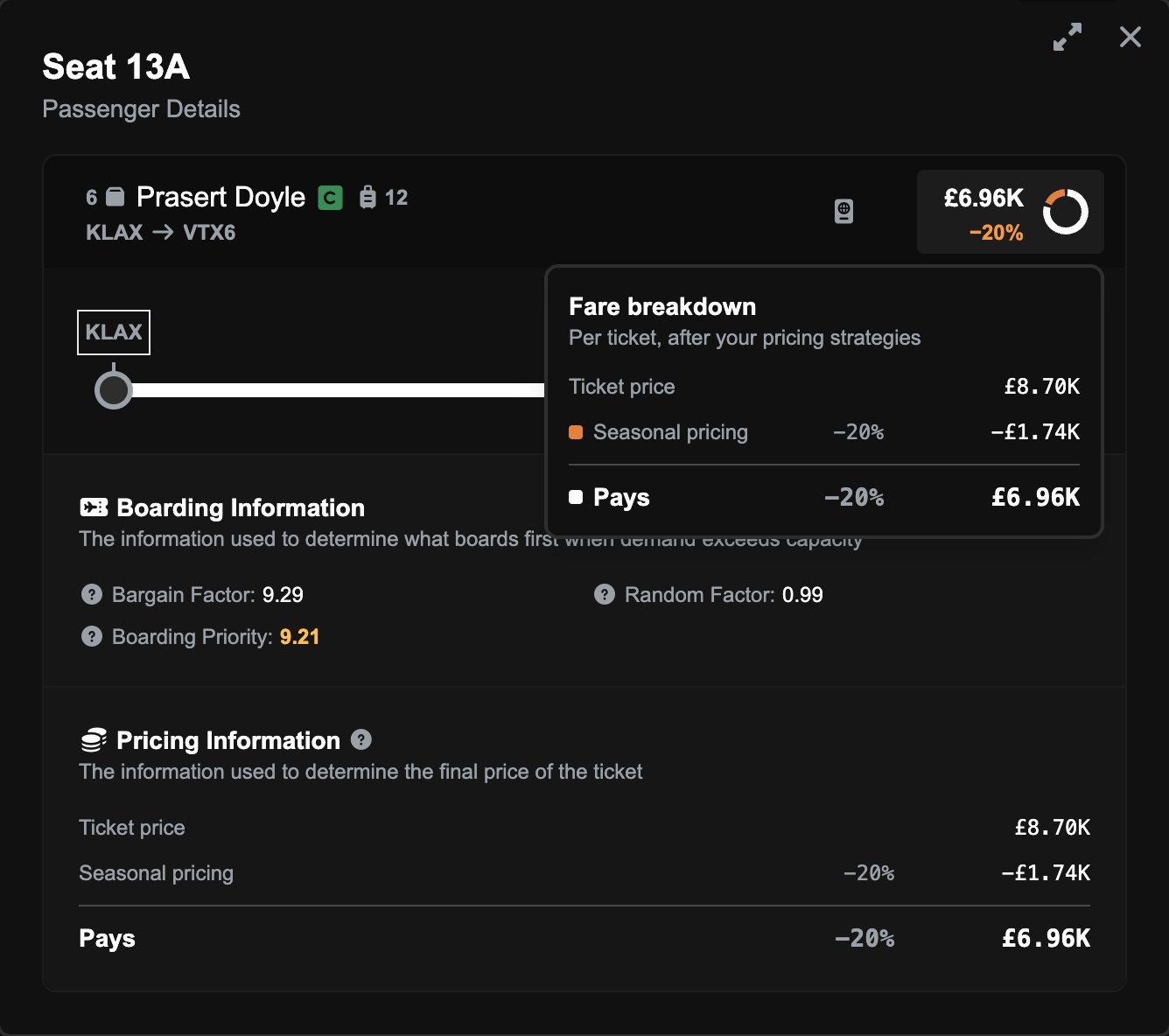
When a passenger boarded a route at a strange price, such as first class for £0, nothing told you why. Your pricing strategies were doing exactly what they were set up to do, including stacked discounts that added up to more than 100%, but no screen showed you which ones had applied. Passenger rows now show the price they pay, with your pricing strategies applied. You can hover over it for a breakdown of every strategy that changed their ticket price. You can also see which strategies apply when you're creating or editing a route.

Above: The route form's ticket prices with a Passengers Pay box for each cabin, and the economy box opened to list the three pricing strategies that change its fares.

Above: The Pricing Strategies on this Route panel, showing each strategy's percentage and passenger count by cabin and what passengers pay.

Above: A passenger's seat details with the Fare breakdown card open, listing the ticket price, a 20% strategy discount and what the passenger pays.

See cargo and freight that gets left behind (FSC-4152)

On a route job, the loadout could leave cargo or freight out without saying why. A 737 with plenty of spare weight and a mostly empty hold could load nothing at all if the freight wouldn't physically fit. Anything the loadout leaves out now shows up as Left Behind, along with the reason. It's there for information only, and it never stops you accepting the job.

Above: A Boeing 737 loadout with an amber Left Behind line, and the Too tall for hold chip's tooltip explaining the hold is 110 cm while the freight starts at 114 cm.

Improvements

Bags with no room in the hold now ride in the cabin

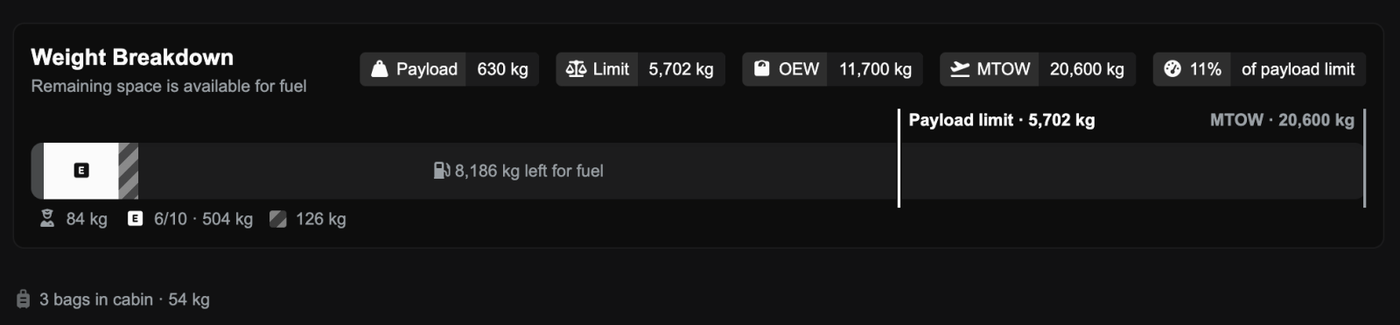
Bags that don't fit in the hold now ride in the cabin with their passengers, and the loadout shows how many there are and what they weigh. Nothing about your payload has changed. These bags always counted towards your weight, and they never stopped you accepting a job. The screens and the help docs now just say so. The PA-18 also gets a small hold for freight.

Above: A loadout's weight breakdown with the line 3 bags in cabin · 54 kg underneath it.

Job Marketplace and hire lists fit on smaller screens (FSC-4148, FSC-4150, FSC-4159)

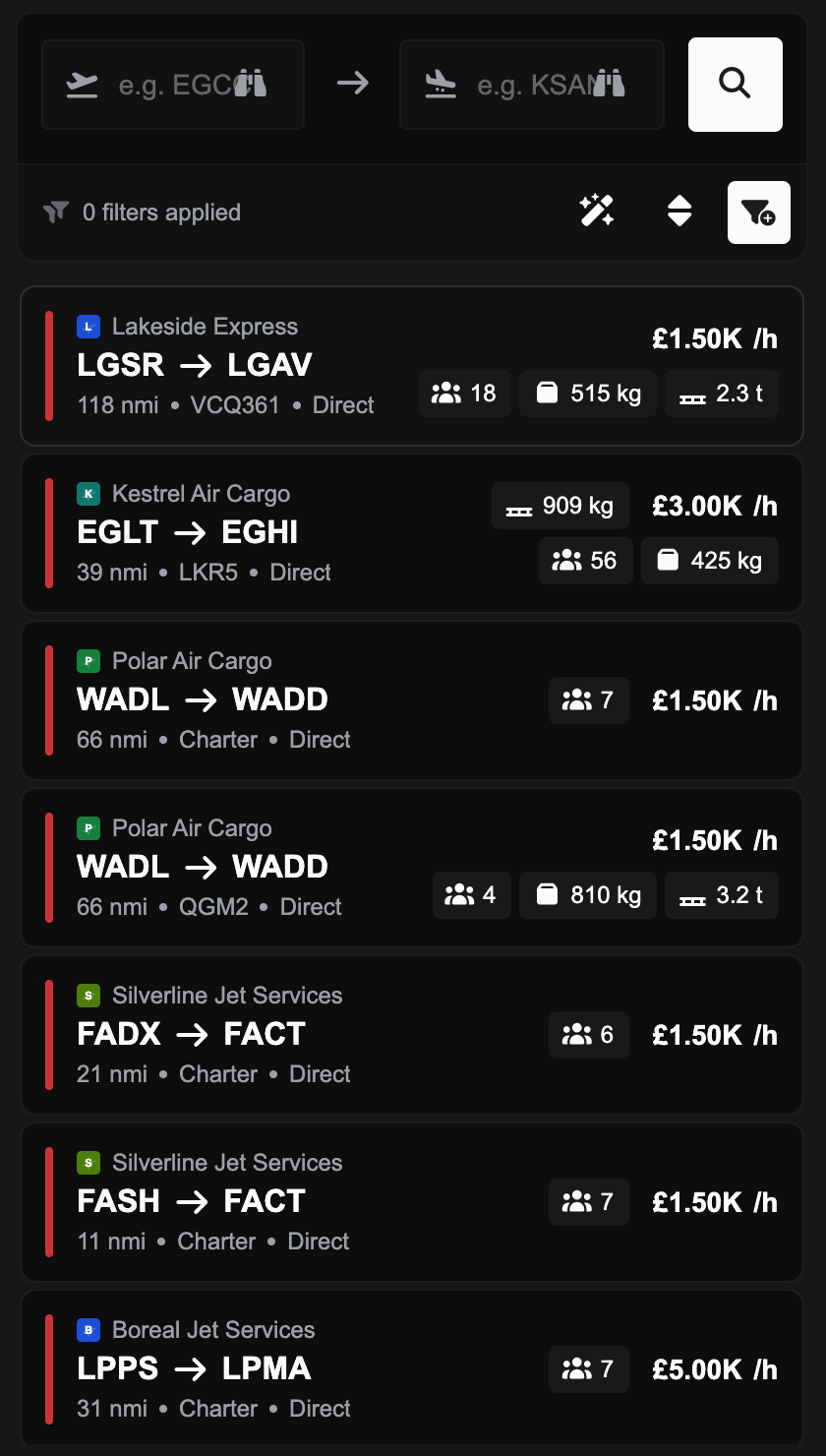
On smaller screens, job rows could be wider than the list, which cut off the price and made the list scroll sideways. Busy rows also spilled into their neighbours, and Charter Aircraft For Hire had the same problem. Rows also now rearrange themselves to fit a narrow list.

Above: The Job Marketplace list on a 14-inch laptop window, with each job's payload badges and hourly rate fitting inside its row.

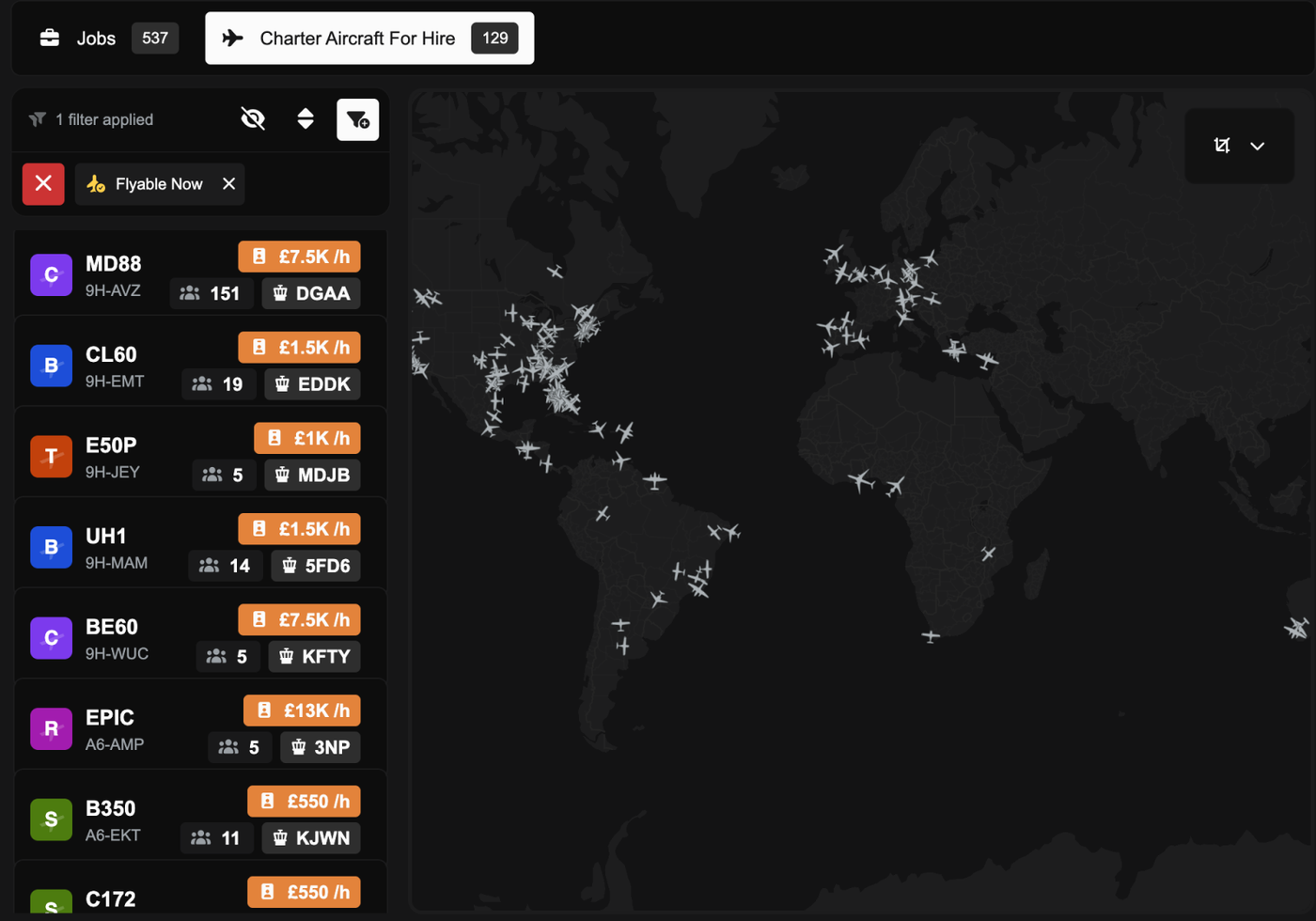
Above: Charter Aircraft For Hire in a 1280 px window, with each aircraft's hourly rate on its own line above the seats and airport.

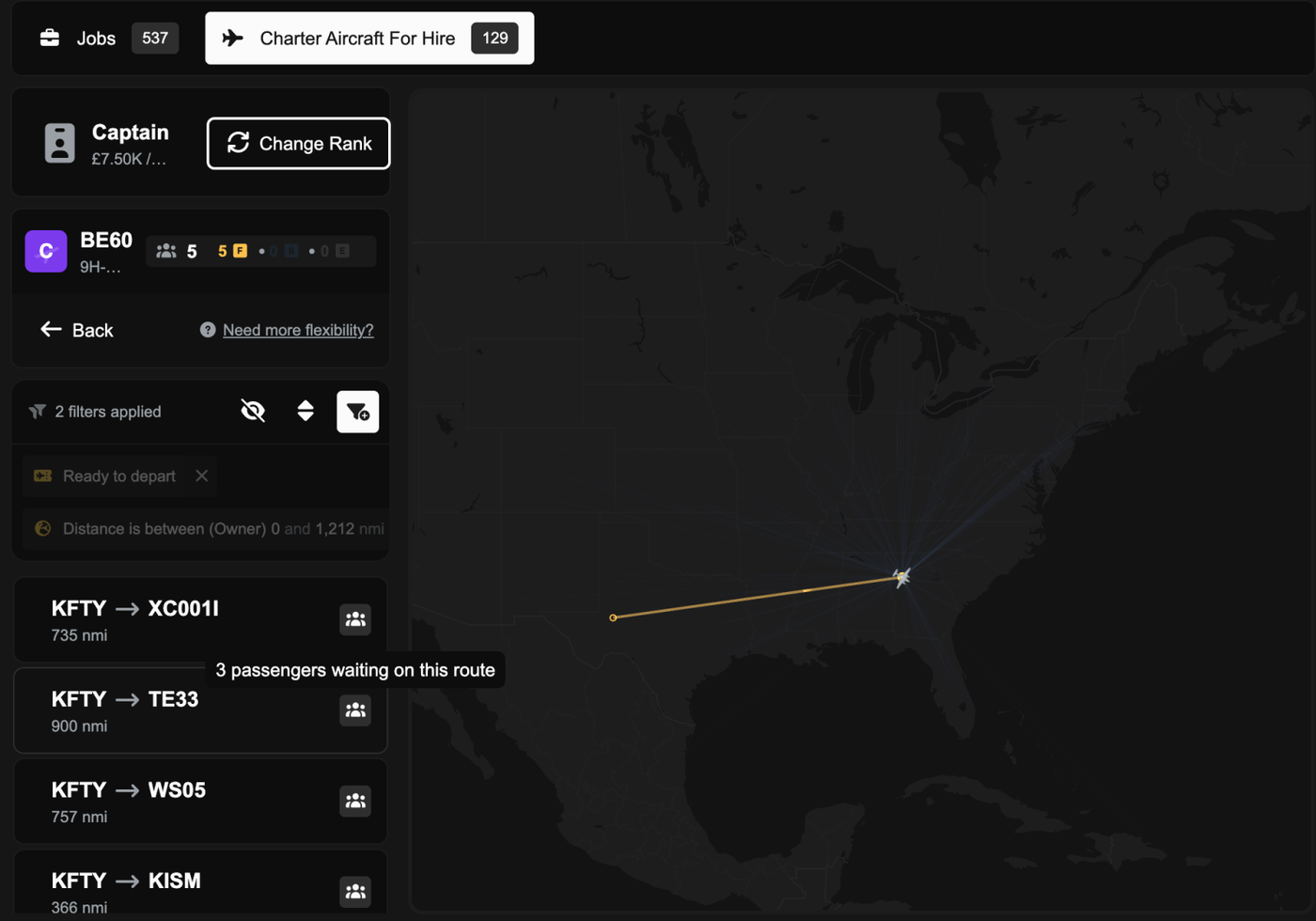
Above: Hire demand rows on a 1280 px window showing load icons only, with the tooltip 3 passengers waiting on this route.

Weight bar tooltips are back, and the handles follow your mouse (FSC-4157, FSC-4158, FSC-4165)

You can hover over any part of the weight bar, or its key, to see what it is. When you drag the cargo and freight handles with Configure Individual Weights on, they now follow your mouse instead of jumping into place afterwards. The pilot also gets the pilot icon.

Above: The Weight Breakdown bar with the tooltip Economy bags · 2,284 kg shown over the striped bags segment.

Above: With Configure Individual Weights on, the freight handle and segment follow the mouse while it is dragged, then the bar settles on what was loaded.

A tidier fare display on the manifest (FSC-4166)

The passenger price could spill out of the seat popover, and the rows looked uneven. The fare now shows the price and its discount side by side, and you can hover over it for the same breakdown as the passenger rows.

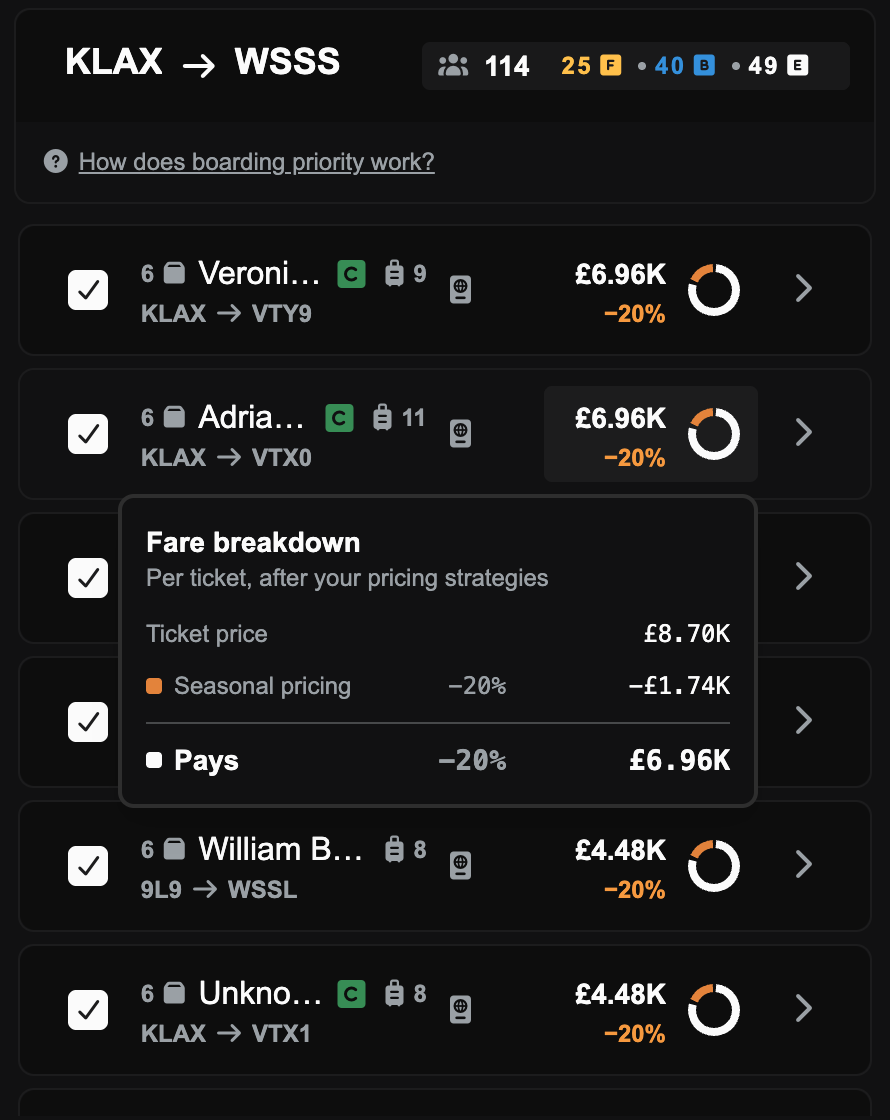
Above: Route preview manifest rows, each with the fare above its discount and a small ring, and the Fare breakdown card open on one row.

The demand map key counts every route (FSC-4145)

The commodities key on the demand map only counted the first page of routes, so at a busy airport it could show 2 cargo groups when the list had dozens. It now counts every route.

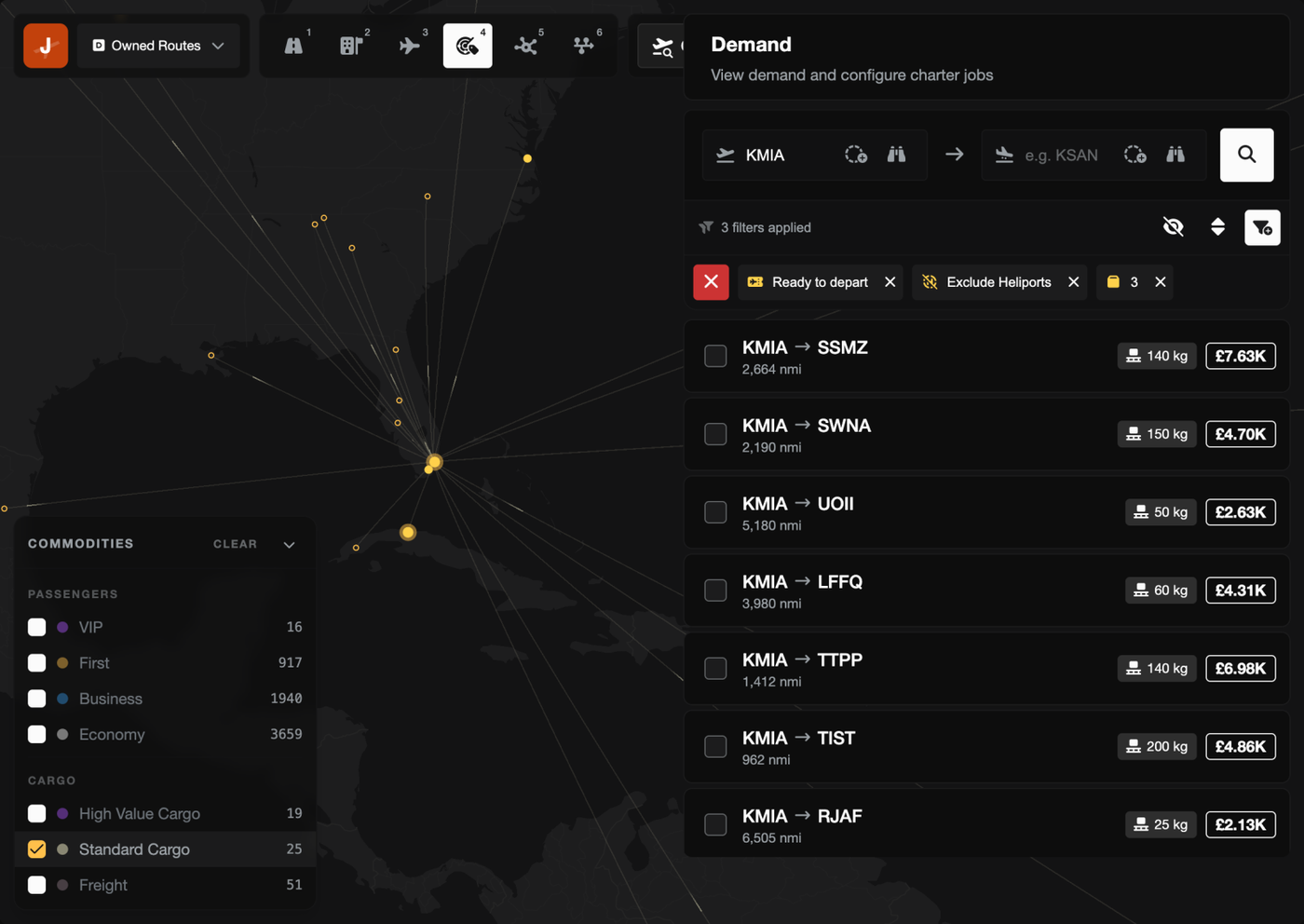
Above: The demand map at KMIA with the commodities key counting every route, Standard Cargo ticked and the list filtered to cargo routes.

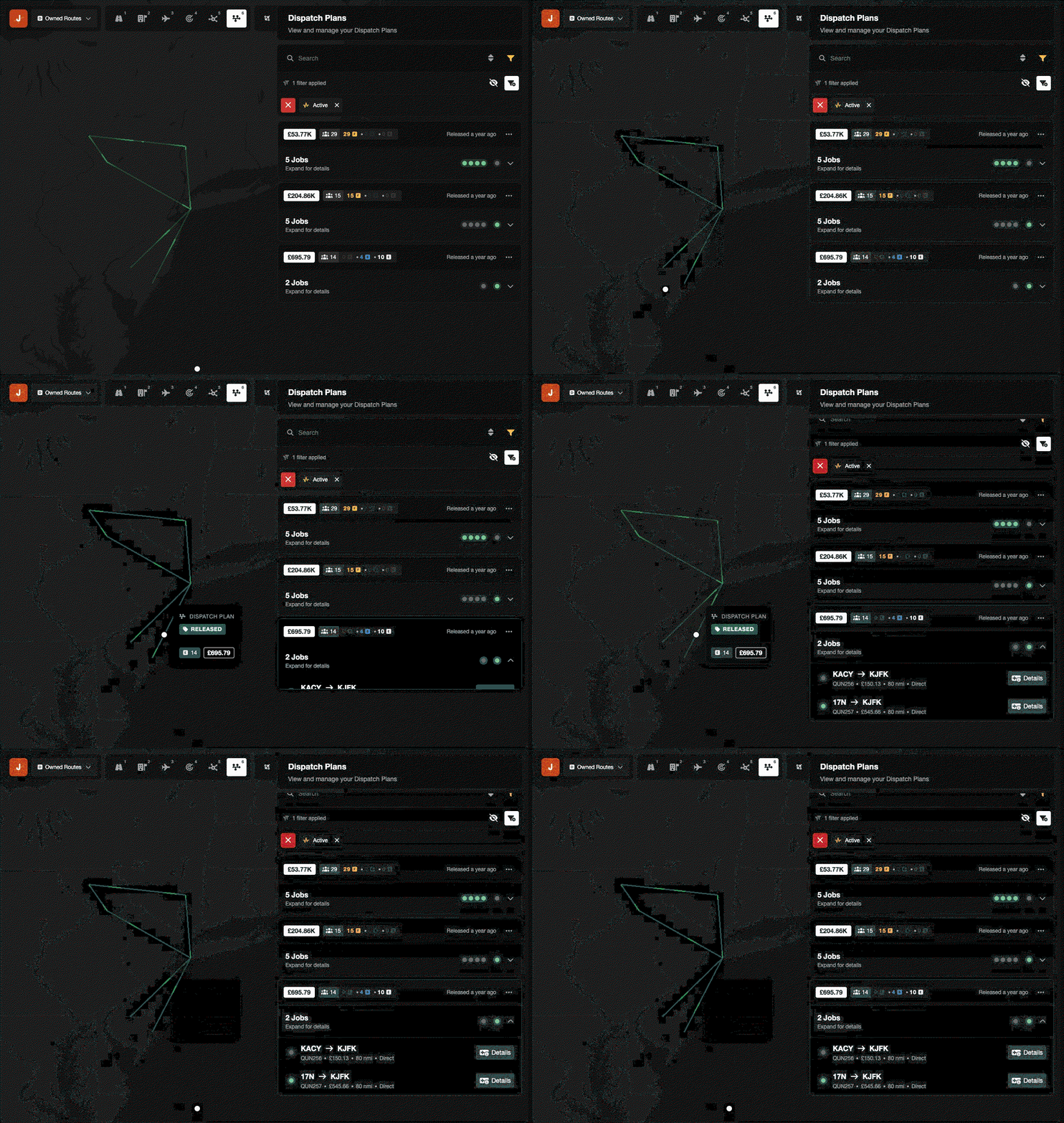
Clicking a dispatch plan on the map opens it (FSC-4151)

In the Operations Cockpit, clicking a dispatch plan's route on the map used to show an empty map. It now opens that plan.

Above: Clicking a dispatch plan's route on the Operations Cockpit map opens that plan in the Dispatch Plans list.

Bug Fixes

PHP security update (FSC-4160)

Earlier today the PHP team announced two serious security flaws in the version of PHP that FSCharter runs on. We took the site offline as a precaution until the fix was out, and this release runs on the patched version. We've found no sign that anyone used these flaws against FSCharter, and no player data was affected.

Accepting a route job no longer fails with "Something broke" (FSC-4129, FSC-4146)

Accepting a route job could fail right at the end of boarding. One cause was a pricing strategy discount that left a fraction of a penny on the price. The other was a pricing strategy earning so much in one day that its total got too big to save. Both are fixed.

Cargo groups load whole (FSC-4153)

The loadout preview could load part of a cargo group, such as 4 of 7 mail bags, while Accept booked and paid for all of it. Cargo groups now load whole or not at all, so you get exactly what the preview showed.

Ticking one passenger group adds just that group (FSC-4132)

With no draft plan, ticking one passenger group in the Demand panel ticked every group of that class on the route. Now it only adds the one you ticked.

Editing a dispatch plan no longer fails with "deadlock detected" (FSC-4135, FSC-4136)

Adding or removing charter jobs quickly could fail with "deadlock detected", or put the same legs in more than one job. Changes to a plan now wait their turn, so fast clicks are safe.

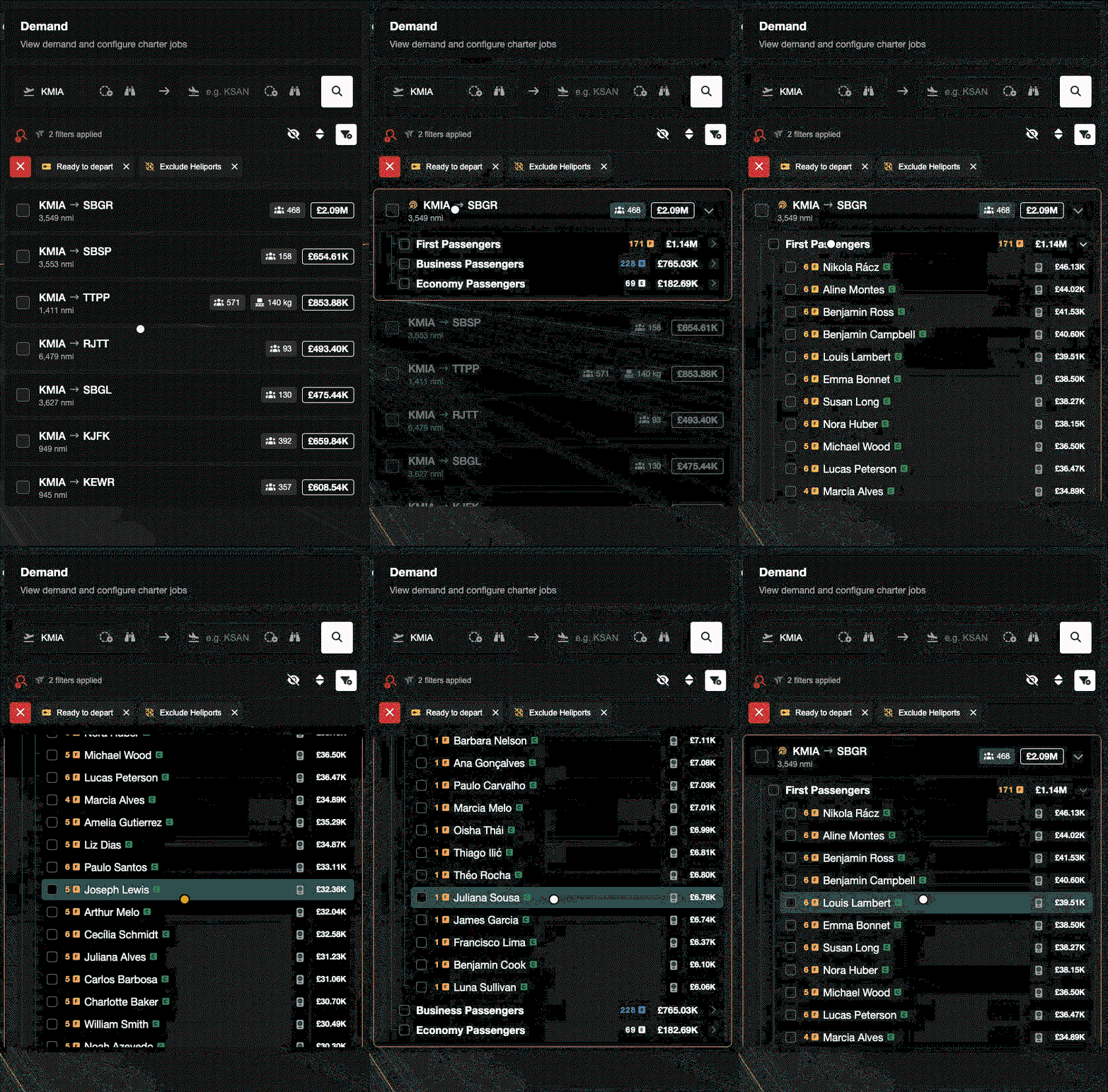
The Demand panel scrolls again (FSC-4133, FSC-4164)

A long passenger list on a focused route ran off the bottom of the Demand panel and wouldn't scroll. It scrolls now, and clicking a route no longer squashes it into a thin line.

Above: Clicking a route in the Demand panel keeps it full size, and its long First Passengers list scrolls down and back up.

Old cockpit links no longer break demand loading (FSC-4142, FSC-4149)

Bookmarks to the Operations Cockpit that used a sort or filter we removed in v2.5.0 made every demand load fail. The cockpit now ignores them and loads as normal.

Switching aircraft on Charter Aircraft For Hire (FSC-4163)

If you switched aircraft while routes were still loading, you could end up with "No demand instances". You now always see the routes for the aircraft you picked last.

The aircraft for hire list no longer errors (FSC-4144)

The list could fail when it included an aircraft from a company that had closed down. Those aircraft no longer show up.

Aircraft picker checkboxes work (FSC-4134)

Clicking a checkbox in the rank and job aircraft pickers did nothing. Now it ticks the aircraft.

No more permission popup for pilots (FSC-3583)

Pilots without View Job Details got a permission error every time they opened the job dialog. The dialog now only shows them what they're allowed to see.

SimBrief mappings and bag weights (FSC-4138, FSC-4140)

Custom SimBrief airframe mappings now match however you type them. Send to SimBrief from the loadout preview now includes every bag's weight.

Cabin cargo on the Flight Map

On some smaller aircraft, the Flight Map payload card showed an empty cabin even when cargo was on board. It now draws the cargo.

The "No aircraft storage space available" email (FSC-4139)

This notification never arrived by email. Now it does.

Account deletions (FSC-4141)

Accounts that players asked us to delete hadn't been removed since January. They've now been deleted, and new requests work again.

The in-sim speed gauge matches the penalty (FSC-4155)

The in-sim delivery speed gauge and the speed penalty worked out your average speed differently, so the gauge could say you were fine while the website still charged a penalty. They now agree, and both allow an extra 20% for normal routing like SIDs, STARs and vectors, so flying realistically isn't counted as slow.

Rank constraint API

The v1 API's rank constraint endpoints returned an error for every rank with a constraint. They now work.

Oct 19, 2026

New Features

Cargo (FSC-3421)

FSCharter now carries more than passengers. Alongside them you'll find cabin cargo, which is the smaller stuff that rides in the cabin (mail bags, parcel sacks, crates and bales), and hold freight, which travels in the hold in real airline containers and pallets.

Cargo demand is built from real-world airport data, so each good is produced in some places and wanted in others. A mining region ships ore out and a farming region takes fertiliser in, and cargo flown in the direction trade naturally flows pays more than the same load on the return leg. Cabin cargo and freight are priced by weight and distance, and cargo pays its airport fees by weight too.

You can set how much of a shipper's budget your company charges for cargo and freight, with one setting covering the whole company. If you'd like different figures on different routes, the new Override route budget factors Premium feature lets you set them per route. Pricing strategies and route minimums work with cargo and freight as well.

This release needs plugin version 20.0.0. The plugin will ask you to update the first time you load it after the release.

VIPs and high-value charters

Charters can now carry VIP passengers and six high-value loads: Human Organs, AOG Aircraft Parts, Medical Supplies, Live Animals, Perishable Goods and Confidential Documents. These are charter-only and carry a much bigger charter bonus than passengers, starting at £10,000 per VIP and £20,000 per Human Organ compared with £1,000 per passenger.

Each of them comes with handling rules, such as a maximum g-force, a maximum bank angle or a minimum average speed, and breaking a rule cuts the pay for that delivery. The rules are shown on the job before you fly, you'll get warnings in flight, and any penalties show up in your company Finance.

VIPs will only sit in first class, so you need an aircraft with enough first-class seats to take them. A VIP charter also loses 75% of its fare if the VIPs have to share the aircraft with any other group.

The loadout screen

Before you accept a job, the loadout screen shows you where everything is going to go. Hover over a passenger group to see their bags in the hold, or over a stack in the hold to see whose bags are in it. You'll find it on the Job Marketplace, when you hire an aircraft, and on the job leg page.

Hiring an aircraft from Charter Aircraft for Hire now shows you this loadout to confirm before the job is created, rather than going straight to an "Are you sure?".

Checked baggage

Passengers now check bags, and those bags travel in the hold. How many bags a group checks and how heavy they are depends on their cabin class and how far they're flying.

Because bags are now weighed separately, each person now weighs 84 kg rather than 100 kg (the EASA standard for an adult with hand luggage).

Jobs created before this release, including the ones already sitting on the marketplace, carry no bags, so anything you're flying when the update goes out isn't affected.

What changes if you only fly passengers

A few parts of this release affect you even if you never touch cargo.

Weight now counts. Every job, passenger jobs included, is now checked against your aircraft's payload limit, counting people, the pilot, checked bags, cabin cargo and freight. Some aircraft that could take a full cabin before, mostly light aircraft, may no longer be offered for that job. The Weight Breakdown bar on the loadout screen shows how the weight adds up and how much room is left for fuel.

The exclusivity penalty counts groups, not passengers. A charter leg can now carry up to 10 separate groups before its fare starts to drop, where previously the penalty started above 40 passengers. The exclusivity factor in a charter's fare breakdown is now always shown, with a help icon explaining how it works.

The Operations Cockpit demand view has been reworked. Demand is grouped by route, the map has a toolbar and a legend, and you can sort and filter by revenue. The Create Charter panel now shows meters for seats, weight, cabin floor and hold, and tells you why a charter can't be released when something is in the way.

The Job Marketplace map can now weigh jobs by what they're worth instead of by the number of passengers.

The help centre is now part of FSCharter

The help centre has been redesigned and now lives at /help. The articles have been rewritten for this release, with new and updated articles covering cargo, hiring, partnerships, the Finance page, AOC levels, profile settings and the Premium plans. Any old help links you have will take you to the new pages.

Public API for third-party tools (FSC-4079)

FSCharter now has a public API at /api/v1 for anyone who wants to build their own tools. The new API Access tab on your profile lets you create personal access tokens with only the permissions you choose. Third-party apps can also ask to connect to your FSCharter account, and the sign-in screen tells you whether an app wants to make changes or just read your data. You can remove a connected app from API Access at any time.

Abandoned collaborative demand returns to the pool (FSC-4066)

Collaborative demand that has sat untouched for 28 days is now released to the public pool automatically, so another operator can fly it. The owning company gets a reminder three days beforehand, and a countdown shows on the Collaboration Dashboard. Any collaborative demand that is already older than 28 days is released when the update goes out, without a reminder.

Improvements

Max Shock removed from landing stats

The Max Shock badge has been removed from the landing stats on the job leg page, as plugin 20.0.0 no longer sends it. The rest of the landing stats are unchanged.

Bug Fixes

Pilots could be paid £0 after a profitable flight (FSC-4110)

If a company's balance was close to £0, its pilot could end up being paid nothing, because the pay went out a moment before the job's revenue arrived. The revenue now arrives first and the pilot is paid after it.

Some pricing strategy filters never applied at boarding (FSC-4067)

Pricing strategies that filtered on Waiting for days, Departure airport type or Arrival airport type looked right in the editor but were never applied when passengers boarded. They now apply, so if you use one of these filters its discount or markup takes effect with this release and fares on those routes may change.

Some networks lost all of their route demand (FSC-4078)

A failed weekly rebuild could leave a network with no demand at all, which meant every route job in it refused every aircraft with a misleading rank error. If a rebuild fails now, the previous data is kept.

Hiring at a rank that needs approval

Hiring an aircraft at a rank that needed the owner's approval used to create a job anyway. That job held on to the passengers, so you couldn't hire them again once you were approved. No job is created now. You apply for the rank, and once you're approved you hire the aircraft again.

Cabin upgrades followed passengers onto the next aircraft (FSC-4106)

Passengers upgraded on one leg could still show as first or business class after the next leg was handed to another operator or flown in a smaller aircraft. Manifests and seat counts now reflect the aircraft that's actually flying the leg.

Leaving a pilot roster

The roster button on My Work now says Leave instead of Resign. The confirmation no longer says your unpaid hours are forfeited, because they aren't. They stay on that rank and count towards your pay if you come back. Lifetime Stats also no longer double-counts hours and pending pay if you left and rejoined a company at the same rank.

Permission error when opening a job (FSC-4122)

Pilots flying for a company they don't own were getting a "You do not have permission to view the finances of this company" error when opening a job. That no longer happens.

Charter Aircraft for Hire kept the last aircraft's filters (FSC-4124)

Opening a route on one aircraft was carrying over the hire filters from the aircraft you'd looked at before, which could wrongly show "No demand instances". Each aircraft now uses its own filters.

A selected route faded on the Create Charter map

A route you'd selected in Create Charter faded almost out of sight when you hovered over its row. It now stays visible.

Persistent Pilot Mode and the Job Search Assistant

With Persistent Pilot Mode on, the From Last Location filter was being dropped whenever you used the Job Search Assistant. It now stays on.

Expanded dialogs didn't fill the screen (FSC-4117)

Expanding a dialog left it at its normal width, pinned to one side of the screen. Expanded dialogs now fill the screen.

Cancelling Premium with an ad blocker

If your ad blocker hid Paddle's cancellation window, the Cancel Premium button did nothing. It now cancels your subscription directly instead.

Wrong text on the Premium pages

The Free plan card said you were limited to 3 pilot contracts, but you can join as many company rosters as you like. The warning shown when you cancel Pro also said demand search goes back to a 200 nm radius, when it's actually 100 nm. Both are now correct.

Job details visible to other players

Another company's job revenue and fares are now only shown to people with the View Job Details privilege in that company.

Jul 10, 2026

New Features

Maintenance warnings before an aircraft goes out of service (FSC-4070)

Until now nothing told you a maintenance check was coming up. An aircraft would quietly go overdue, stop being offered jobs, and stop being sellable or listable, and the only hint was a badge you would see if you happened to open that aircraft.

Your company now gets two new notifications. Maintenance Due Soon arrives when a C or D check reaches 90% of its interval, and Maintenance Overdue arrives once the check is past due. Each is a single message listing every affected aircraft, so a neglected fleet earns you one notification rather than twenty. The overdue message knows what kind of aircraft it is describing, pointing general aviation owners at field service and airliner owners at a Service Centre.
Overdue notifications default to both in-game mail and email.

Field service for C and D checks on smaller aircraft (FSC-4070)

Single-engine aircraft, multi-engine aircraft, business jets and helicopters can now have a C or D check carried out wherever they are standing, for a fee, once the check is close to due. No more ferrying a stranded aircraft a thousand miles to the nearest facility.

The fee is 0.75% of the aircraft type's catalogue price for a C check and 1.5% for a D check. A Cessna 152 pays around £1,312 for a C check, a King Air 350 around £12,917, and a Gulfstream G650 around £151,889.

Service Centres keep their advantages. They remain free to use, they remain twice as fast, and airliners still have to use them. Field service takes double the time a Service Centre would, and you see the exact price and the downtime before you confirm.

Improvements

Jobs you would not be paid for no longer appear (FSC-4064)

Jobs from companies that could not cover your rank pay when the job completes are now hidden. If you are on a company's roster this is based on your own rank's rate, and if you are not, it is based on the cheapest rank you could join at. Owners always see their own company's jobs.

Boarding is gated the same way. If finishing a leg would trigger a payout the company cannot cover, you are stopped before you fly it and told why, rather than finding out afterwards.

Bug Fixes

Pilots were being silently short-paid, and past shortfalls have been settled (FSC-4064)

If you flew for a company that could not afford your rank pay, you were quietly paid whatever was left in its account and the rest was written off. Your accrued flight hours were wiped, your payment record claimed you had been paid in full, and nobody told you.

This is now fixed. When a company cannot cover the full amount, only the hours it actually paid for are cleared. The remaining hours stay on your record and are paid the next time you complete a job for that company while it has the money. Your payment record shows what you actually received. You get a message explaining the shortfall and how many hours were carried over, and the company gets a notification of its own.

We have also settled the historic shortfalls. £332,784.69 has been paid back to affected pilots across 11 settlements, arriving as refunds from the central FSCharter bank.

Jun 09, 2026

Bug Fixes

Jobs that could not be reset are now unstuck (FSC-4035)

A small number of jobs had got into a state where resetting them failed every time, and kept failing on every automatic retry afterwards. This happened when one of the job's passengers (a piece of collaborative demand) was removed by the demand engine while the job was mid-flight. The job's saved snapshot still pointed at that now-deleted passenger, so replaying the snapshot during a reset hit a dead reference and aborted the whole reset.

Resets now cope with this. Before replaying a job's saved state, we check which of the referenced records still exist and quietly skip any that have since been deleted, so the reset converges on the live, consistent state instead of failing outright.

May 27, 2026

Bug Fixes

Used aircraft listings could get stuck unpurchasable (FSC-4034)

A small number of used aircraft were showing in the marketplace but throwing "This listing is no longer available." when you clicked Buy. The aircraft stayed on the marketplace afterwards, so the next person clicking Buy hit the same error, and so on.

Two things were going on. The first was a price cap that kicks in if the aircraft's current market value drifts below the asking price (introduced as part of the FSC-4029 anti-exploit work). On player-to-player listings, a sweep cleans those up every 15 minutes; in the gap between sweeps a listing could sit visible-but-unpurchasable. The fix retires the listing on the spot the first time a buyer hits the cap, so it leaves the marketplace immediately instead of trapping the next buyer too.

The second was the same cap firing on broker (FSCharter-owned) listings, where it was never supposed to apply. The cap exists to stop a player-to-player exploit that has no equivalent in broker sales. When market saturation drove the calculated value below the broker's decay floor, those listings became stuck unpurchasable with no cleanup. Brokers are now exempt from the cap, and any previously-stuck broker listings are buyable again.

May 26, 2026

Improvements

Pilot pay now caps at the time the trip should reasonably take (FSC-4033)

Pilot rank pay continues to be your time in the air multiplied by your hourly rate, but it now has a generous ceiling tied to the trip itself. A small number of players were running the meter up by parking the plane in a hold near the destination, by flying past the field and back, or by other padding tricks. From this release on, you are paid for the trip you actually flew rather than for time spent padding it.

The ceiling is shaped to be generous on short hops, where climb, descent and taxi overhead is a big slice of the flight, and tight on long-haul, where padding would otherwise be most profitable. Genuine holds, diversions, headwinds and slow types should sit comfortably under the curve.

We replayed the new rule against every flight from the last year (over 23,000 trips) before shipping it. 169 trips would have been touched, with a median trim of 17 minutes. This is not retroactive (pay you have already received is unchanged), and the cap only applies to flights you disembark from this release onwards.

May 24, 2026

Improvements

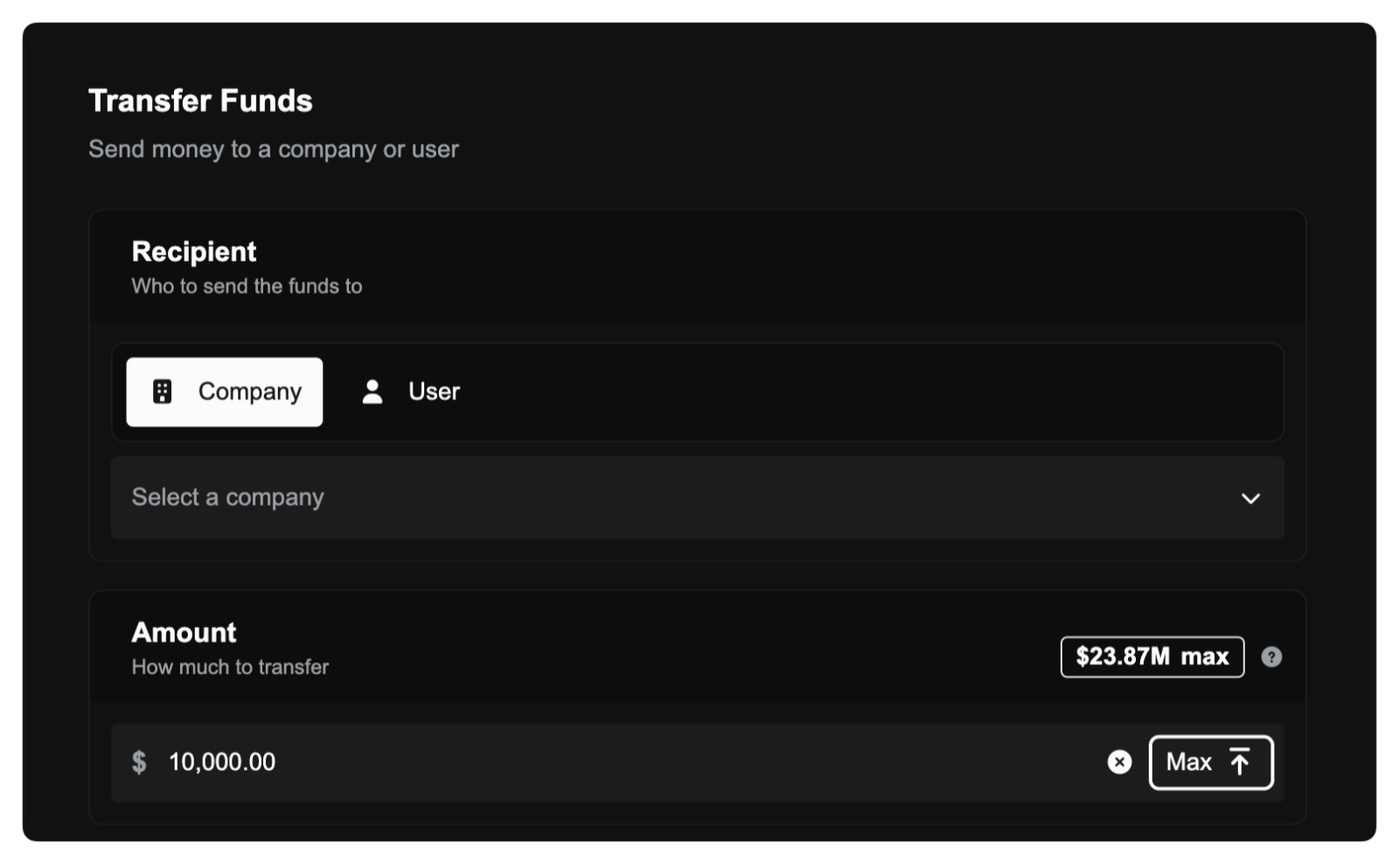
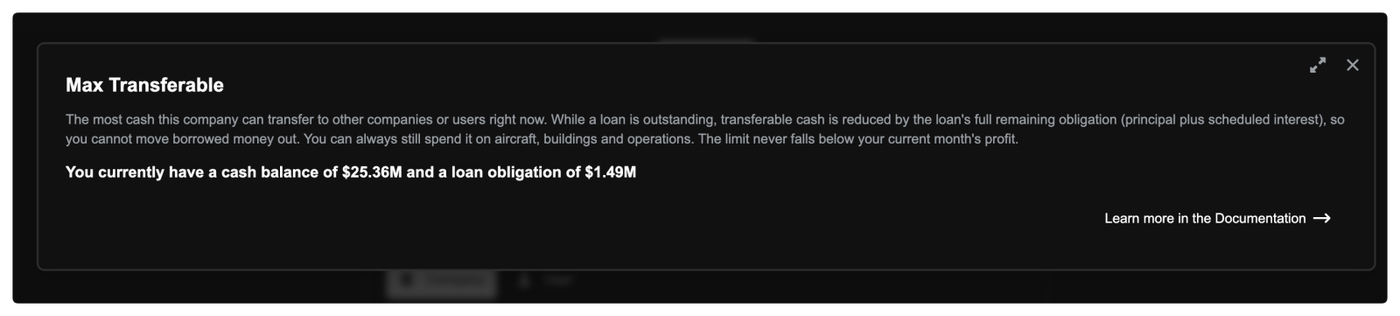
Max Transferable help popup now always shows the full breakdown (FSC-4029)

When you open the Max Transferable help popup on the transfer funds screen, it now always lists the three figures your transfer cap is derived from, instead of just the single limit that happened to be binding.

Previously, if your current month's profit was the figure setting your cap, the popup showed only "your current month's profit" with no balance or loan obligation context, which made the number look arbitrary. The popup now always lists your loan obligation, cash at hand, and current month profit together, so you can see exactly how the cap was worked out. The explanatory text has also been reworded to make clear the cap is the higher of (cash minus loan obligations) or your current month's profit.

This is a display-only change. The actual transfer cap and the amounts you can move are unchanged (the underlying calculation was already correct), this just makes the reasoning behind the figure visible.

May 23, 2026

New Features

See how much you can transfer, up front (FSC-4029)

The transfer screen now shows a live "max transferable" figure with a one-tap Max button, and the New Loan dialog shows how much you will be able to move to other companies once the loan is drawn. Previously this limit only appeared when a transfer was rejected.

Improvements

How loans affect moving cash between companies (FSC-4029)

While a loan is outstanding, the cash you can transfer to other companies now accounts for the loan's full remaining obligation (the principal plus its scheduled interest), not just the principal. This keeps borrowed money working inside the company that borrowed it. You can still spend it freely on aircraft, buildings, fuel and day-to-day operations, and the limit never drops below your current month's profit.

This change patches an exploit where holding companies could be used to draw large loans with no intention of paying them back. Now, cash that is transferred into a company to artifically increase the net worth is tied to the loan as collateral and cannot be transferred back out until the loan is paid off.

Classified aircraft prices kept realistic (FSC-4029)

Aircraft listed in Classifieds are now capped at the aircraft's current market value rather than the brand-new catalogue price. Selling direct still earns you more than selling to the broker, but listings can no longer be priced above what the aircraft is actually worth.

May 16, 2026

New Features

See your Passenger Services reach at a glance (FSC-4011)

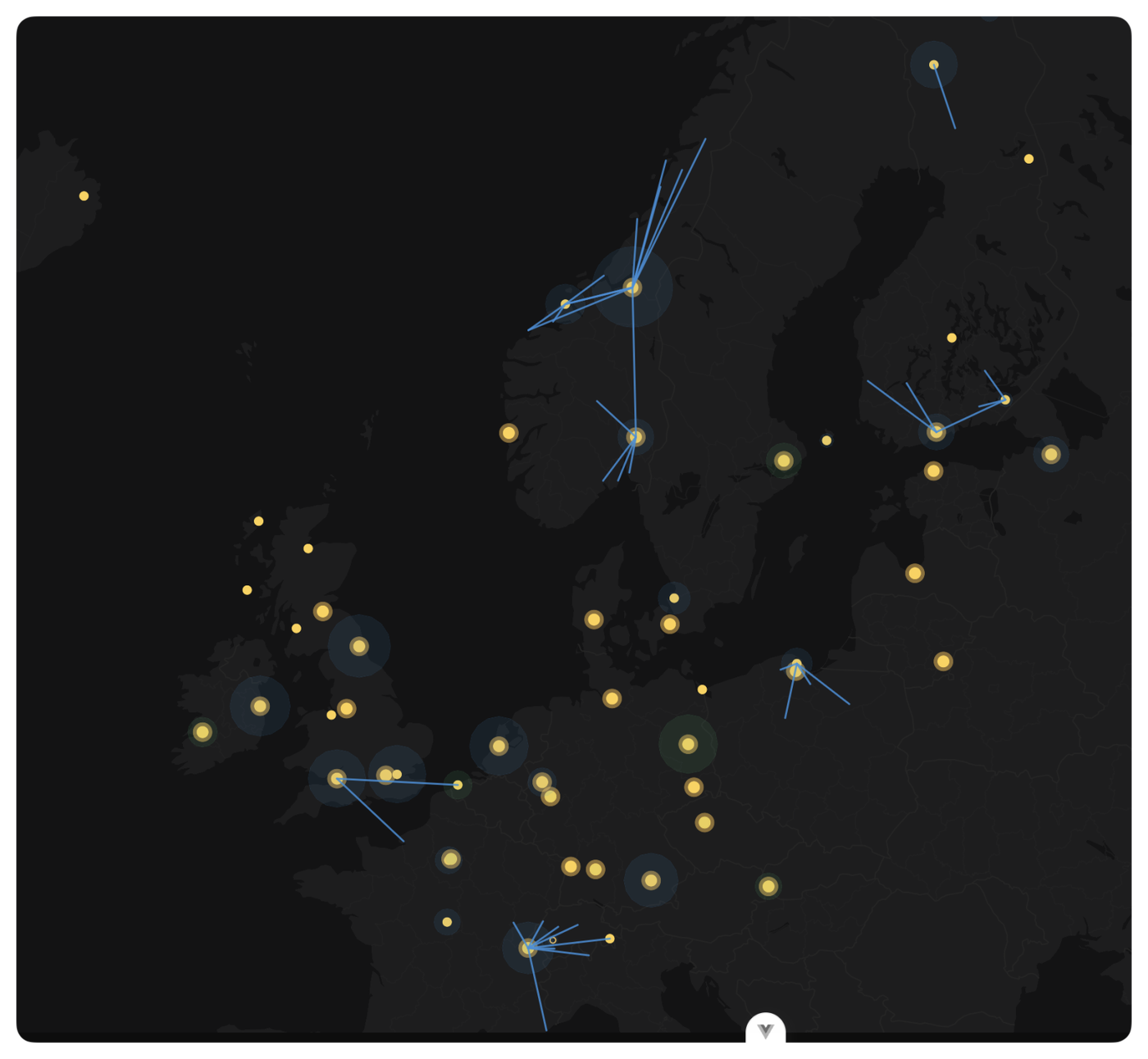
The Operations Cockpit map now visualises Passenger Services reach when the Base Operations lens is active. Every visible Passenger Services building draws a translucent radius circle showing its auto-complete coverage, and a line is drawn from each Passenger Services to every configured bespoke onward-charter destination.

Hover over a radius circle to see the source airport, the Passenger Services variant, the owning company, and the auto-complete radius in nautical miles. Hover over a line to see the source and destination airports, and the release target (Internal Collaboration or the partner company name).

Visibility piggybacks on the existing building accessibility rules: you'll see your own Passenger Services reach in your company colour, and any partner Passenger Services reach in the partner colour. Toggle Base Operations off and both layers disappear.