Updated seats on Pilatus PC-12 from 10 to 9 and increased MTOW from 4,500kg to 4,740kg
Updated seats on Airbus A321 neo from 230 to 244 and renamed to A321neo LR
Updated OEW for Airbus A321XLR from 49,000kg to 46,600kg
Persistent Rank Approval
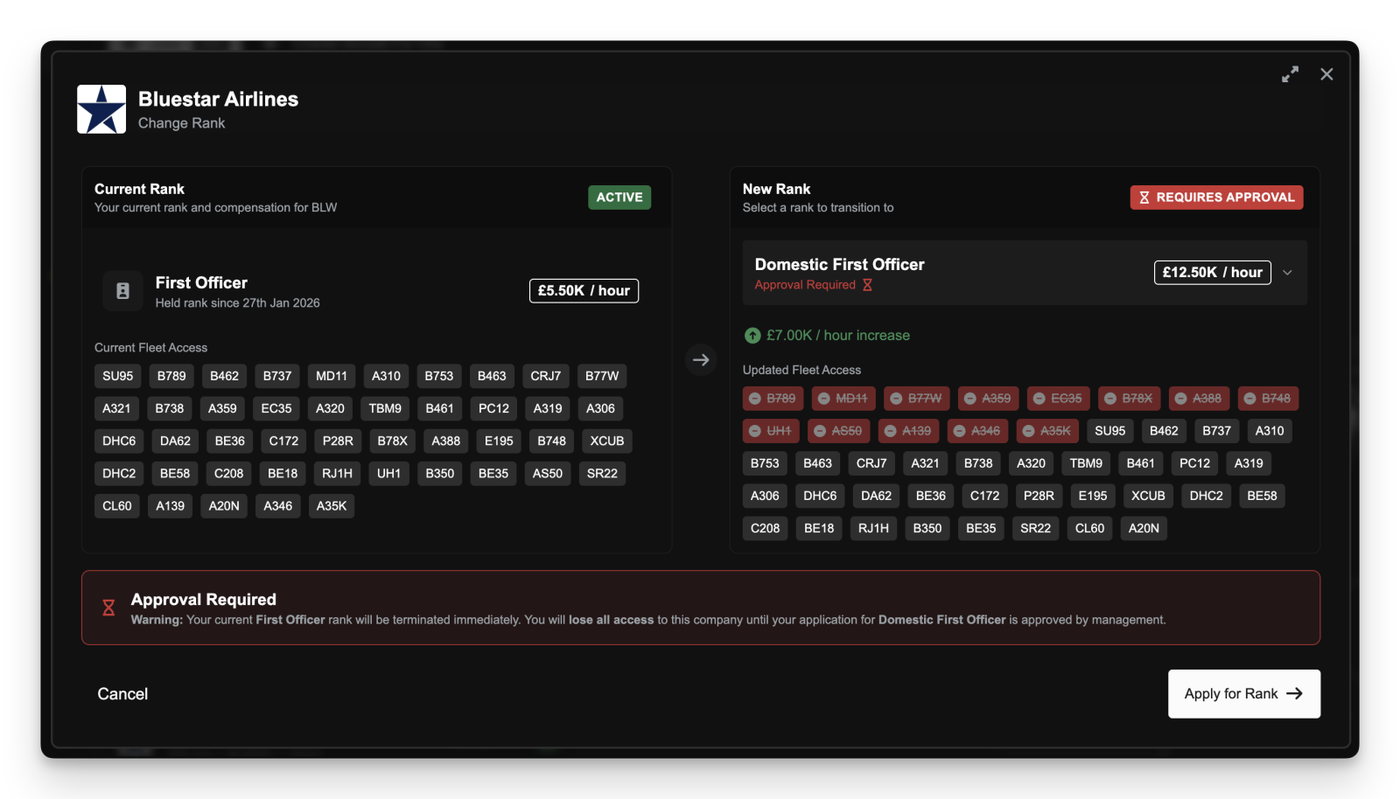
You no longer need to re-apply every time you return to a rank you’ve already been cleared for.
When a company approves you for a rank (whether manually by a manager or automatically through progression or eligibility) that approval is now remembered. If you later switch away and decide to come back, you can move straight into the rank without waiting for approval again.
In the Pilot Portal, ranks you’ve previously been approved for are clearly marked as Pre-Approved. These ranks let you switch instantly, even if they would normally require an application.
Other Improvements
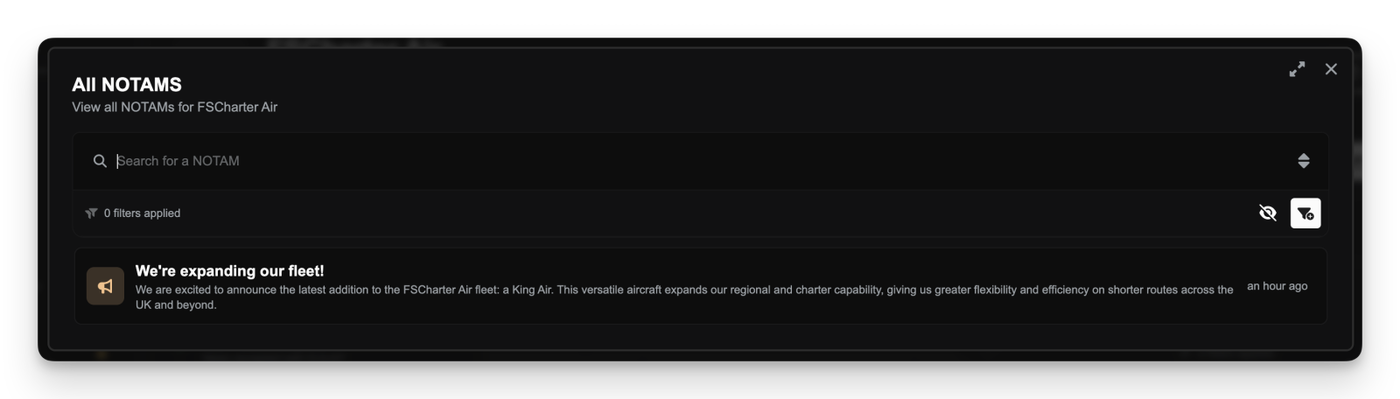
NOTAM messages now show a live character counter, so you always know how close you are to the 255-character limit
Fixed arrow key navigation being intercepted while typing in company description and message fields
Managing the release of collaborative demand across multiple airports is now significantly faster and more controlled.
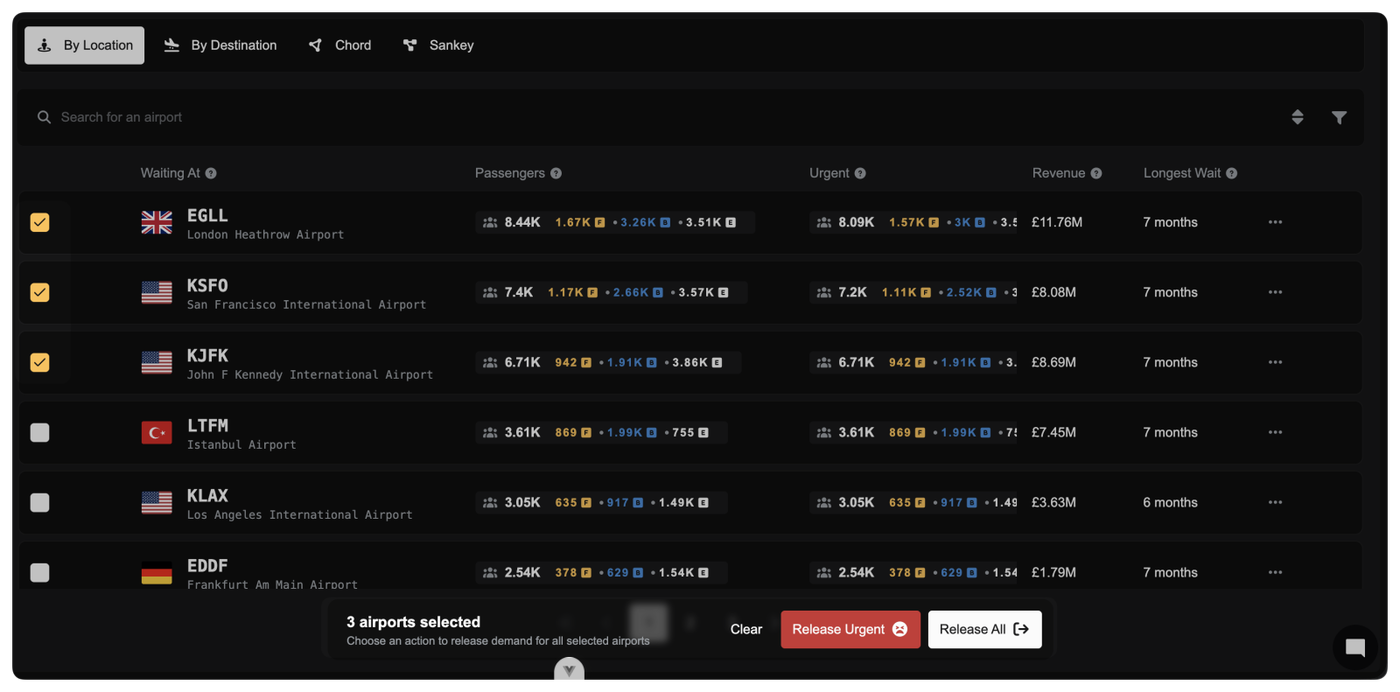
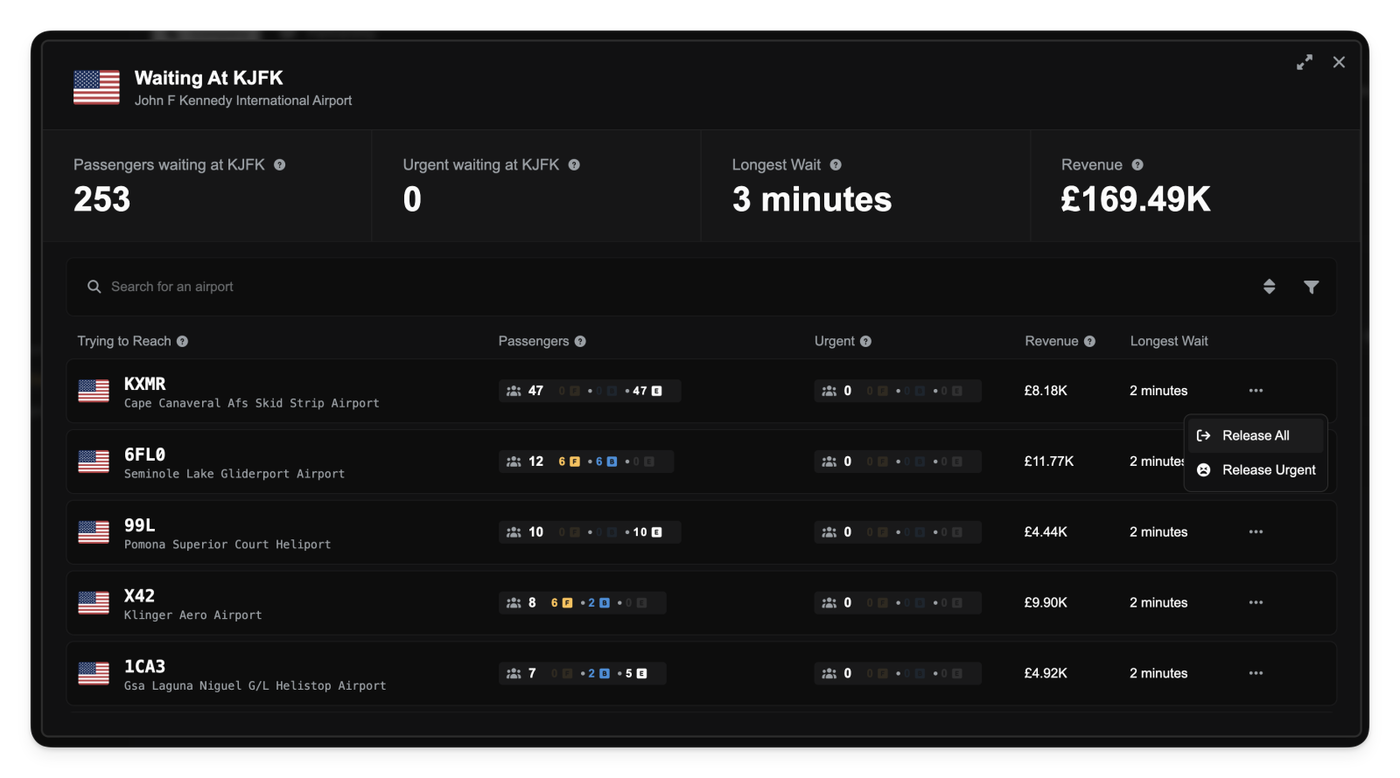
You can select multiple airports directly in the Collaboration Dashboard and release demand for all of them in one action. A new batch selection bar appears as soon as you start selecting rows, clearly showing how many airports are selected and which actions are available.
Two batch actions are available when you have the appropriate company privileges:
Release All: Releases all collaborative demand for the selected airports.
Release Urgent: Releases only demand that has exceeded the urgent threshold, leaving newer demand untouched.
Company Logos and User Avatars in Selectors
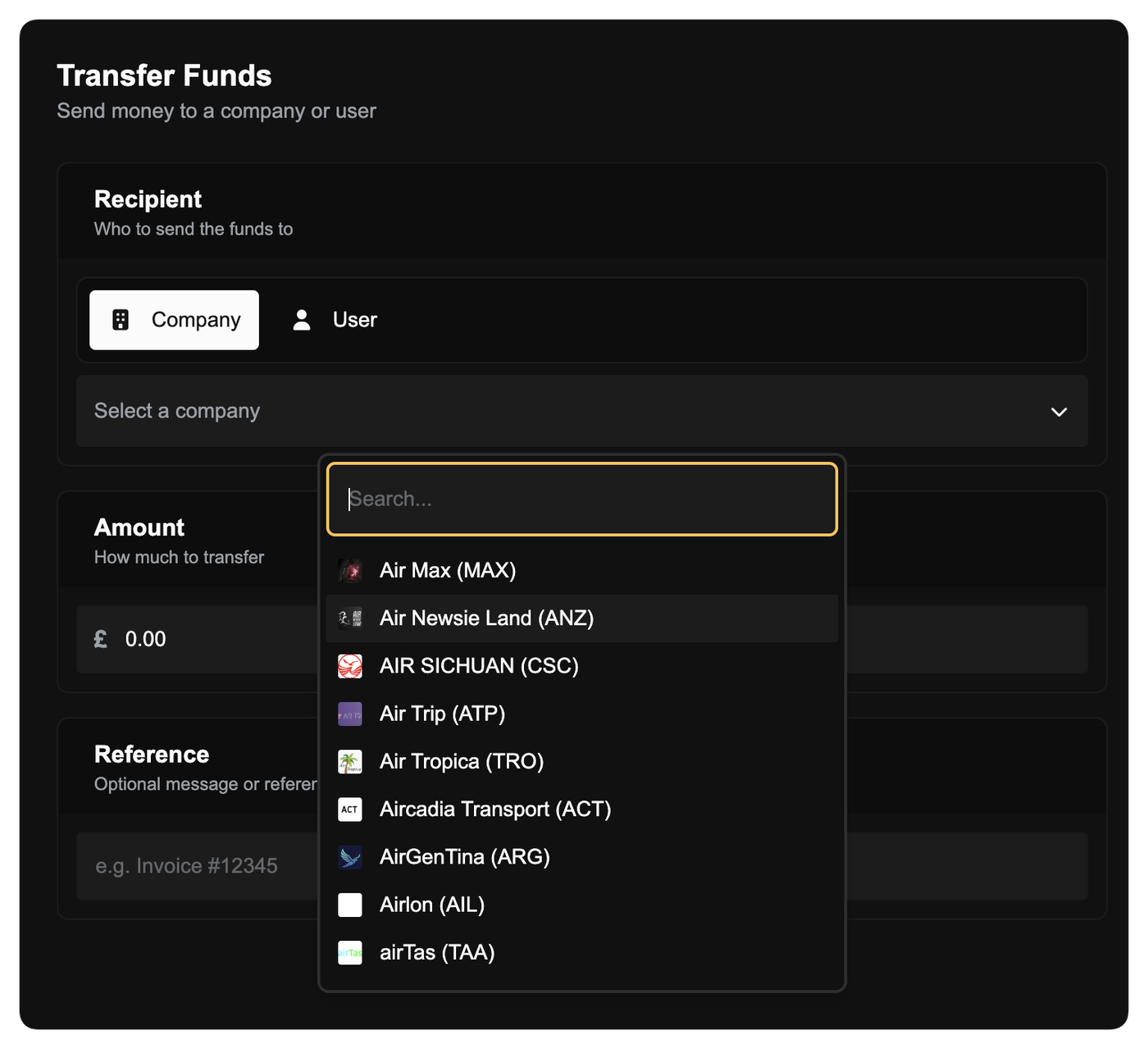
Company and user selection fields are now more visual and easier to scan. Wherever you choose a company or user (such as transferring funds, deleting a company, or selecting a recipient) logos and avatars are displayed alongside names instead of generic icons.
This makes it quicker to identify the right company or person at a glance, especially when working with long lists or similar names.
Aircraft Market Listing Enhancements
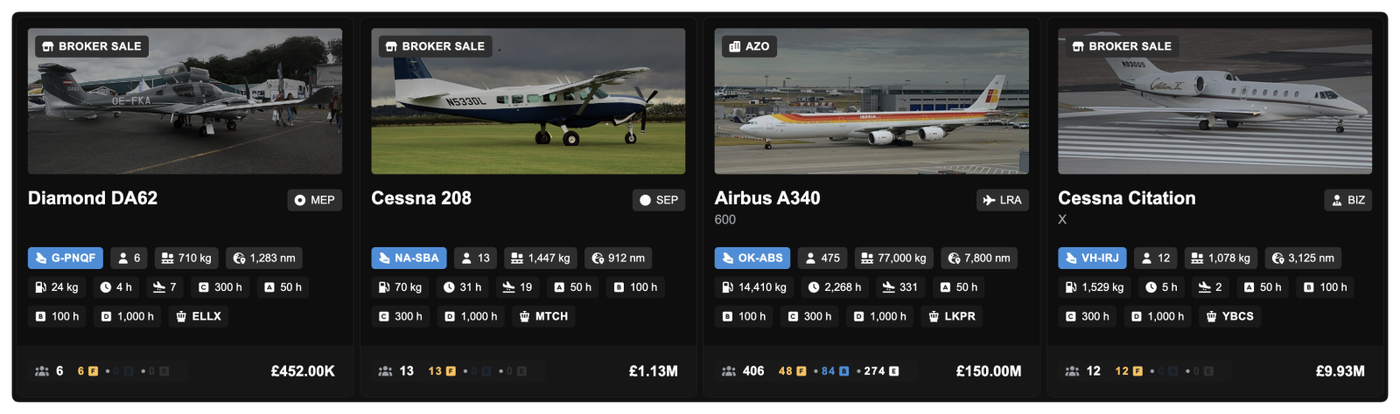
Used aircraft listings are now clearer and more informative. Broker sales and third-party sellers are highlighted directly on the aircraft image with new badges, making it obvious who is selling the aircraft.
Smarter Hangar Storage for Company-Owned Buildings
A bug with aircraft storage logic has been fixed to better reflect ownership. Previously, if you owned a hangar but had set it to public use for a fee, your own aircraft would not automatically use it after slot grace periods end.
Now, if you own a hangar, your aircraft will always automatically use it for storage, even if that hangar is set to public access with a price. You never pay storage fees to yourself, and aircraft will no longer be pushed into less suitable public storage because of pricing settings.
Other improvements
Fixed tables scrolling slightly within tables
Minor visual polish across aircraft listings and dashboards
The FSMail message that is sent to all partners when demand is released back to the public pool now shows a breakdown by departure airport and class, so you can immediately see where demand is coming from.
Fixed the FSMail message viewer to properly scroll for long messages
The Airport Lens Space for (m²) filter now accepts larger values instead of being capped at 999
SimBrief exports now correctly exports payload values
Fixed the Route Lens Does Not Meet Minimums filter from showing routes from all companies
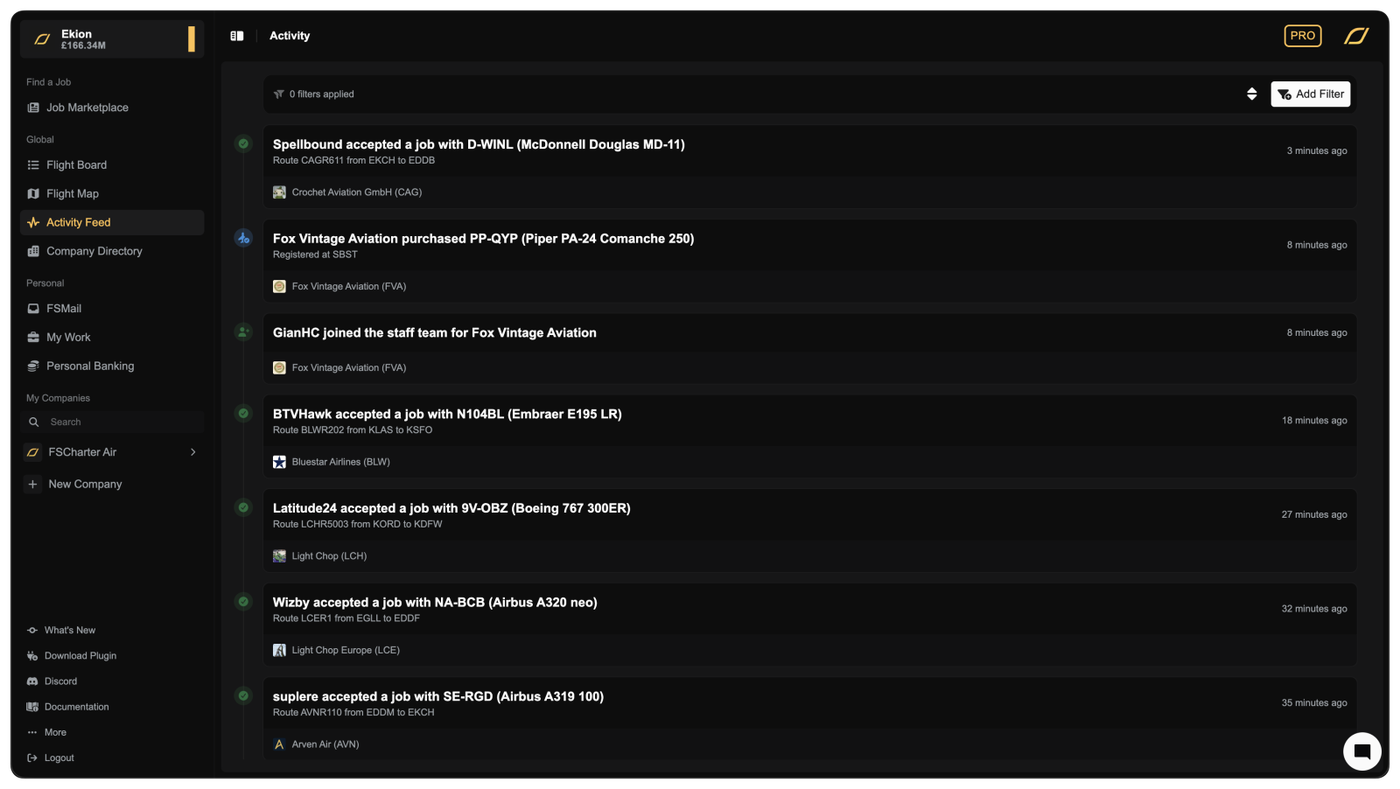
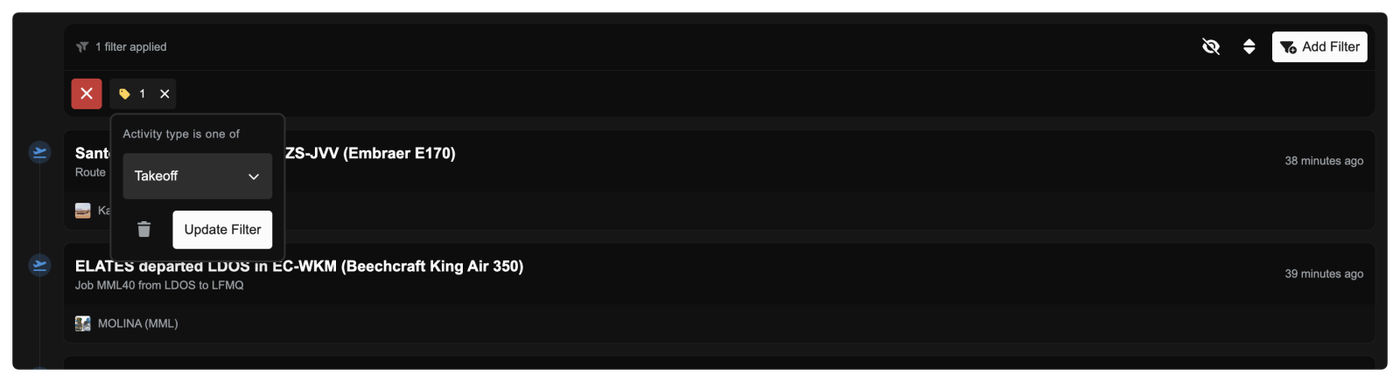
You can now see what’s happening across all companies in FSCharter in one live, real-time feed.
The new Activity Feed page brings together major events from every company into a single global timeline. As flights depart and land, jobs are accepted, aircraft are traded, or companies join partnerships, you see it instantly.
Each entry is clearly labelled with readable titles, meaningful descriptions, and visual icons so you can quickly scan what’s going on. You can also filter the timeline by company or activity type, making it easy to focus on competitors, partners, or specific kinds of events.
The feed updates live while you’re on the page and supports infinite scrolling, so you never miss what’s happening across the world.
Clearer Pay Progression and Pending Earnings
You now get much better visibility into how and when you get paid as a pilot.
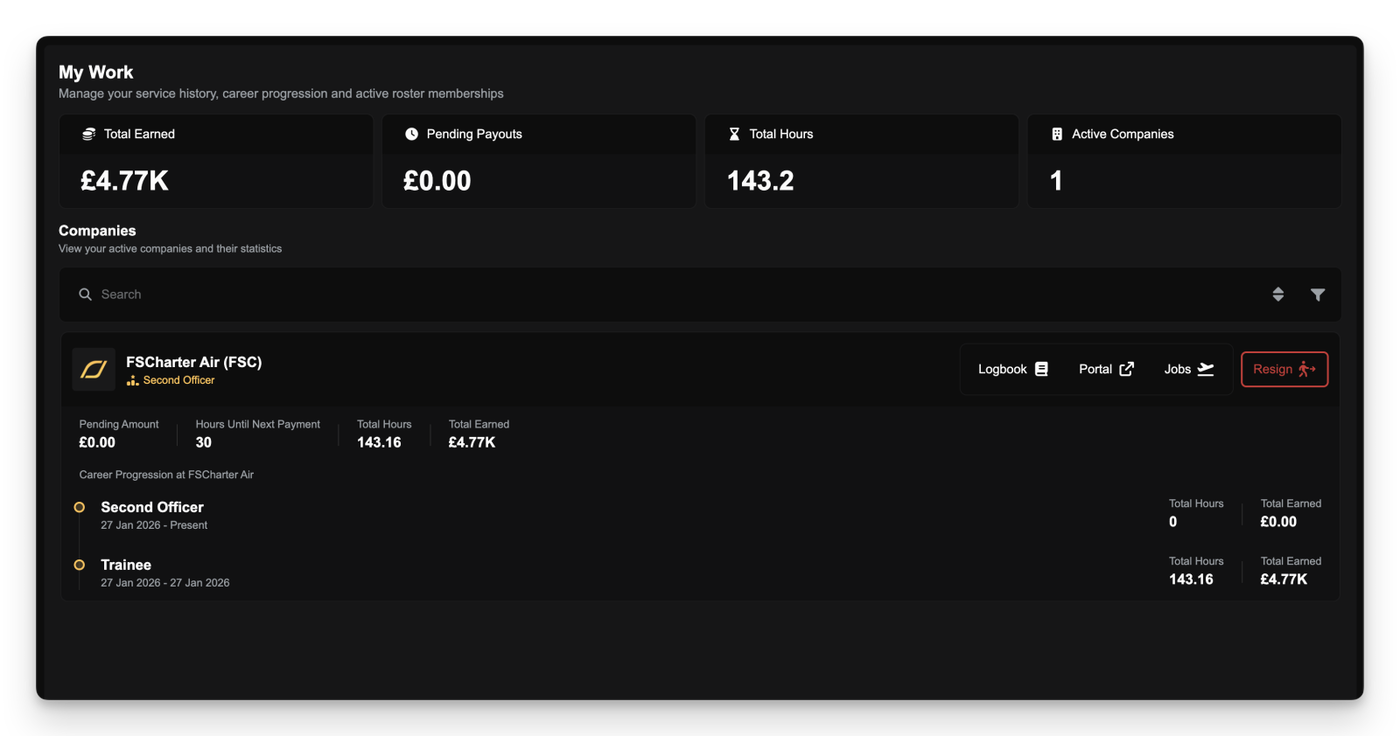
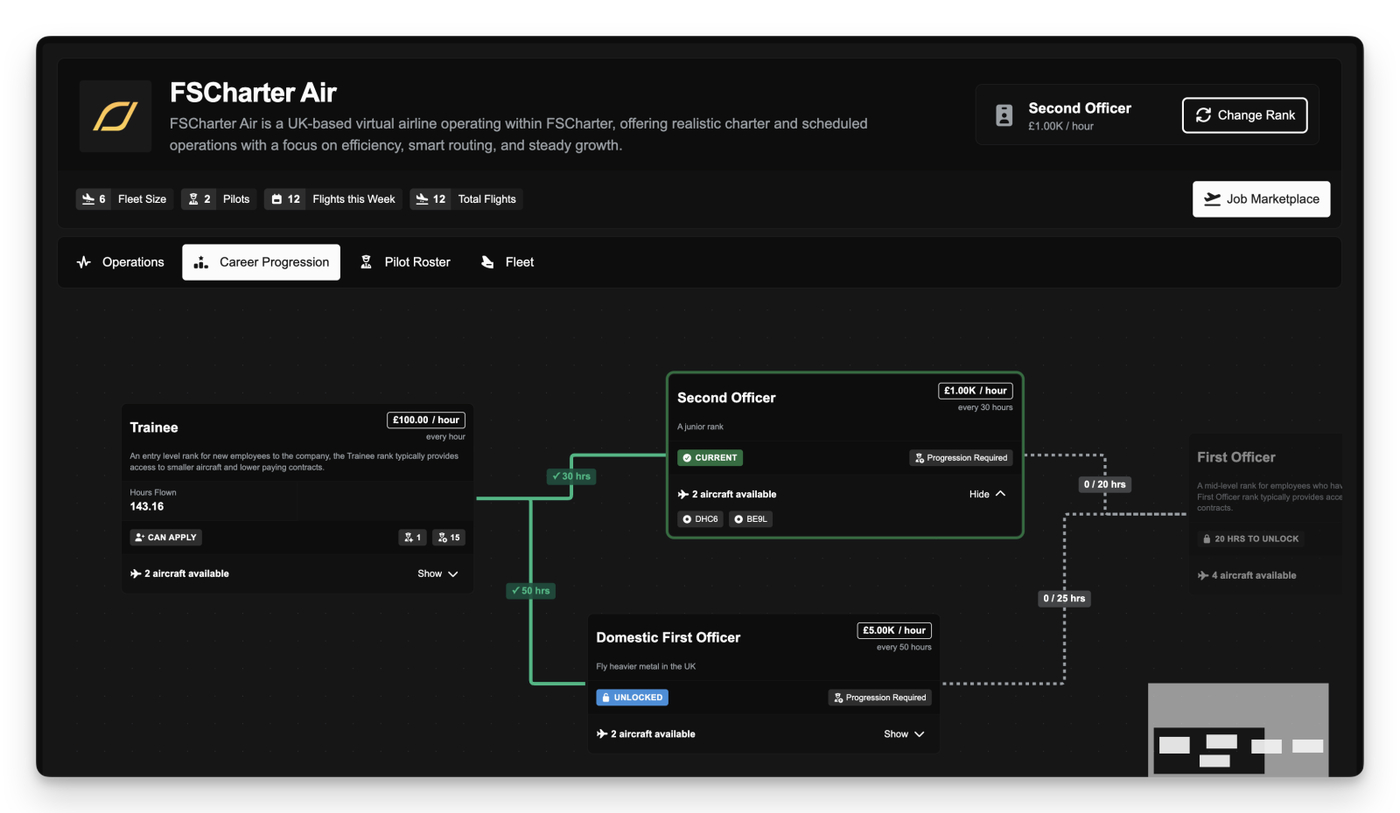
In the Career Progression tab in the Pilot Portal for a company, each rank now shows:
How many hours you’ve flown at that rank
How many hours remain until your next payout
How much money is currently pending
How often that rank pays out (pay interval)
This makes it much easier to understand why pay is pending and exactly what you need to do to unlock it. If a rank pays every 10 hours, you’ll now clearly see your progress toward that threshold and the amount building up along the way.
The My Work page has been upgraded to give you clearer, more actionable information. At the top, Pending Payouts now includes contextual help explaining:
Why pay can be locked to specific ranks
How switching ranks affects pending earnings
How to unlock accumulated pay
Each company row now shows:
Progress toward your next payout at your current rank
Pending amount for that rank
Lifetime earned and pending amounts
Total hours flown
You can now also jump straight to managing your pilot career from My Work. A new Manage Employment button takes you directly to the Career Progression tab for that company, where you can:
Switch ranks
Review pay intervals
See which ranks have pending pay waiting to be unlocked
This removes the need to hunt through company pages to manage your pilot status.
New Job Filter: Hourly Pay
You can now filter jobs by hourly pay, letting you focus on work that matches your earning goals. The filter intelligently accounts for:
Your current rank if you’re already employed
Ranks you’re eligible to apply for
Auto-accept ranks when “Flyable Now” is enabled
This helps surface jobs that actually make sense for you to fly.
Other Improvements
Fixed airport type data so heliports are correctly classified
Improved activity log titles and descriptions throughout the platform for clearer, more readable events
Visual polish and spacing improvements in timelines and panels
This release represents one of the largest structural updates to FSCharter since launch.
The focus has been on reducing friction and making long-term progression feel more intentional for both pilots and company managers. Core systems such as contracts, job discovery, company interaction, and rank progression have been reworked to and make the platform easier to understand and operate for both beginners and long term users.
For pilots, the aim of this update has been to make jobs much easier to find and to reduce the overhead of using FSCharter. For managers, the update brings better tools, less micro-managing, and more control over how companies are structured and run.
We've updated the the documentation to reflect this change and we'll be updating the videos soon. Here are the most notable documentation pages that have changed:
Many of these changes also lay the groundwork for future features and improvements. As always, this release reflects feedback from the community and ongoing use of the platform - thank you.
Introducing Pilot Rosters
The contract system has been replaced with permanent Pilot Rosters.
Pilots now join a company’s roster on an ongoing basis, allowing continued access to jobs without needing to renew contracts. This, as you'll see in later sections, also enables us to build long-term progression routes within a company.
The new Roster system behaves likes the old contract model (hourly pay and rank-based earnings), but massively reduces the administrative overhead of contract management.
One of the key changes enabled by this system is rank flexibility. Pilots are no longer tied to a single contracted rank. If the requirements for multiple ranks within a company are met, pilots can switch between them freely to access different aircraft types or pay structures.
Attention Managers: Existing contracts have been automatically mapped to the appropriate ranks where appropriate. If the new rank has different pay and/or pay interval to the old contract then the contract with the user will be terminated and any due funds paid out. It is recommended that Rank and Pay settings are reviewed to ensure values are configured correctly under the new system.
Attention Pilots: If you had an active job during the migration and we were unable to manually map your contract to a new rank you will be paid a one-off payment for the value of your flight. You will not lose out on revenue.
The Open Job Marketplace
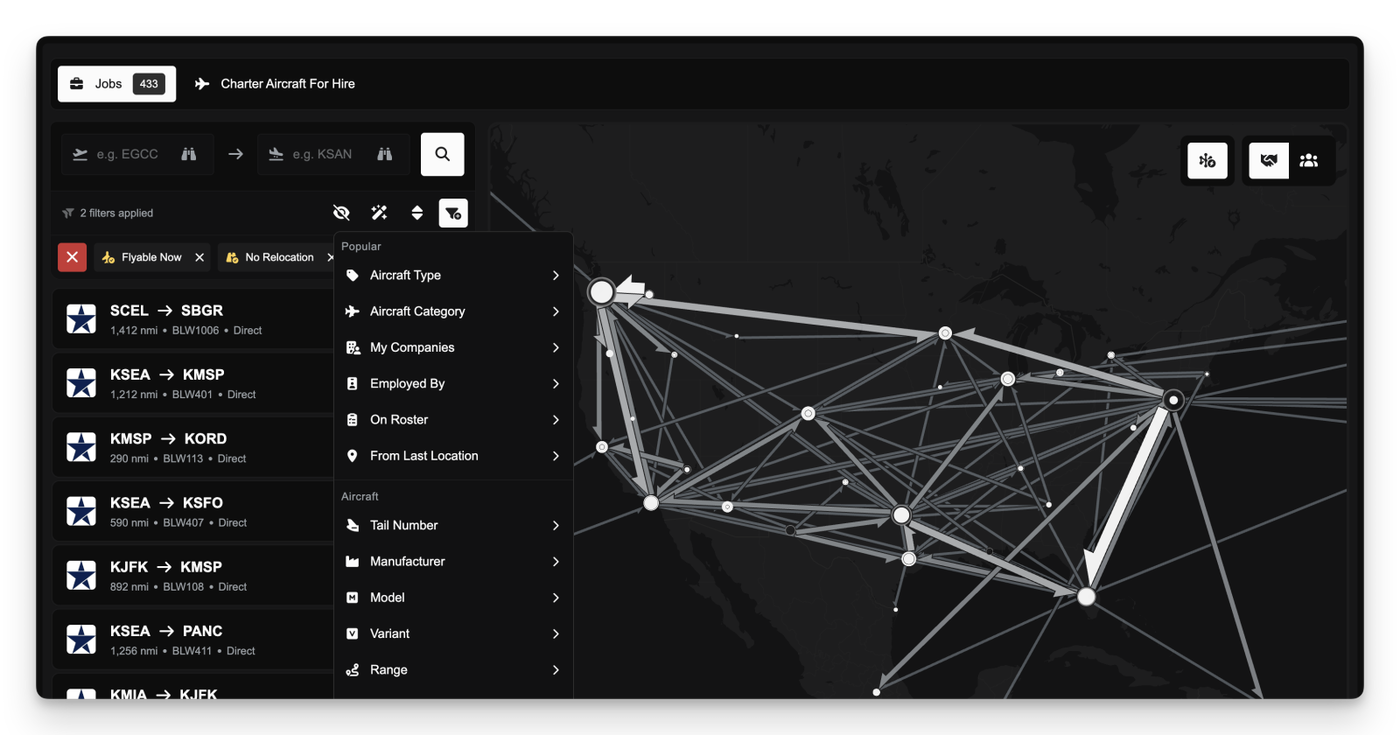
The Job Marketplace has been redesigned to remove barriers to job discovery. All jobs that you are eligible for across FSCharter are now visible by default, regardless of current company roster membership. This replaces the previous model where visibility was limited, and allows pilots to explore routes and operators without needing to first accept contracts. The legacy 5-contract limit for viewing jobs is also gone, removing the guesswork from finding jobs you actually want to fly.
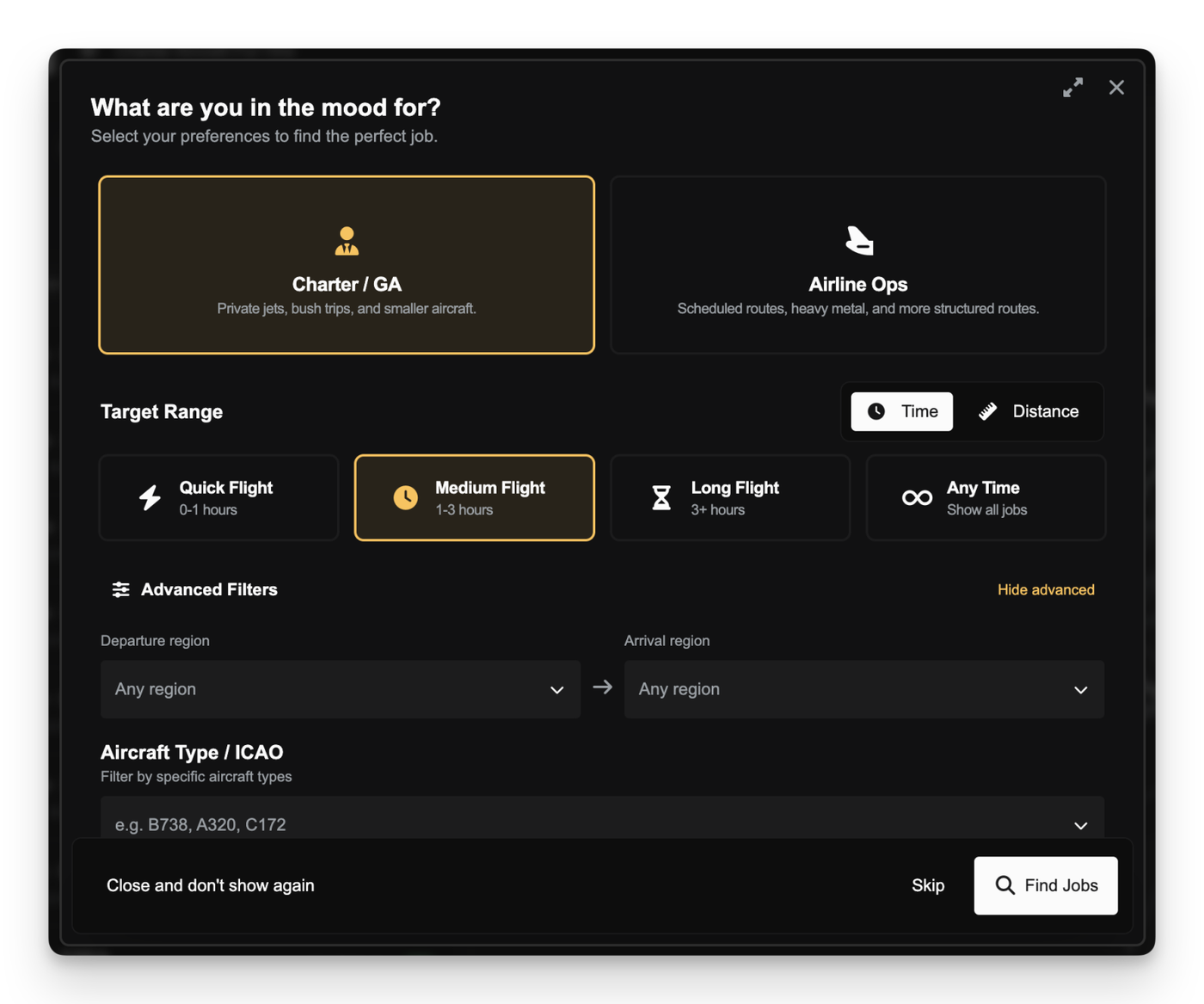
To support faster and more approachable job discovery, particularly for newer pilots, the Job Search Assistant has been introduced. It provides a guided way to surface suitable flights based on factors such as distance, duration, and aircraft type, without needing to configure complex filter combinations.
For more experienced users, the main filtering system has been reorganised into clearer, purpose-driven sections covering Popular, Aircraft, Route, and Company filters. A dedicated sidebar also enables quick searches for jobs departing and/or arriving at certain airports.
Accepting a job will automatically add the pilot to the operating company’s roster if they are not already a member.
Company Portals & Progression
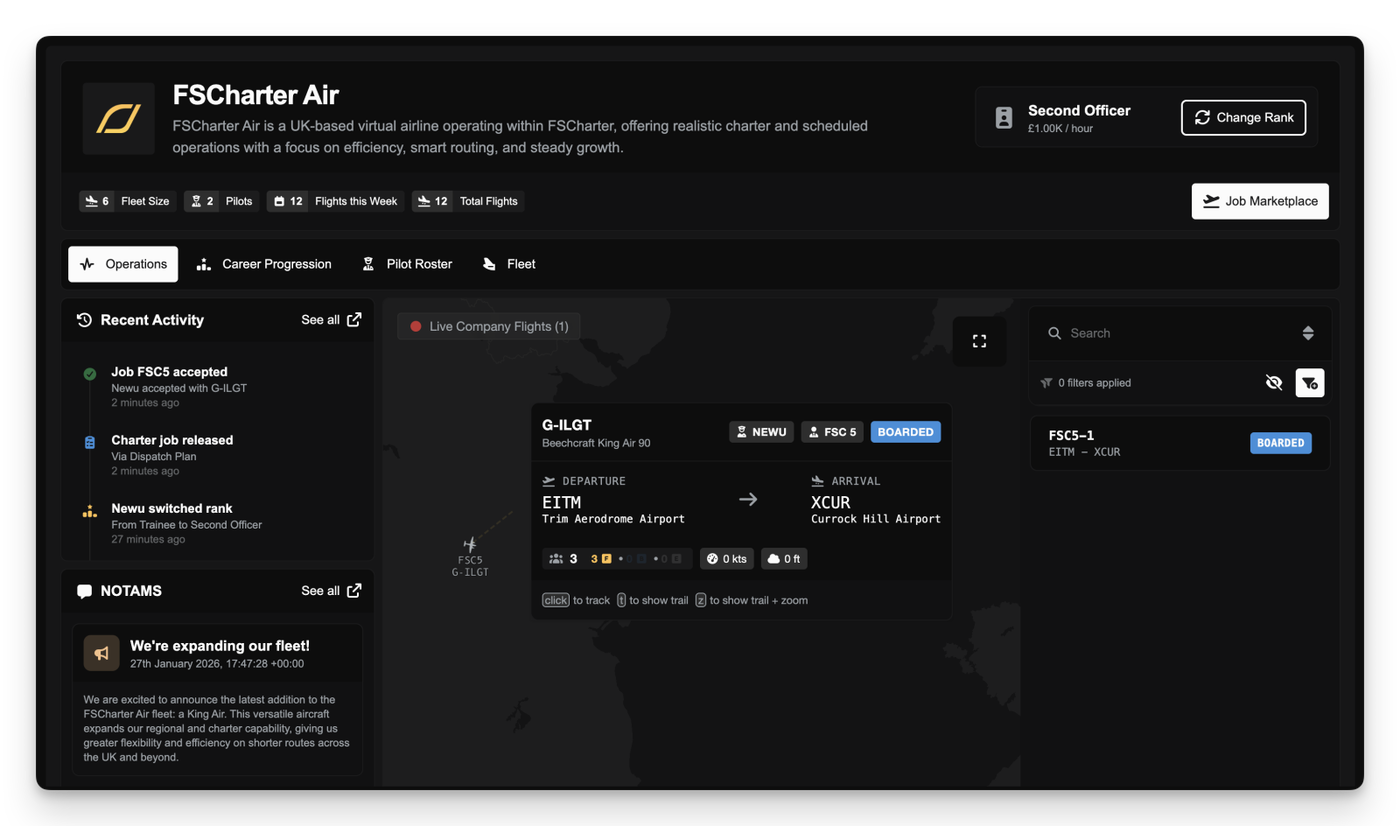
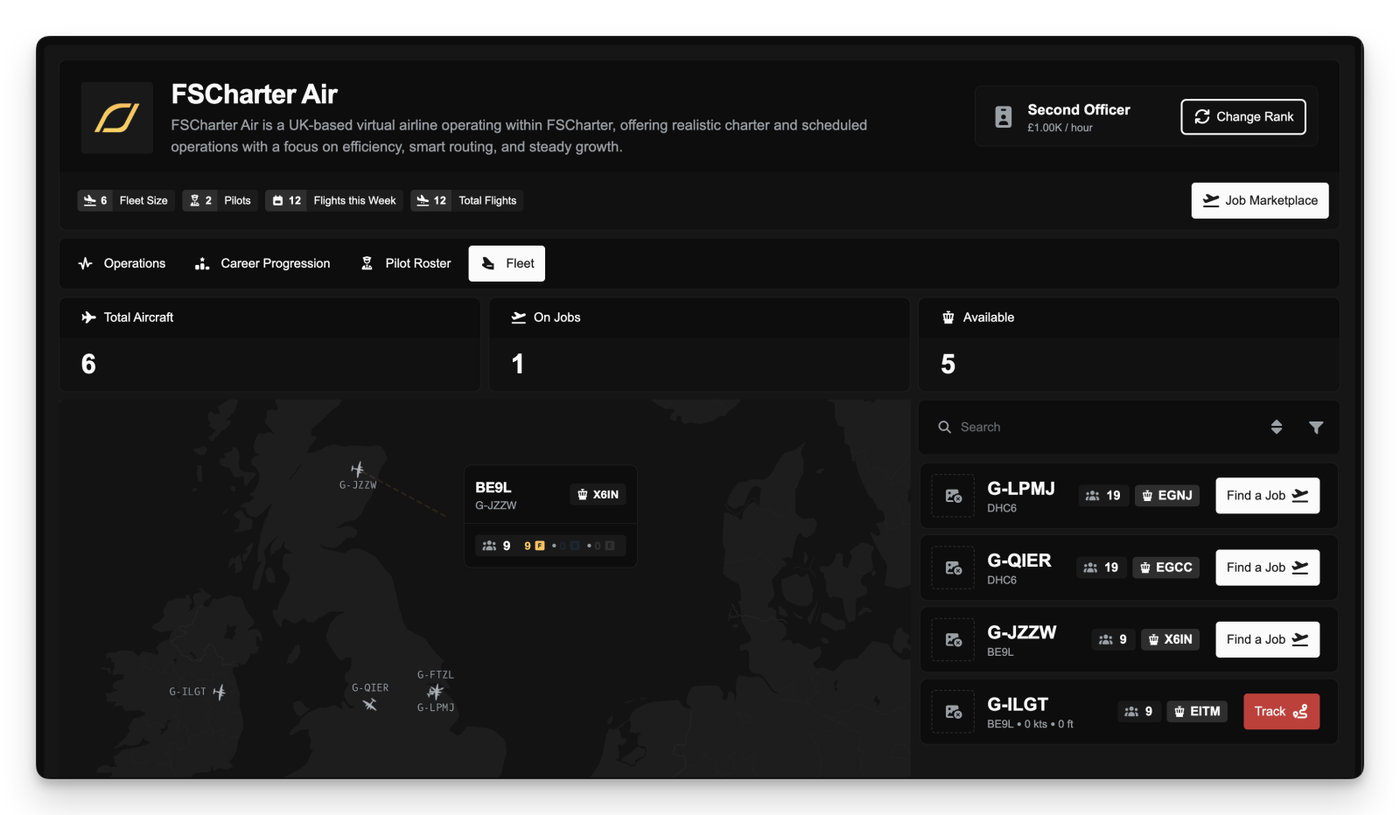
Interaction with companies has been restructured around the introduction of Company Portals. Each company now has a public-facing portal that can be viewed before applying, providing visibility into their operations and fleet. It also serves as the home for existing pilots, with quick links to manage career progression and view the job marketplace for that company.
From the company profile, pilots can see operations, catch up on company acticity, read NOTAMS, and quickly search for jobs associated with specific company aircraft.
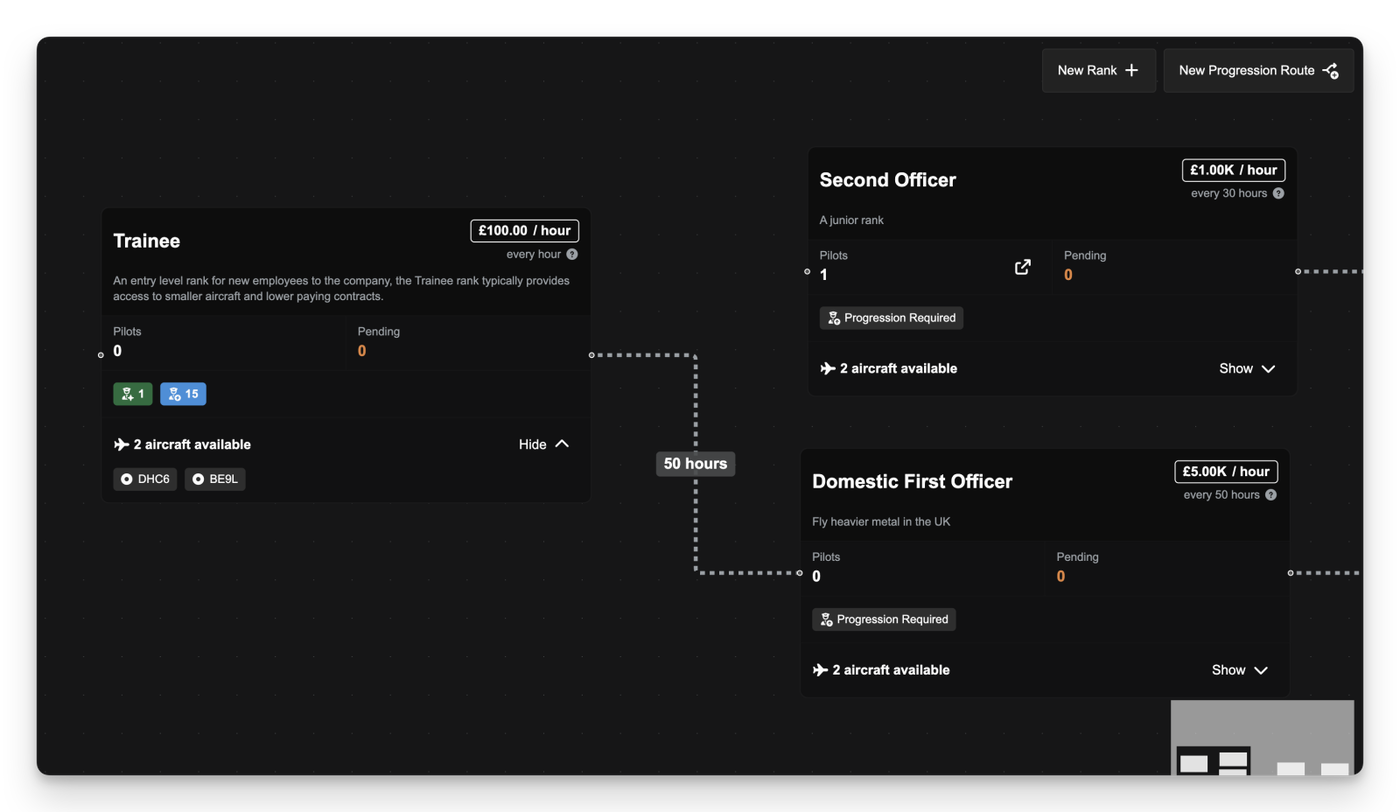
After joining a company's roster, pilots gain access to the Career Progression view. This tree-based interface maps out progression within the organisation, showing rank requirements, aircraft access, and the steps needed to unlock new ranks over time. From here pilots can apply for new ranks or switch between existing ranks that have been unlocked.
Alongside this, a new Company Directory page has been added to allow pilots to discover existing companies and better understand their structure, pay, activity, and areas of operation before committing.
Powerful Tools for Managers
Management tools for company owners have been expanded and reorganised to support clearer planning. The new Rank and Progression Manager introduces a visual, drag-and-drop canvas for defining career paths and managing rank pay within a company. We've also introduced rank duplication as a quality-of-life improvement, allowing rank settings and aircraft constraints to be copied quickly when creating or adjusting progression structures.
Communication with pilots has also been improved through the introduction of the NOTAMs feature. Managers can now issue Notices to Airmen, categorised as Announcements, Information, or Important, which are surfaced directly in the Pilot Portal to ensure key updates are visible to the roster. All active roster pilots also receive FSMail messages when new NOTAMS are published.
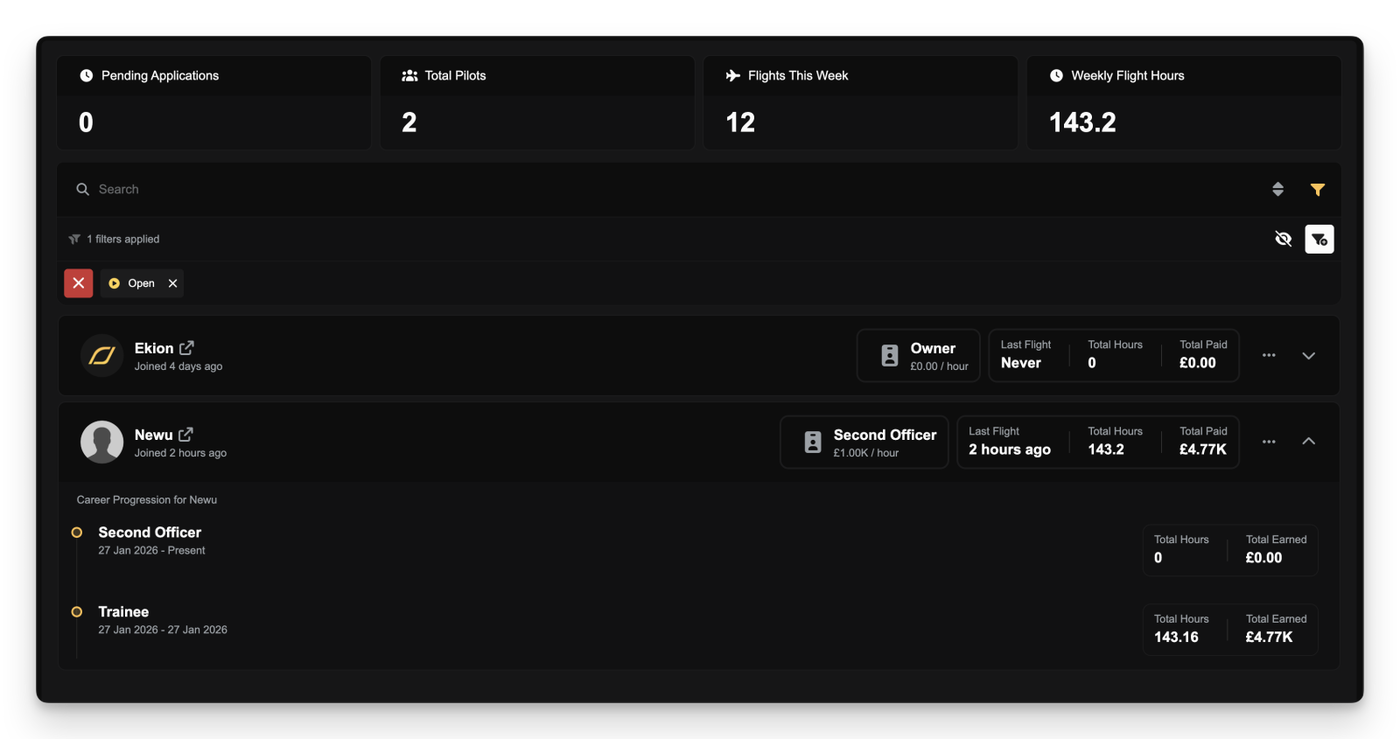
A dedicated Roster Management page has also been added to provide better oversight of pilot activity, including hours flown and incoming applications.
Other Improvements
Redesigned Filter List: Active filters are now displayed in a wrapped layout, allowing you to see every applied constraint at a glance without horizontal scrolling or losing access to the filter and sort buttons.
Persistent Pilot Mode: We've introduced an opt-in Persistent Pilot Mode that, if enabled in your settings, automatically applies the new From Last Location filter to jobs so that only show jobs departing from your last arrival airport are shown by default.
Aircraft Group Constraints: Managers can now assign rank access based on Aircraft Groups.
Smart URL Sync: The browser URL now automatically updates to reflect your active tabs and filters, letting you bookmark specific marketplace views or refresh the page without losing your place.
Region & Flight Time Filters: Added new filter options to search for jobs by global region or specific flight duration ranges.
UI Polish: Tweaked the sidebar menu order and refined styling on various components for a cleaner look.
Heliport Filters: Added demand filters to exclude Heliports from demand search. This filter is applied by default. Also added demand filters to only show Heliports in demand search.
Quick Maintenance Actions: Added visual indicators for overdue maintenance in the Aircraft list in the Operations Cockpit, allowing you to identify and start maintenance directly from the list without navigating away.
We have implemented significant improvements to how partnership payouts are calculated and distributed to ensure every penny is accounted for and payments never fail due to minor rounding discrepancies.
Previously, certain partnership balances could cause a "rounding error" during the automated payout process. If the sum of individual member shares exceeded the total available balance by even a single penny, the final payment in the sequence would fail.
We have now introduced "payout saturation" logic. This ensures that if a rounding discrepancy occurs, the system will automatically adjust the final payment to match the remaining balance in the partnership account. This guarantees that your partnership funds are always distributed fully and successfully, leaving a clean balance of zero after every payout cycle.
As part of this update, we have also performed a one-time correction for any partnerships that were affected by these rounding issues during the January 1st payout. If your company was the final member in a payout sequence that missed a few pence due to these errors, you will see a correction payment in your company ledger.
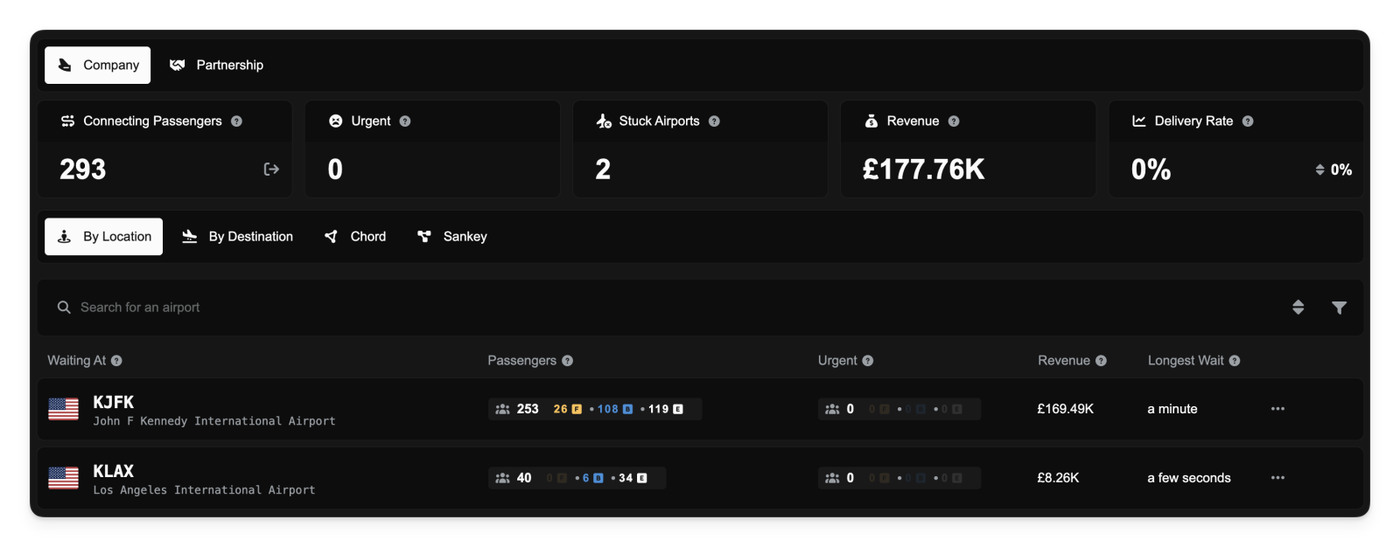
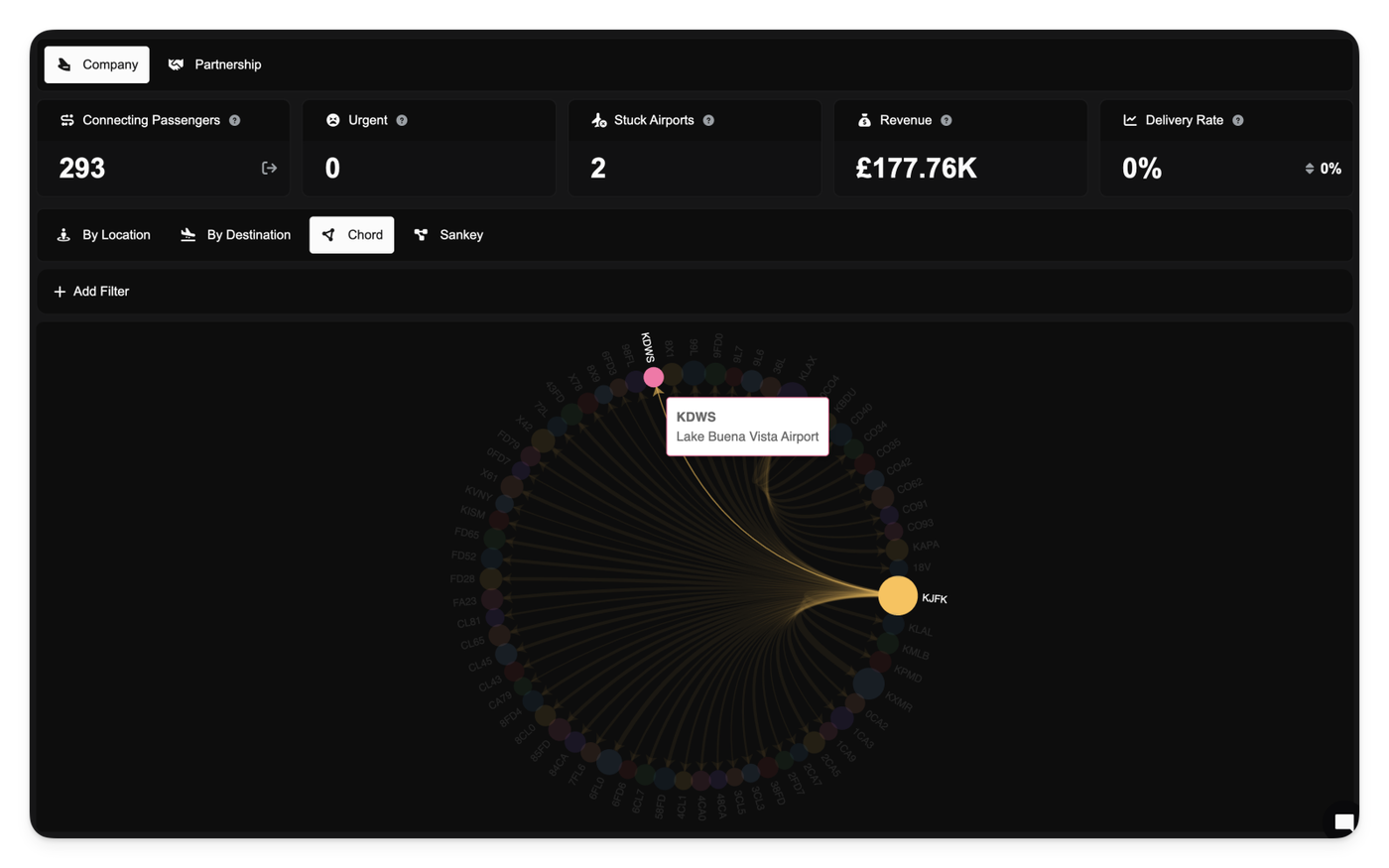
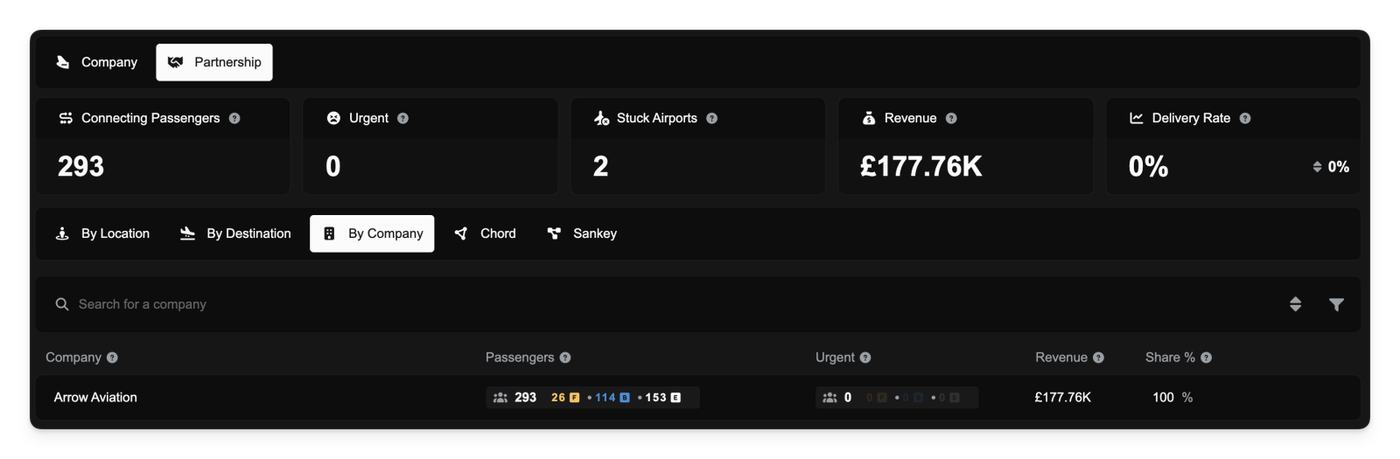
Companies now have a dedicated command center for managing their collaborative network. The new Collaboration Dashboard provides a high-level overview of how passengers are moving (or getting stuck) within your company and/or partnership.
We've introduced a new documentation page to cover the Collaboration Dashboard. You can read it here.
The dashboard highlights key performance indicators such as Delivery Rate (how effectively you are moving passengers) and Stuck Airports (bottlenecks where passengers are piling up). You can switch between viewing data for your specific company or the entire partnership to gauge overall health.
A new Flows view visualizes the movement of collaborative demand across the network, helping you identify high-traffic routes at a glance. Additionally, the Partner Share tab breaks down contributions, showing exactly how much demand and potential revenue each partner is bringing to the table.
Note: Before this update there was no mechanism to attribute the company that introduced collaborative demand into the partnership and as such all collaborative demand is assigned to the lead partner. Going forward all new collaborative demand will be correctly attributed to the correct company.
Releasing Collaborative Demand
Sometimes your network can't handle the load, and passengers are left waiting too long. You now have the ability to release collaborative demand back to the public pool.
You can choose to release All Demand or specifically Urgent Demand (passengers who have been waiting past the 14-day threshold). This can be done globally from the dashboard overview or granularly for specific airports or routes via the detailed airport dialogs.
Releasing demand ensures that passengers aren't stranded indefinitely in your system if you lack the capacity to fly them, protecting your reputation (soon to be implemented) and allowing other operators to pick them up.
Targeting Stuck Passengers
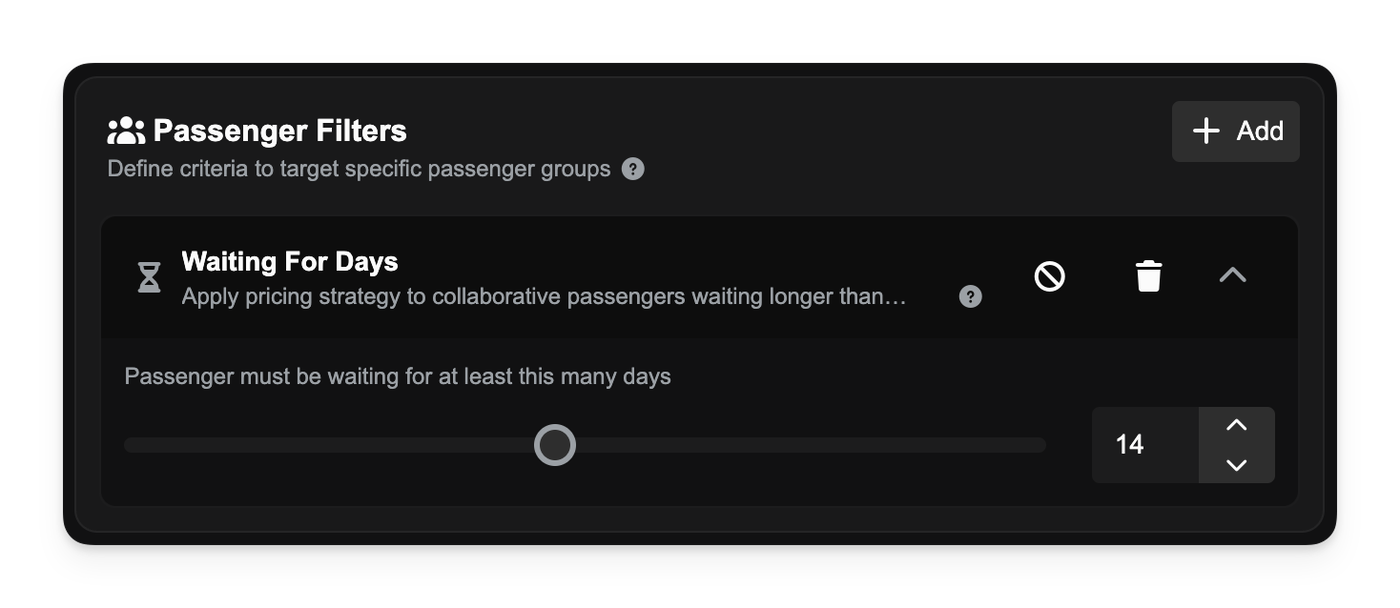
A new filter is available in your Pricing Strategies to help move stagnant demand.
The Waiting For Days filter allows you to apply specific pricing rules (such as aggressive discounts) to collaborative passengers who have been waiting longer than a set number of days. This helps prioritise clearing older demand from your system without manually intervening on every route.
Other Changes
Collaborative demand originally created by your company is now tracked and returned to your internal audience if you leave a partnership.
When you pause your simulator, the Company Clock will now pause with it. This ensures you are not penalized with accumulating background costs such as agreements and loan repayments while attending to real-life interruptions during a flight.
Because the simulator does not send a direct "pause" signal to the server, the system infers a paused state if no flight telemetry (sitreps) are received for 5 minutes. Once you unpause the simulator and flight data resumes, the Company Clock automatically restarts.
Small Improvements
We have removed the calculation cap (saturation) on route demand. Previously, extremely high Economy numbers could hit the calculation limit before Business or First Class passengers were counted, causing premium demand to appear as zero. This may result in slower route demand refresh.
Route demand now displays the exact passenger count for all classes rather than a capped estimate (e.g., "3.00K+").
You now have more granular control over your ticket pricing with new airport-type filters and the ability to temporarily pause active strategies and price-out passengers.
Airport Size Filters
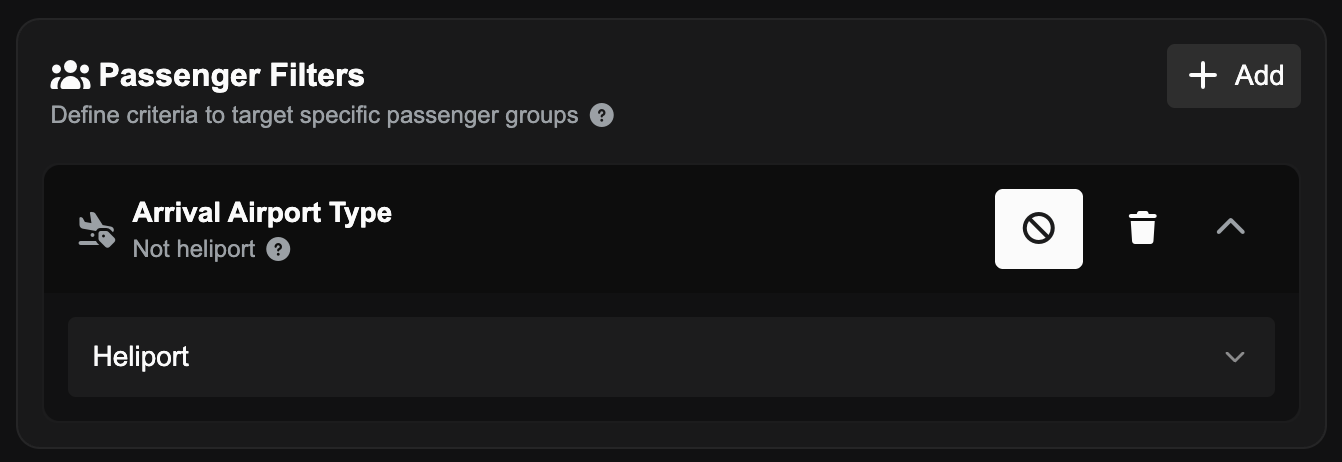
You can now apply strategies to passengers who have a final destination of a Heliport and price them out or incentivise them - useful for preventing passengers with hard-to-deliver endpoints from boarding your routes.
Strategy Pausing
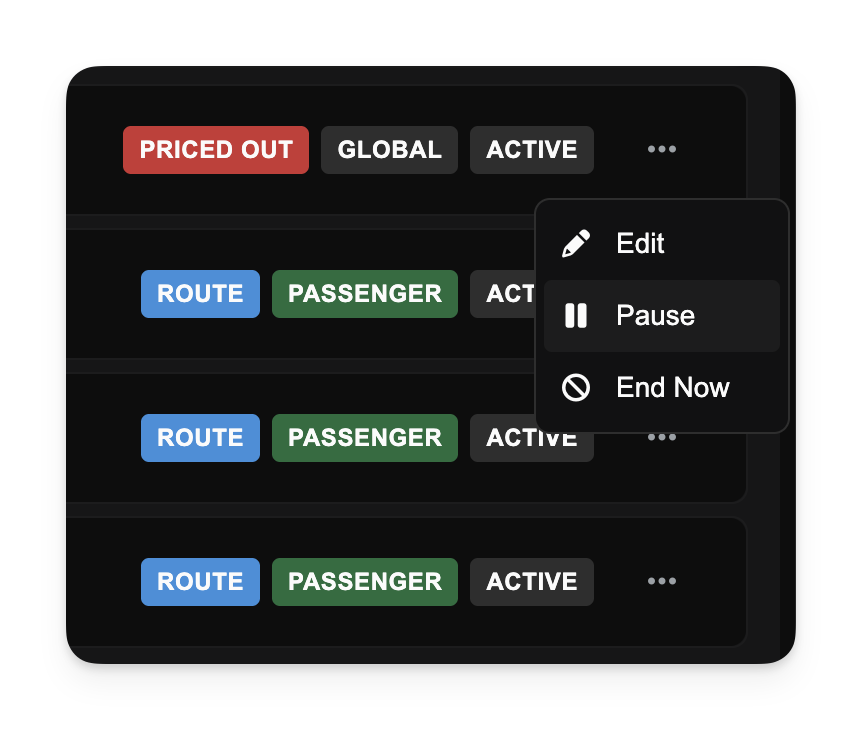
Active pricing strategies can now be paused and resumed without being deleted or ended permanently.
This is ideal for temporary promotional pauses or adjusting fleet operations without losing your complex strategy configurations. While paused, ticket prices will revert to baseline levels, and once resumed, the rules stack again immediately.
Price Out Passengers
By using the new Price Out feature, you can automatically set ticket prices so high that passengers will no longer book that route. Previously strategy surcharges were capped at 100%, which would not be enough to price out passengers on low-fare routes.
Other Changes
Improved route demand logic to ensure passengers on connecting journeys are correctly identified for "Last Leg" pricing rules.
Fixed an issue in the Strategy Preview dialog where switching between aircraft types would occasionally fail to update projected demand.
Enhanced the active strategies display to show surcharges more clearly (instead of negative discounts), preventing confusion.
Fix some buttons in the Operations Cockpit showing for users who did not have permission to click on them.
Prevented an issue where jobs inside draft dispatch plans were incorrectly updated or released when prerequisites were met by inbound flights, leaving the Dispatch Plan in a broken state.