- Fixed an issue during the company migration process where you were asked to configure aircraft that were being refunded. You will no longer see a prompt to configure seating for these aircraft.
- Fixed a bug that prevented migration entirely.
We’ve completely overhauled the underlying query system for the job market, making it significantly faster to find and filter flights.
Previously, if you had contracts with multiple companies, the job search could become slow as the system checked every possible flight against your pilot constraints. We've rebuilt this logic from the ground up to be far more efficient. The system now intelligently filters jobs based on the companies you can fly for before evaluating complex aircraft and route constraints, dramatically reducing the processing load.
You'll notice the biggest improvements when searching broad areas or when you hold many active pilot contracts. The job list and map view now populate much more quickly, getting you in the air faster.
We've resolved an issue that could sometimes cause the Live Flight Map to appear empty when you first opened it.
This was caused by a race condition where the map would occasionally try to draw aircraft before their data had been fully loaded. The map now waits for all data to be ready and displays a clear loading indicator, ensuring you always see a complete picture of active flights.
Finding flights from your allies and partners is now easier than ever. You can now filter the public flight board to show only jobs by companies belonging to specific partnerships.

When filtering jobs, you will see a new "Partnership" filter. Simply select one or more partnerships from the list, and the flight board will instantly update to display only flights from member companies. This makes it simple to support your partners, find specific charter flights from a major alliance, or just explore the operations of different groups.
Managing your own company just got simpler. You are now automatically assigned a special Owner Contract when you create a company, which means you no longer need to take up a regular pilot contract slot.

This new contract is designed specifically for you as the company owner. It features unlimited hours, so you never have to worry about renewing it. As a result of this change, you can no longer sign regular pilot contracts with your own company. Instead, your compensation is now handled through the new Owner Salary system.
You can now automatically pay yourself a monthly salary based on your company's performance. A new Owner Salary section in your company settings lets you set a percentage of the previous month's net profit to be paid directly to your personal bank account.

This system connects directly to the "Current Month Profit" figure on your finance dashboard. On the first day of each month, FSCharter will automatically calculate your company's profit from the previous month and transfer the designated salary percentage. The payment will appear in your transaction history as a "Salary" payment from your company.

This feature automates your compensation, rewarding you for running a profitable airline without any manual transfers. Simply set your desired percentage, and FSCharter handles the rest. If your company doesn't make a profit in a given month, no salary will be paid.
You can now customize your partnerships with a unique identity, including a logo, a 2-3 character code, and a brand color. This new branding will be displayed on the public flight board for every flight operated by a member company, giving your alliance more visibility.

When managing your partnership, you’ll find new branding options. You can upload a logo, set a unique alphanumeric code to represent your alliance, and choose a distinct color to make your flights stand out. If you don't choose a code, one will be automatically generated for you.

Once set, your partnership's branding will automatically appear next to every flight operated by any member of your alliance on the airport flight boards. This serves as a great way to advertise your partnership to other players looking for jobs, helping you attract new members and establish a recognizable presence in the world.
We've completely overhauled how aircraft are handled on the ground, making maintenance and storage seamless and automatic. You can now focus more on your operations and less on shuffling assets around the airport.
Previously, moving an aircraft into a service centre required you to first manually take it out of its hangar or stand. When the service was complete, you then had to remember to go back and store it again. This is now a thing of the past.
You can now send an aircraft for maintenance or modification directly from its current location, whether that's a hangar or a stand. We'll handle the logistics of moving it to the service centre for you.
The biggest improvement comes when the work is done. Once your aircraft's service is complete, it won't just be left on the tarmac. The system will automatically find an available hangar or stand you have access to at that airport and move the aircraft there, ready for its next flight. If no space is available, you'll be notified so you can make arrangements.
You can now clearly see which aircraft are occupying temporary slots directly from the Operations Cockpit, thanks to new slot status badges.

A new badge with a Gantt Chart icon now appears next to aircraft that are temporarily stored in a slot. These badges work just like those for stands and hangars - click them to view the associated agreement and owner information.
This visual cue gives you quicker insight into how your aircraft are positioned and helps you avoid surprises when managing limited capacity.
All new agreements, such as airport slots and stands, are now billed upfront. This means the first payment is taken as soon as you sign the agreement, securing your access for the upcoming period from day one.
Previously, all recurring payments were charged at the end of a billing cycle. Now, you pay for services like slots at the beginning of each cycle. This provides more predictable cash flow, as the cost is covered immediately rather than being a future liability. The payment will appear in your finance log right after you sign the agreement, clearly marked under the new "Agreement" category.
We’ve removed the Operations Centre (OC) requirements from all slot and stand agreements. Agreements no longer require any specific OC size or type to be purchased. This opens up access for airlines with alternative operating structures or smaller footprints.
In addition, the minimum term for all agreements has been reduced to 1 month, down from previous requirements ranging from 2 to 10 months. This allows for more nimble infrastructure decisions and easier trial of new locations.
Hourly Contract Rates & Sorting
You can now see and sort contracts and contract types by their hourly rate, offering a much clearer view of pay relative to time commitment. The hourly rate is now shown across:
This makes it significantly easier to compare job value, especially when contract durations vary.

Hourly rate sorting is now available in both the contracts tab and the contract type marketplace, helping users prioritize higher-value opportunities efficiently.
We've adjusted the Operations Centre (OC) requirements for international slot agreements to make them more flexible and accessible.
Previously, some agreements required you to have an OC at the specific airport where the agreement was signed. Now, these agreements only require you to have a suitably-sized OC anywhere within the same country. This means a single Operations Centre in the United Kingdom, for example, can now support international slot agreements at both London Heathrow and Manchester without needing a separate building at each.
In addition, the minimum OC size required for some international slot agreements has been reduced. For example, some agreements that previously required a 'Large' OC now only require a 'Medium' one. These changes should make it easier and more cost-effective to expand your international route network.
The live flight map has been updated to include Air Traffic Control-style data blocks for each aircraft. This provides more information at a glance, showing the aircraft's callsign and tail number directly on the map for easier identification and tracking.
The standard weight for passengers has been updated to 100kg. This change accounts for the average weight of a passenger plus their baggage, providing a more realistic figure for weight and balance calculations in your flight planning.
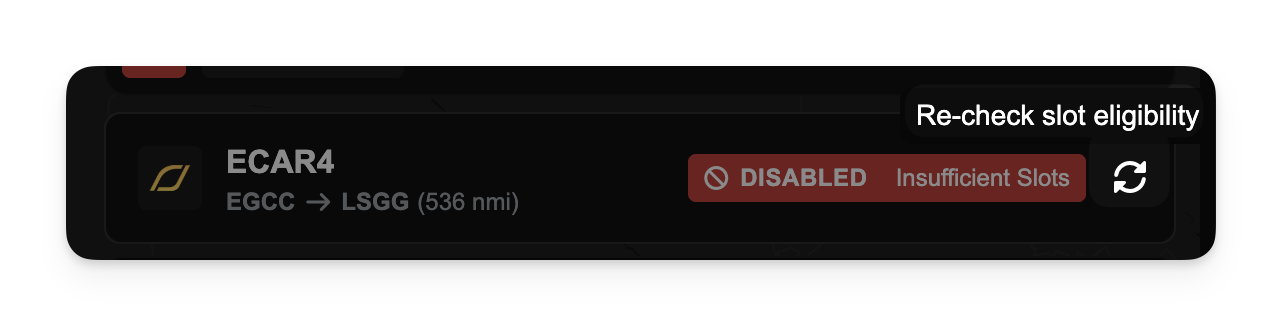
We've changed how routes are enabled and managed. From now on, all routes will require an available Slot to operate. Slots are a new type of recurring agreement within the game, designed to provide a more realistic and structured approach to network management. They come in two distinct types: domestic for internal flights and international for flights crossing borders. This change means you'll need to secure the correct type of slot for each route you wish to fly.

In addition to the new slot system, we're giving you more direct control over your flight network. You can now manually enable or disable routes as you see fit. This allows for greater flexibility in managing your network. Disabled routes do not contribute to your route network at all, effectively behaving as if they were deleted.
A new type of parking agreement, Stands, is now available. These are specifically designed for airliners. Unlike General Aviation (GA) aircraft, airliners do not accrue accelerated maintenance when parked outside, making stands a more flexible parking solution for your larger aircraft. While primarily for airliners, you can also use any spare stand capacity to store your GA aircraft, protecting them from parking fees when you find yourself in a pinch.
We've introduced a new auto-storage system that intelligently manages where your aircraft are parked. The system uses a priority-based approach to automatically assign aircraft to the most suitable available space. It will prioritise hangars for aircraft that benefit most from being sheltered and then allocate remaining aircraft to stands or other available parking. This should reduce the amount of manual shuffling required to keep your fleet organised and maintained.
To help you better understand the activity of your business, we've added a new company clock visualisation. This feature provides a heatmap of your company's operational hours, showing you at a glance when your fleet is most active and when it's idle. You can use this information to identify patterns and make more informed decisions about your company's operations.