Auto-Maintenance now performs the correct check level (FSC-3661)
When multiple maintenance checks were overdue at the same time, the system was incorrectly triggering a lower-level check (e.g. an A-Check) before performing the higher-level check that was actually due (e.g. a B-Check). Since a B-Check already covers everything an A-Check does, this caused unnecessary extra downtime and cost. The system now correctly identifies the most comprehensive check due and performs that directly.
Collaboration dashboard no longer shows passengers who aren't ready (FSC-3818)
The collaboration dashboard was including legs where passengers were still in transit between connections and not yet ready to board. It now only shows legs where passengers are actively waiting to depart, giving a more accurate picture of what needs servicing.
Create Charter Mode now applies the correct demand filter (FSC-3904)
Reported by community member milliotseb. Create Charter Mode was applying an "amount available" filter when the option to sync filters was selected instead of the "group size" filter. This caused fewer charter proposals to appear than expected, incorrectly excluding demand that could be served in smaller groups. It now correctly applies the group size filter instead.
Charter bonus exploit prevention (FSC-3885)
The charter bonus structure could be exploited by splitting a single journey into many short legs across separate jobs, multiplying the payout. Now, each company can only earn one charter bonus per passenger group, regardless of how many legs they operate. Normal charter revenue without the bonus is still earned on subsequent legs.
Stability fix for aircraft reporting (FSC-3905)
An out-of-memory database error could occur when certain sitreps were generated under load. This has been resolved.
In our Open Beta survey, 75% of you told us it was difficult or very difficult to turn a profit. The economy was the #1 frustration. Charter limitations, demand distribution, and the feeling that the deck was stacked against smaller operators came up again and again. This patch is our answer to those concerns.
Here's what matters most:
The charter aircraft cap is gone. Fly charters in anything, with a new bonus system that makes small charters way more profitable. The demand engine has been rebuilt from the ground up with fairer global distribution, more economy passengers at airports that matter, and higher economy fares to match. A new Create Charter Mode lets you pick an aircraft and find work for it instead of the other way around. And every new and existing aircraft gets one free cabin reconfiguration to adapt to the new demand landscape. Full details below.
What's Changed
1. Charter is Unshackled
The 20-seat charter cap is gone. Completely removed. You can now charter any aircraft in your fleet, from a Cessna 172 to a 777. No permits, no artificial restrictions.
The economy now naturally balances itself. Charter now uses an exclusivity bonus that rewards small, intimate charters and progressively penalises you for trying to run a 200-seat airliner as a taxi service. Passengers expect exclusivity when they book a charter. Cram 100 people in and your revenue per head drops by ~75%. Keep it under 40 passengers and you get the full bonus with no penalty at all.
Charter bonus per person: Up to £967 per person for a solo charter, scaling down as you add passengers. A 10-passenger charter still earns £716 per person on top of the base fare. The bonus tails off around 30-40 passengers, and above 40 a capacity penalty kicks in.
Passengers
Bonus/Person
Capacity Penalty
1
£967
None
10
£716
None
20
£513
None
30
£367
None
40
£270
None
50
£188
~28% total revenue cut
80
£71
~65% total revenue cut
The takeaway: small charters are now genuinely lucrative. A well-planned 4-passenger business jet charter can earn good money. We hope that this is a giant leap in the right direction for the economy that the survey called for. Smaller operators have a real competitive edge in the charter market now.
But it's not just small aircraft that benefit. Combined with the demand changes below (more economy passengers, higher economy fares), chartering economy passengers in larger aircraft is now a genuinely viable strategy. There's a ton of demand out there and the charter bonus still applies up to 40 passengers with no penalty. The cap removal plus the new bonus structure means you have options that simply didn't exist before. For the full breakdown of how charter bonuses and the exclusivity multiplier work, check out the Charter Jobs documentation.
2. Demand Has Been Rebuilt From the Ground Up
We've overhauled how the demand engine generates and distributes passengers across the world. The old system had a massive skew toward the USA and Brazil (where ~60% of all airports are), with places like Spain and China getting disproportionately little traffic. The new system accounts for:
Airport density: Areas with hundreds of tiny airfields in a small radius (New York, Sao Paulo) no longer hog a disproportionate share of global demand
Country airport count: Countries with fewer airports are no longer punished for it
Class-specific geo-scoring: Every airport now has separate economy, business, and first class scores that influence where passengers spawn and where they want to go
What this means in practice:
Economy passengers cluster around larger airports. No more random economy demand spawning at a grass strip in the middle of nowhere. If you're running economy routes, focus on the airports people actually fly through.
First and business class are more spread out. Premium passengers travel to more varied destinations, rewarding diverse route networks.
Economy passengers pay more. With the demand ratio shifting toward economy, we've increased economy fares proportionally so that economy routes remain profitable. Any existing collaborative demand has also had prices scaled up.
Demand fills fast. The demand engine can now generate the full 8 million passenger groups in approximately 3 hours instead of taking over a week. After this patch, demand has been fully reset and will populate quickly.
Behind the Scenes: The Demand-o-Matic
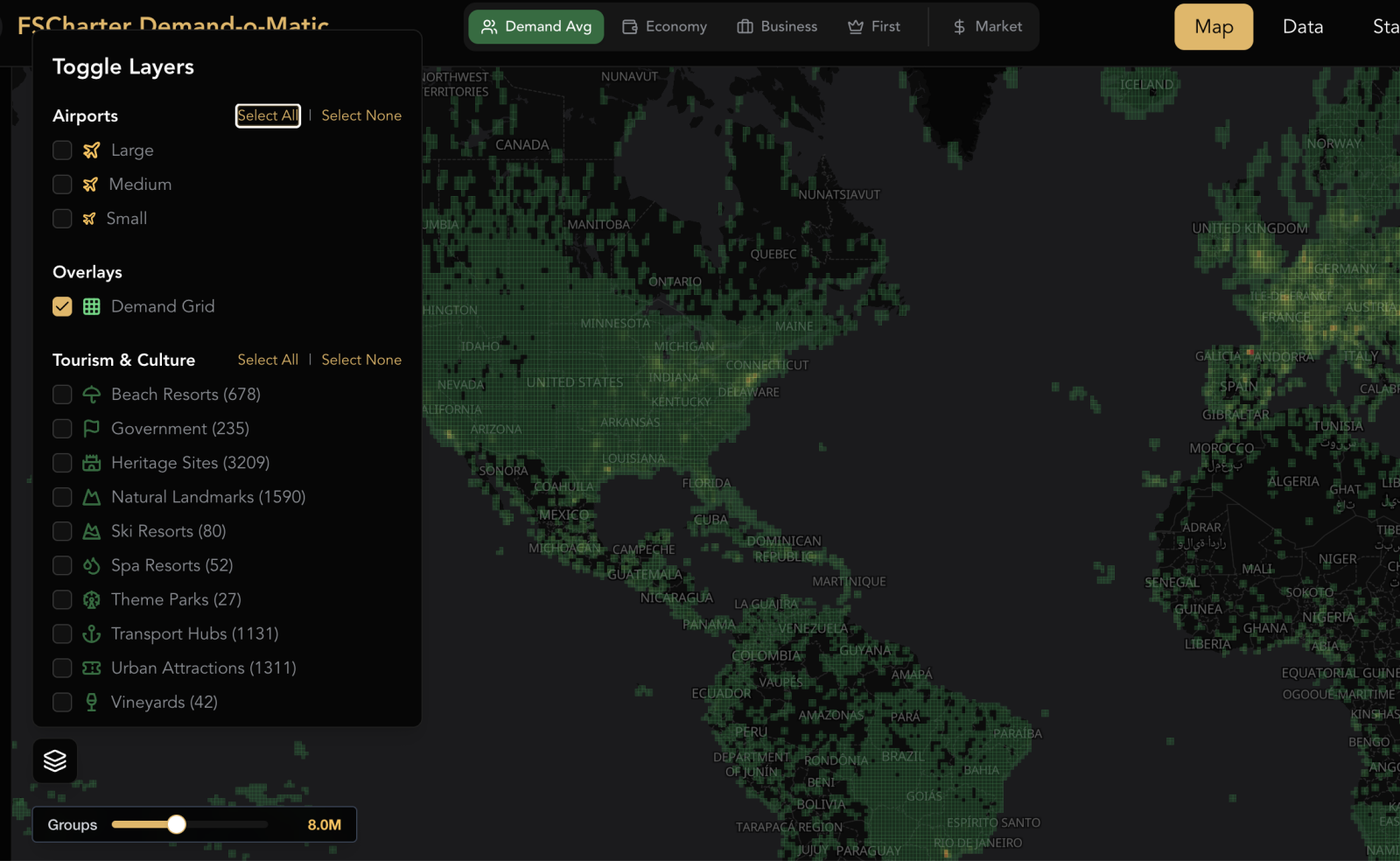
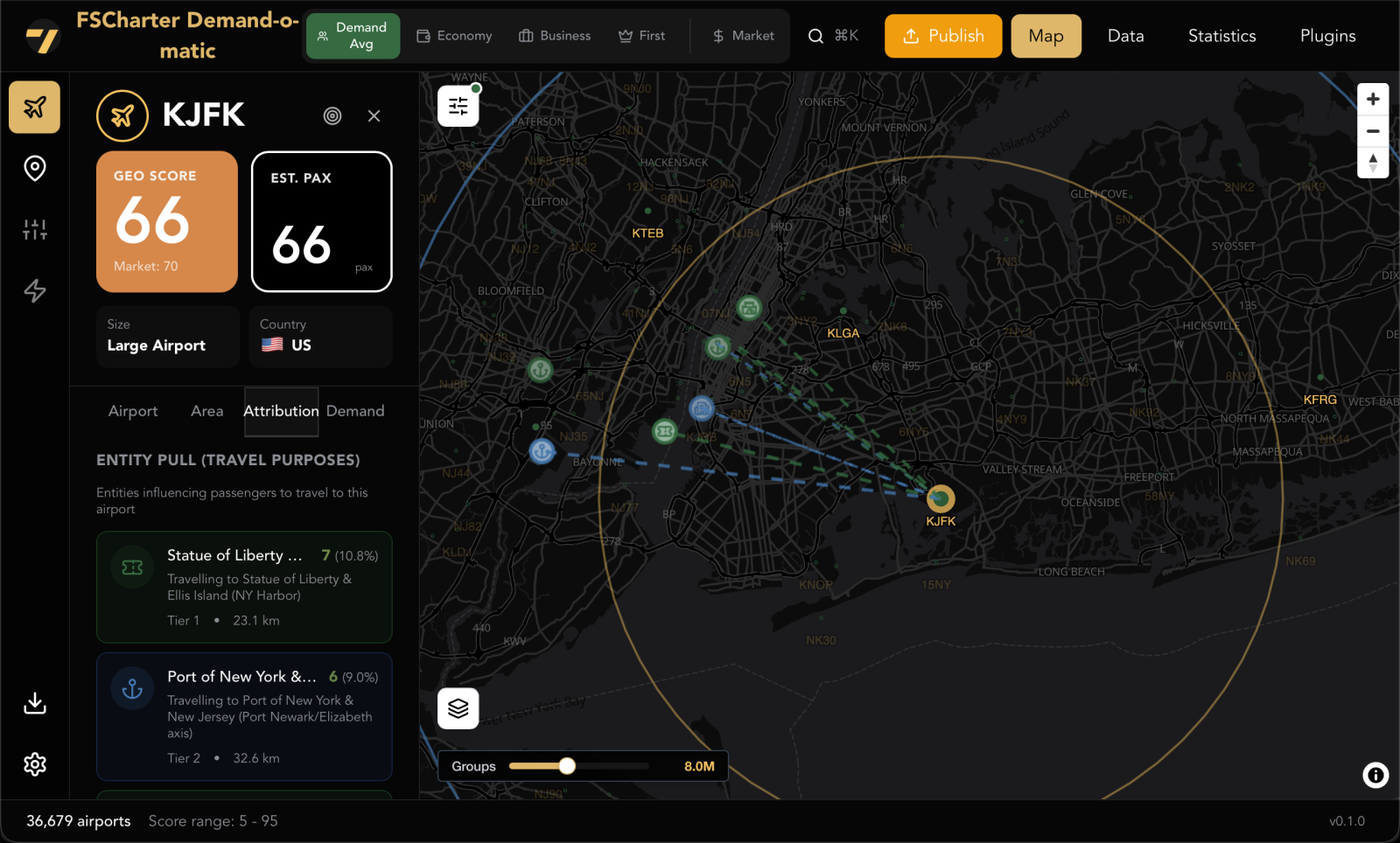
Distributing demand fairly across 36,000+ airports is a serious big data problem, and getting it right required purpose-built tooling. RCTO has developed an internal tool (that we affectionately refer to as the Demand-o-Matic) that powers the new geo-scoring system behind this update.
The tool combines UN travel data, World Bank GDP figures, and a database of over 40,000 real-world entities (think Disneyland Paris, the Bank of England, the Statue of Liberty) to build a model of where passengers actually want to go and why. Each entity contributes a weighted pull on nearby airports, giving demand a grounding in real-world travel motivation rather than random distribution.
Passenger class scoring is split by travel purpose. Economy passengers are weighted more heavily toward tourism entities, while business class passengers lean toward commercial and financial centres. First class demand is deliberately spread thinner and into less obvious locations, making premium passengers harder to gather but more rewarding when you do.
One of the biggest problems the tool solves is clustering. In the old system, every airport effectively acted as a lottery ticket for demand. The more airports a country or region had, the more demand it won. The USA holds roughly 60% of all airports in the game, so areas like New York and Sao Paulo were hoovering up a disproportionate share of global traffic. Meanwhile, countries like Spain, which has relatively few airports for its size, were being unfairly underserved. The Demand-o-Matic runs geospatial calculations to counteract this, so demand distribution is based on where people actually travel rather than where airports happen to be densely packed.
This tool is what makes it possible to keep iterating on demand balance going forward. The scores in this patch are the result of months of testing and adjustment, but the tooling is now in place to make further refinements as we gather feedback.
3. Create Charter Mode (Premium Core)
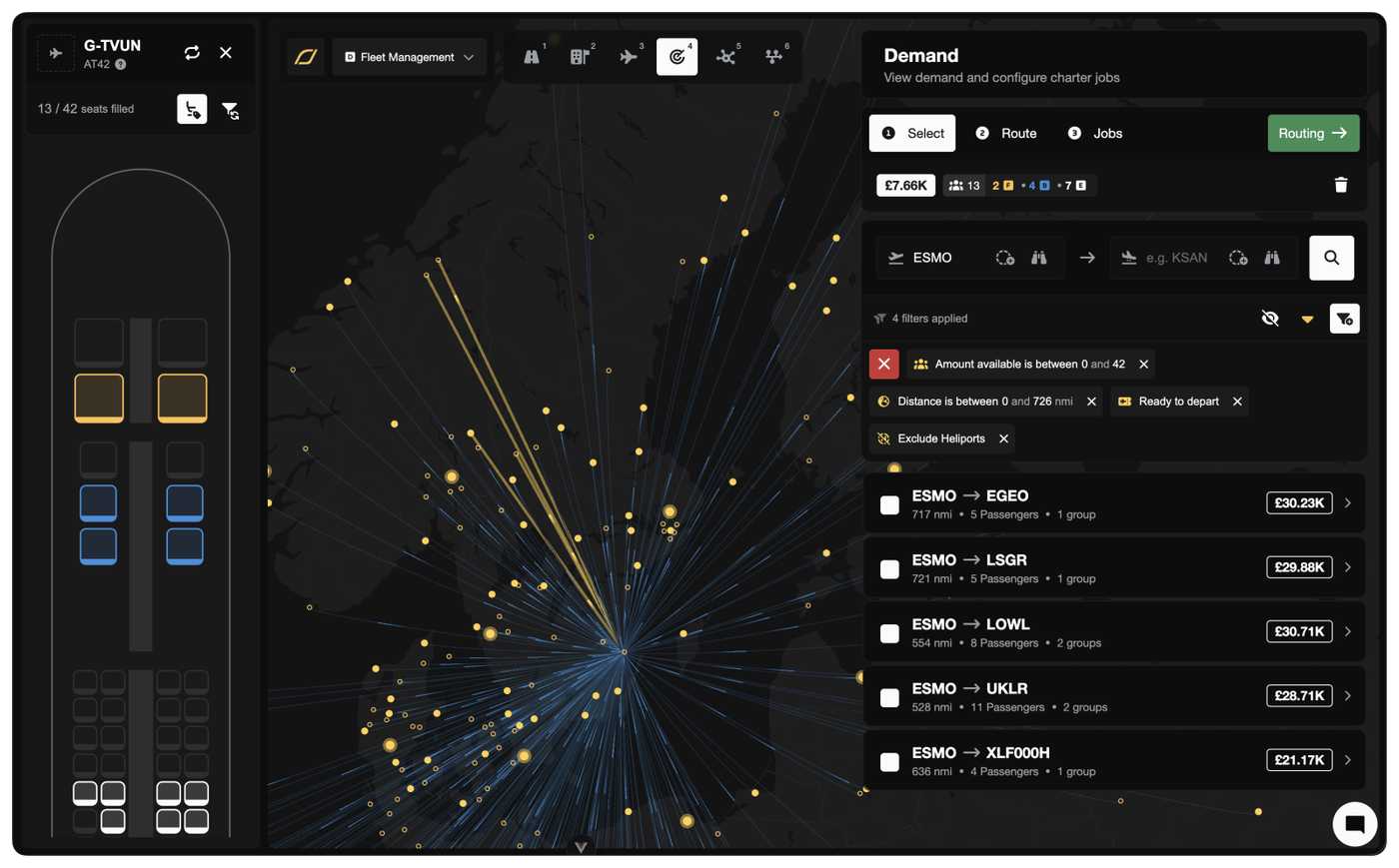
A massive quality-of-life upgrade for charter companies. Create Charter Mode flips the Dispatch Plan workflow on its head. Instead of browsing demand and hoping something fits your aircraft, you pick your aircraft first and the system shows you what it can fly.
The old way: Browse the demand map, find interesting passengers, then figure out which aircraft can fly them.
The new way: Pick your aircraft first. The system shows you every demand group it can reach, filtered to its range and capacity.
Key features:
Interactive seat map: Watch passengers fill your cabin in real time as you select demand groups. Click any filled seat to remove that group.
Filter Sync: Toggle this on and the demand list automatically updates as you fill seats. Select 12 of 19 seats? The list now only shows groups of 7 or fewer. No more accidentally overfilling.
Map integration: Ctrl/Cmd-click demand lines on the map to add or remove groups directly.
Release & Accept: One-click shortcut that publishes the job and immediately assigns it to you as the pilot. No need to visit the marketplace.
Switch aircraft mid-flow: Realise a different aircraft would be better? Swap it out without losing your selected passengers.
Ferry companion: Each aircraft row has a split button with both Charter and Ferry actions. Reposition to a better airport first, then charter from there.
Create Charter Mode is available from the Operations Cockpit > Aircraft lens. It complements the existing demand-first workflow. Use whichever fits what you're doing.
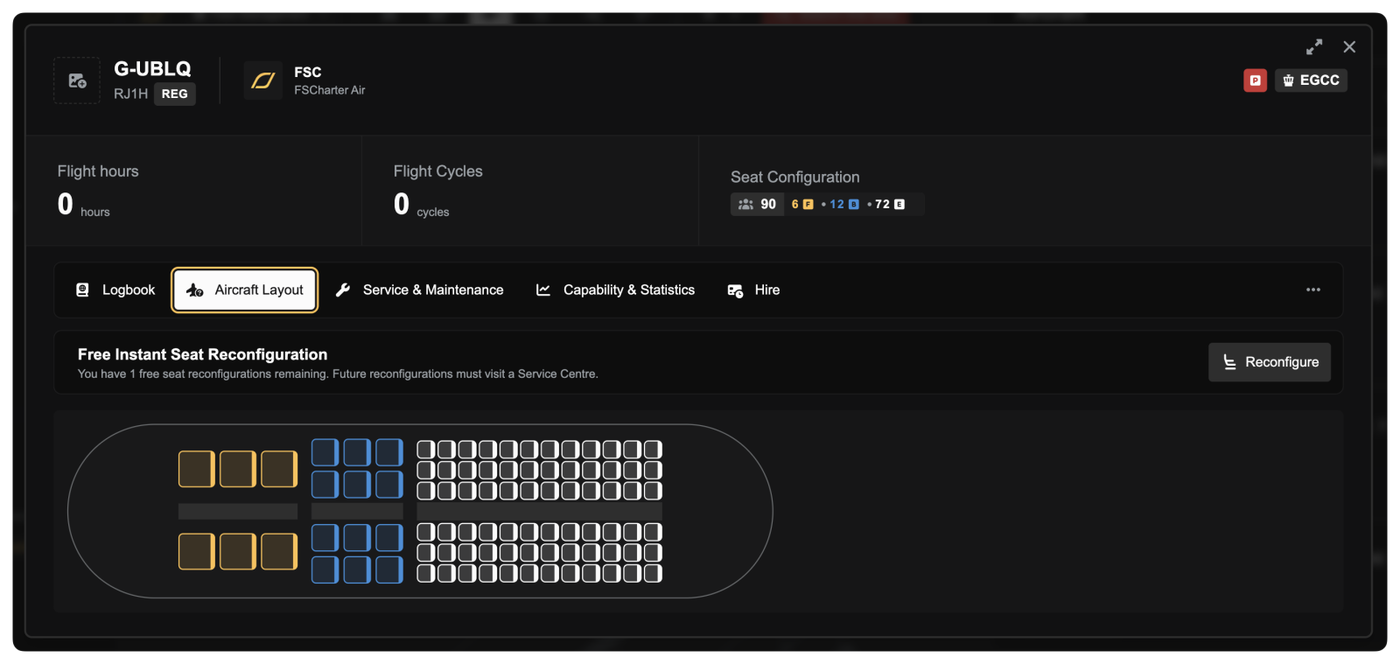
Every aircraft now gets one free cabin reconfiguration, applied instantly with no downtime. This new feature can be accessed from the Aircraft Layout tab of your Aircraft dialog in the Operations Cockpit.
With the demand model shifting toward more economy passengers, your current cabin layouts may not be optimal. This free reconfiguration lets you adapt without penalty. Use it to match the new demand reality. You'll likely want more economy seats on most aircraft going forward.
Financial Previews
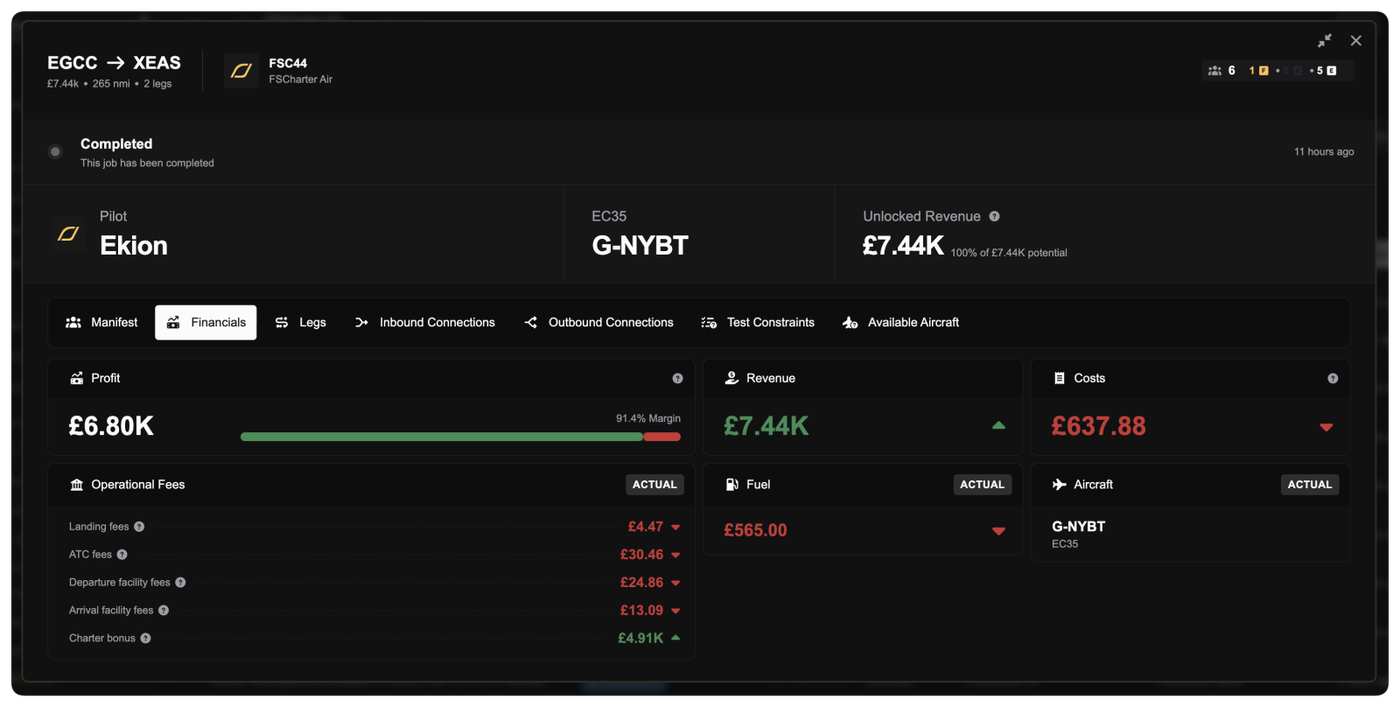
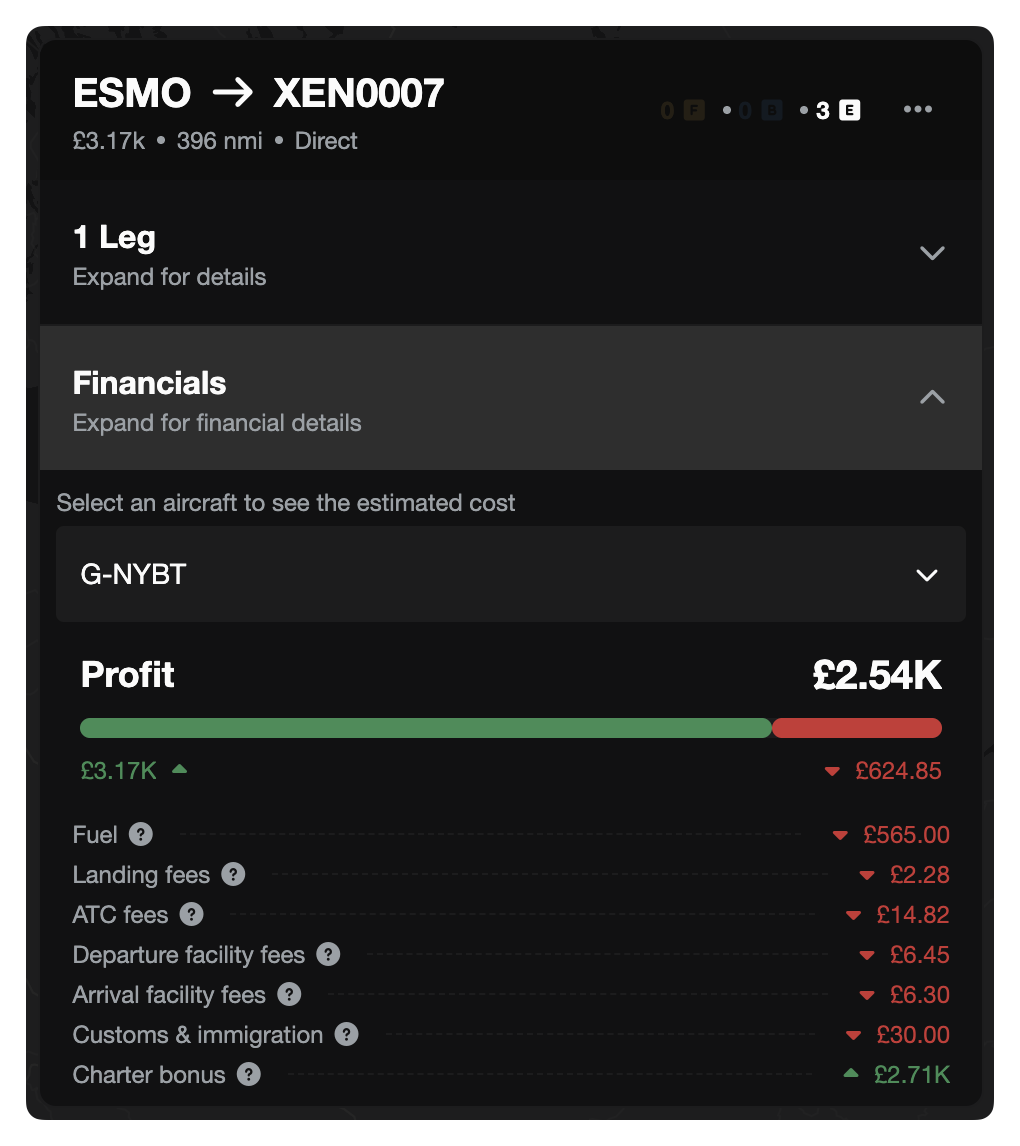
You can now see estimated and actual financials for all jobs and routes, including fuel costs, landing fees, ATC charges, customs fees, and revenue. Available both during charter creation and after the fact.
During charter creation: See revenue estimates and cost breakdowns as you build your dispatch plan, so you know whether a charter is profitable before you commit.
After completion: Review what you actually earned vs. what it cost. Fuel burn is calculated from your real flight history average for that aircraft type.
Ferry jobs too: Fuel and landing fee estimates for repositioning flights, so you can factor ferry costs into your charter planning.
Route financials: View estimated revenue based on demand minimums, with a passenger count parameter to model different load factors.
No more flying blind on whether a job is worth taking.
Other Improvements
Release & Accept for jobs: Jobs and dispatch plans can now be released and accepted in a single action. No more releasing to the marketplace and then racing to accept your own job.
Restyled Aircraft rows: The Aircraft lens in the Operations Cockpit has been redesigned with split action buttons, letting you launch Create Charter Mode or create ferry flights directly from the dock without extra navigation.
Aircraft location flags: Aircraft rows now display the flag of the country where the aircraft is currently located, making it easy to scan your fleet's global positioning at a glance.
Demand date filter: Filter demand by the date it was generated, useful for spotting fresh demand.
Demand badge on jobs: The Job dialog now shows a badge with seat requirements by cabin class (Economy/Business/First), so you can see at a glance what a job needs.
Massively faster route demand loading: Route demand queries have been optimised from ~8 seconds down to ~266ms (a 30x speedup). The demand map and route demand refresh should feel dramatically snappier, especially on servers with full 8M-row demand tables.
Map reliability fixes: Fixed race conditions in the deck.gl map layers that could cause route lines to not update properly when dragging or switching views.
Bug Fixes
Fixed unfair last-leg payment distribution. A significant bug where the final leg of a multi-leg journey was receiving a disproportionately large share of the total payment. All legs now receive their fair proportional share based on distance contribution. Also corrected the calculation that determines how passenger budgets are split across legs, ensuring accurate pricing throughout multi-leg journeys.
Fixed charter job configuration bugs. Resolved multiple issues in dispatch plan and job configuration that could cause incorrect leg assignments, seat allocation errors, and routing problems.
Fixed orphaned jobs after demand removal. Removing demand from a dispatch plan now correctly cleans up orphaned job legs and recalculates seat requirements, preventing ghost jobs from lingering.
A Note on Testing
These changes have been through extensive internal testing over the past few weeks. We've been hammering the new demand engine and the charter economics on staging for a while now. That said, this is a big patch touching a lot of interconnected systems. If anything doesn't look right, feels off, or the numbers seem wrong, please reach out. We'd much rather hear about it than have you quietly frustrated. Your feedback is what got us here, and it's what'll keep us improving.
What's Next
Next up: cargo. It was the #1 most-requested feature in the survey and it's on the roadmap. More to come on that soon.
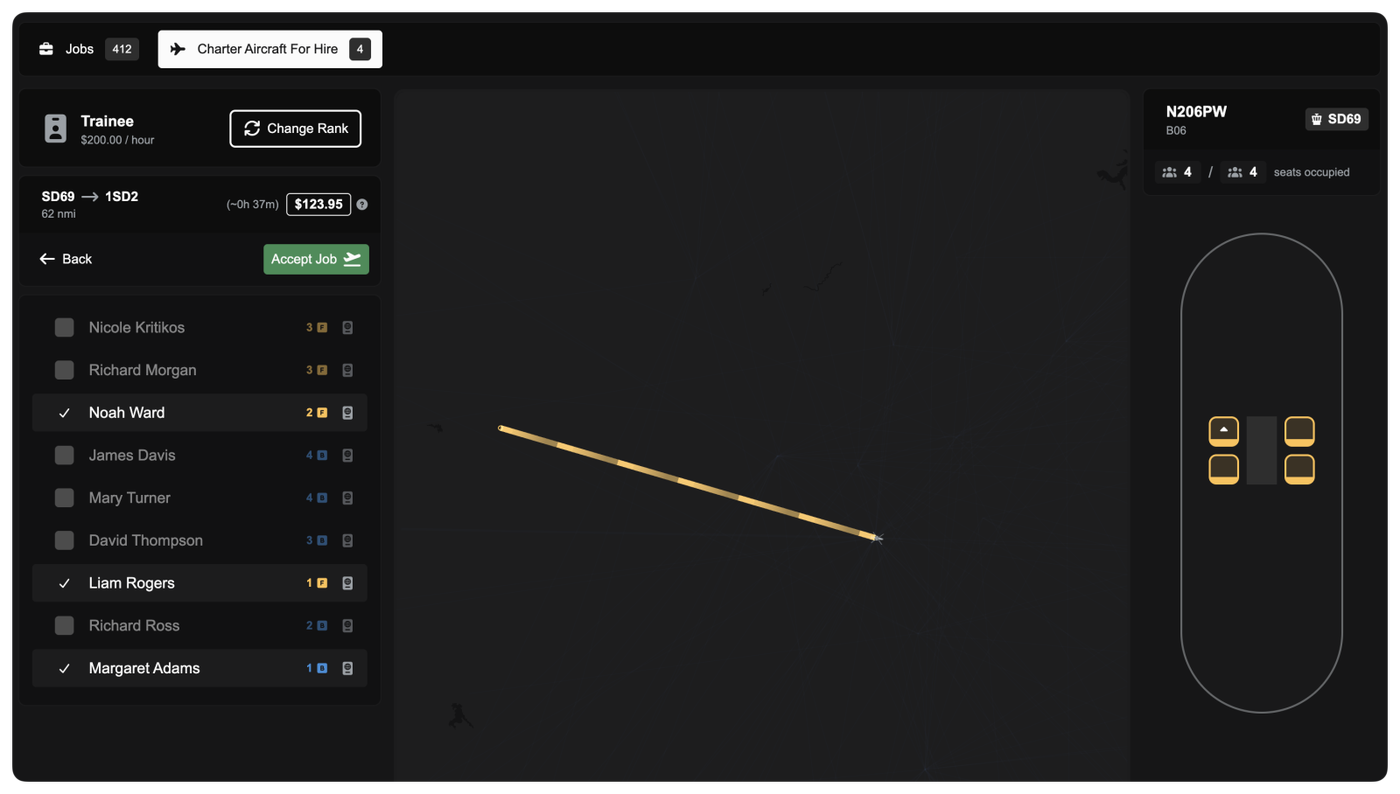
Charter hire demand no longer shows a misleading per-row payout of £0.00. Instead, you get an estimated pay shown at the top based on your rank and the expected flight time for the route. The estimate is calculated from the route distance (multipled by 1.2) and the aircraft’s cruise speed.
A new help tooltip explains the calculation and the realism factor used to account for climb, descent, and non-perfect routing.
Other improvements
Relocation for hireable aircraft is now based on your rank’s aircraft constraint radius (one consistent rule), instead of separate aircraft-level relocation settings.
Fixed an issue where switching between aircraft could leave old demand filters behind, causing incorrect or missing demand results.
Updated seats on Pilatus PC-12 from 10 to 9 and increased MTOW from 4,500kg to 4,740kg
Updated seats on Airbus A321 neo from 230 to 244 and renamed to A321neo LR
Updated OEW for Airbus A321XLR from 49,000kg to 46,600kg
Persistent Rank Approval
You no longer need to re-apply every time you return to a rank you’ve already been cleared for.
When a company approves you for a rank (whether manually by a manager or automatically through progression or eligibility) that approval is now remembered. If you later switch away and decide to come back, you can move straight into the rank without waiting for approval again.
In the Pilot Portal, ranks you’ve previously been approved for are clearly marked as Pre-Approved. These ranks let you switch instantly, even if they would normally require an application.
Other Improvements
NOTAM messages now show a live character counter, so you always know how close you are to the 255-character limit
Fixed arrow key navigation being intercepted while typing in company description and message fields
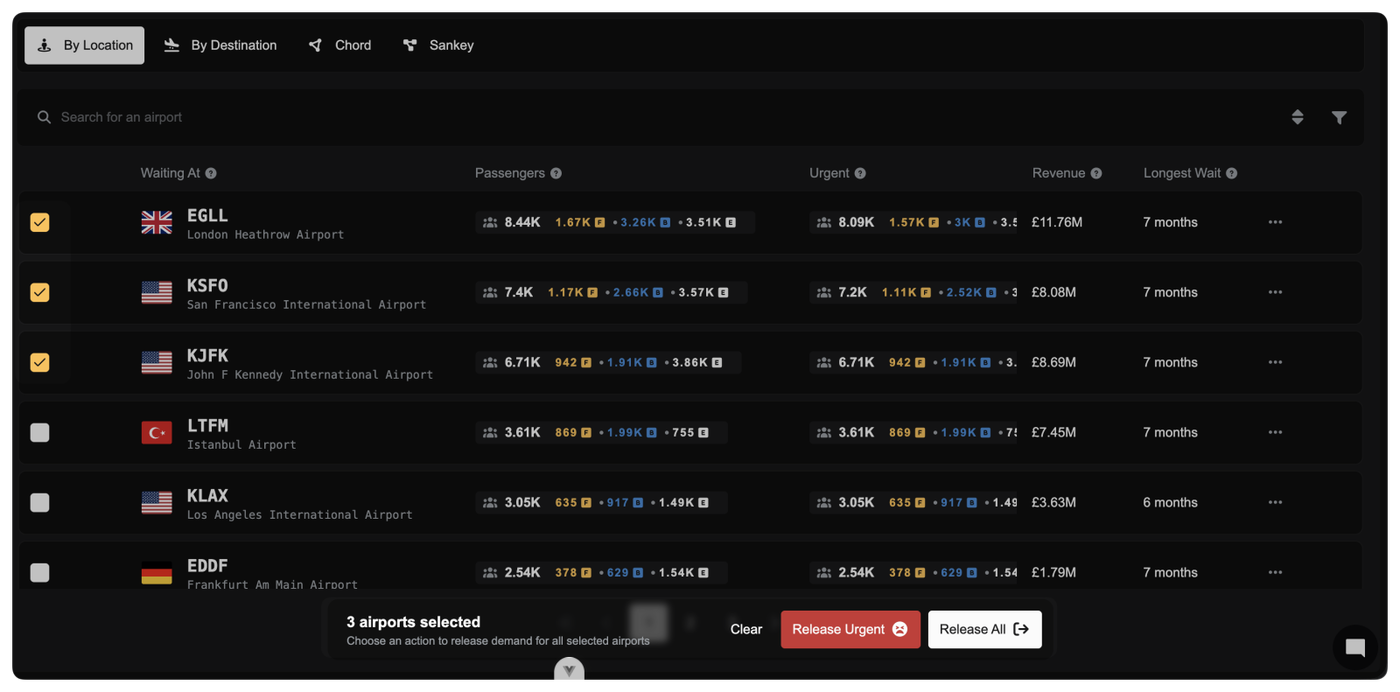
Managing the release of collaborative demand across multiple airports is now significantly faster and more controlled.
You can select multiple airports directly in the Collaboration Dashboard and release demand for all of them in one action. A new batch selection bar appears as soon as you start selecting rows, clearly showing how many airports are selected and which actions are available.
Two batch actions are available when you have the appropriate company privileges:
Release All: Releases all collaborative demand for the selected airports.
Release Urgent: Releases only demand that has exceeded the urgent threshold, leaving newer demand untouched.
Company Logos and User Avatars in Selectors
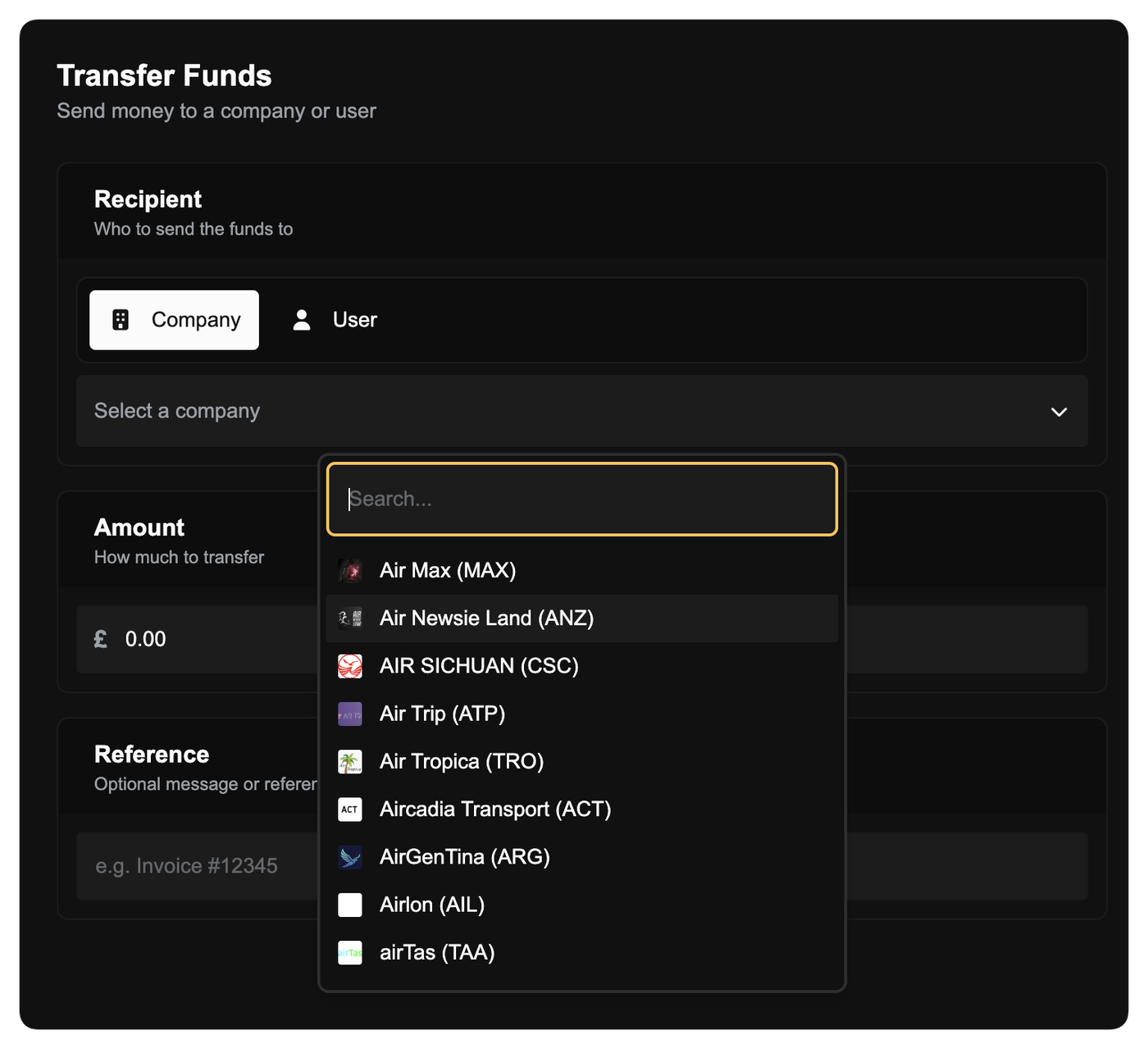
Company and user selection fields are now more visual and easier to scan. Wherever you choose a company or user (such as transferring funds, deleting a company, or selecting a recipient) logos and avatars are displayed alongside names instead of generic icons.
This makes it quicker to identify the right company or person at a glance, especially when working with long lists or similar names.
Aircraft Market Listing Enhancements
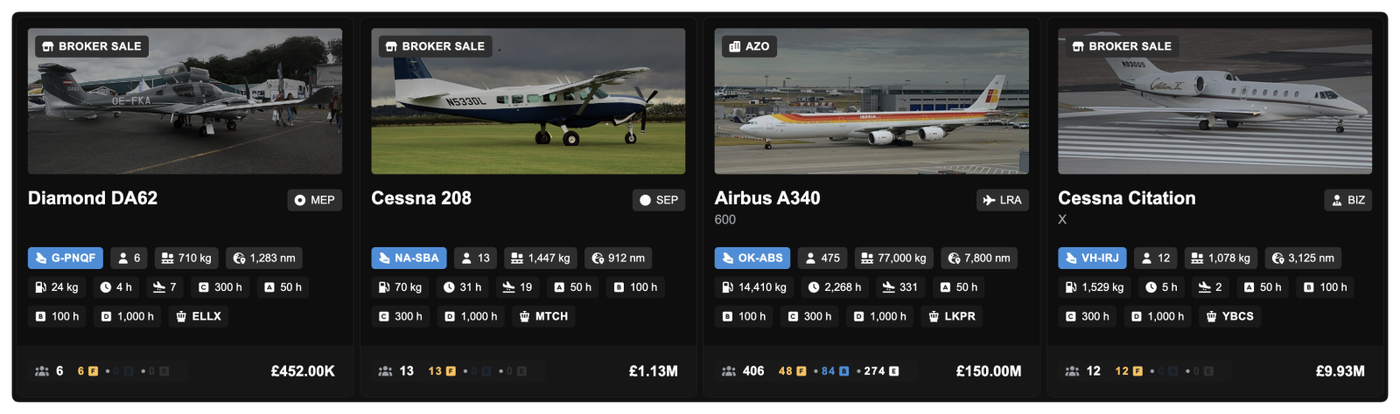
Used aircraft listings are now clearer and more informative. Broker sales and third-party sellers are highlighted directly on the aircraft image with new badges, making it obvious who is selling the aircraft.
Smarter Hangar Storage for Company-Owned Buildings
A bug with aircraft storage logic has been fixed to better reflect ownership. Previously, if you owned a hangar but had set it to public use for a fee, your own aircraft would not automatically use it after slot grace periods end.
Now, if you own a hangar, your aircraft will always automatically use it for storage, even if that hangar is set to public access with a price. You never pay storage fees to yourself, and aircraft will no longer be pushed into less suitable public storage because of pricing settings.
Other improvements
Fixed tables scrolling slightly within tables
Minor visual polish across aircraft listings and dashboards
When you pause your simulator, the Company Clock will now pause with it. This ensures you are not penalized with accumulating background costs such as agreements and loan repayments while attending to real-life interruptions during a flight.
Because the simulator does not send a direct "pause" signal to the server, the system infers a paused state if no flight telemetry (sitreps) are received for 5 minutes. Once you unpause the simulator and flight data resumes, the Company Clock automatically restarts.
Small Improvements
We have removed the calculation cap (saturation) on route demand. Previously, extremely high Economy numbers could hit the calculation limit before Business or First Class passengers were counted, causing premium demand to appear as zero. This may result in slower route demand refresh.
Route demand now displays the exact passenger count for all classes rather than a capped estimate (e.g., "3.00K+").
Fix some buttons in the Operations Cockpit showing for users who did not have permission to click on them.
Prevented an issue where jobs inside draft dispatch plans were incorrectly updated or released when prerequisites were met by inbound flights, leaving the Dispatch Plan in a broken state.
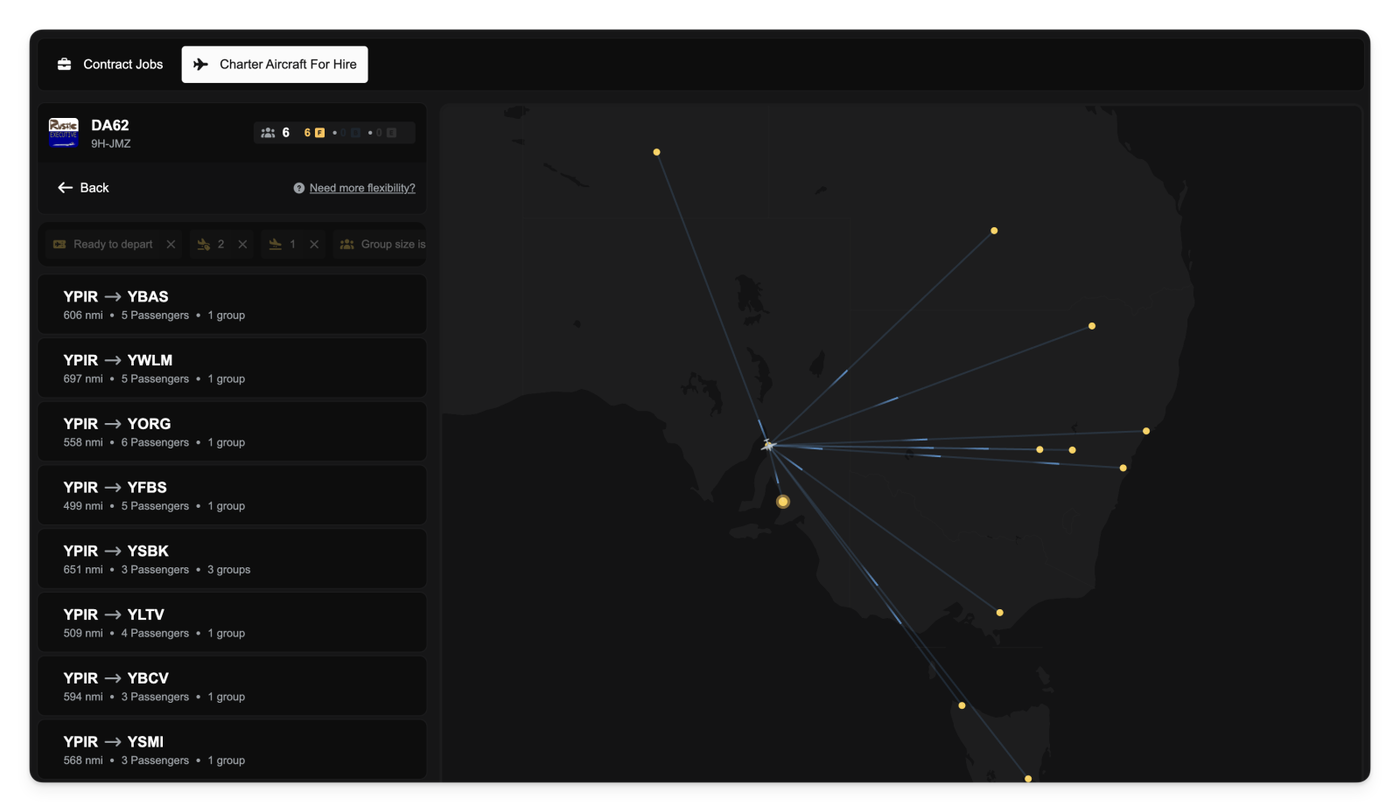
When you select an aircraft for hire in the marketplace, the list of available jobs (demand) is now automatically filtered to only show contracts that are within a realistic operating range for that specific aircraft.
Previously, you might have selected a short-range aircraft only to be presented with job opportunities hundreds or thousands of nautical miles away, leading to jobs you couldn't actually complete. Now, the system automatically applies a distance filter to the job list. This filter is calculated to be 120% of the aircraft's base range, giving you a small buffer while ensuring the available jobs are sensible. If the aircraft owner has specified a manual range filter this will be applied instead of the default range filter.
Additionally, we've made it easier to see the passenger capacity of the aircraft you're about to hire. When browsing the demand for an aircraft you will now see a clear badge showing the number of First, Business, and Economy seats available on the aircraft right next to its name.
Other improvements
Removed pagination from the aircraft for hire list to allow for quicker and more comprehensive browsing of all available aircraft without needing to click through pages. All aircraft are now shown by default.
We've removed the default, non-functional marker that used to appear alongside the aircraft icon when you clicked to place a new aircraft in the world.
The map used in the aircraft-for-hire marketplace no longer attempts to automatically zoom in every time you update the results or click the Search this area button.
We have corrected a long-standing issue where Owner Salary Payments were being credited to your personal account but were not properly debited from your company's bank account (oops)!
Previously, when you received your monthly salary based on your company's profit, your personal funds increased, but the company's funds were not reduced, leading to an artificially inflated company balance.
With this fix, salary payments now correctly operate as an outgoing payment from your company to you, ensuring the company's financial records are accurate.
This change is only a correction to the ledger and does not affect the amount of salary you actually received. Your personal balance remains unchanged.
We have automatically processed a correction payment for any past salary payments to deduct the amount from your company's bank account, ensuring your company's balance is now accurate. In some rare cases, this may cause your company's balance to go negative temporarily, but it correctly reflects the true financial state.
We have lowered the purchase price for all aircraft by 10% to better align to the current economy. To ensure fairness for those who have recently invested in their fleet, we have processed automatic refunds. If you own an aircraft affected by this price adjustment, the difference between your original purchase price and the new market value has been credited back to your company bank account.
Extended Loan Terms
To support faster fleet progression and better cash flow management, we have doubled the maximum repayment period for loans. You can now secure loans with terms of up to 120 cycles (previously capped at 60). Spreading payments over a longer period reduces your recurring cycle costs, allowing you to invest in larger, more capable aircraft earlier in your career.
Smarter Demand for Hireable Aircraft
Finding the right job for a rented aircraft just got easier. When browsing demand for a hireable aircraft, the marketplace now automatically filters out passenger groups that won't fit. The system now checks the aircraft's capacity against the available groups, ensuring you only see jobs you can actually fly.
Recurring Payments & Agreement Improvements
We have improved the company finance page to give you better visibility and control of recurring payments. You can now view the total of all recurring payments and the ability to view a detailed breakdown of your recurring expenses, categorised by type.
Additionally, the Recurring Payments tab now clearly displays the specific name of the agreement that it relates to. We have also added the ability to cancel agreements directly from the Agreements page within the Operations Cockpit, saving you unnecessary navigation steps.
Other Changes
You can now generate and download CSV reports of all financial activity within a partnership.
We have removed the fee for withdrawing a pending contract application. You can now change your mind and withdraw an application without financial penalty.
Companies that are already members of an active partnership can no longer be invited to join a new one.
Fixed an issue where "Passenger Facility Fees" (Departure) were not being refunded if a job was reset after boarding.
Corrected the format for Hungarian aircraft tail numbers to adhere to the real-world 3-letter suffix standard (e.g., HA-ABC).
When hovering over demand on the map, you will now see a specific breakdown of passenger classes (First, Business, Economy).
Fixed the order of passenger class labels in the Job Overview dialog to be consistent.
The "Create New Route" screen now displays the exact nautical mile distance between the selected airports.
Added "Toggle All" controls to the Role Editor, allowing you to quickly check or uncheck entire groups of privileges and notifications.
The Rank Pay editor now calculates and displays an "Effective Hourly Rate" based on the total salary and contract hours to help you set competitive wages.
Fixed a bug where available aircraft for specific Ranks did not update immediately after modifying the Rank's constraints.
Notifications sent when a job is reset now include detailed context, including the aircraft tail number, route, job number, and airports involved.
Added specific filters to the job board to view only Charter jobs or Route jobs.
Fixed an issue where all logbook entries were incorrectly labeled as charter flights regardless of their actual type.
Fixed a bug preventing the deletion of a Rank if it had associated contracts that were already completed.
Improved the aircraft database search; you can now search across the platform by tail number, type, ICAO code, manufacturer, model, or variant.
Fixed the marketplace contract filter to correctly hide old, expired contracts.
The aircraft selector in the Route Preview dialog now displays the airport where each aircraft is currently located.
You will now see the estimated time required for jobs like "Reconfigure Seats" before confirming the work order.
Added a filter to the job marketplace to view jobs belonging to a specific partnership.
Fixed overlapping scrollbars on the Aircraft Database page.
The flight map now display a "Fuel Consumed" badge for completed flights.