
Smarter Aircraft Hiring and Map Polish
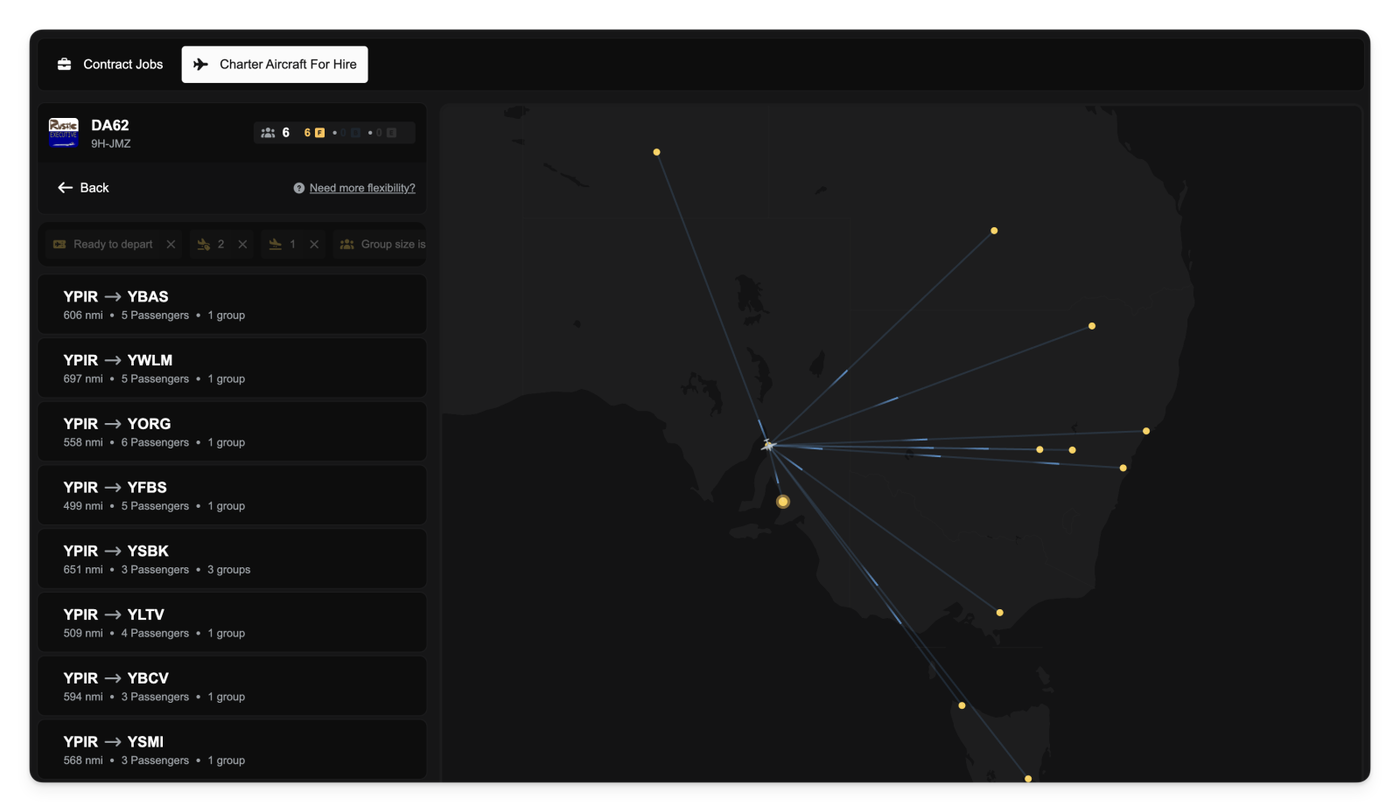
When you select an aircraft for hire in the marketplace, the list of available jobs (demand) is now automatically filtered to only show contracts that are within a realistic operating range for that specific aircraft.
Previously, you might have selected a short-range aircraft only to be presented with job opportunities hundreds or thousands of nautical miles away, leading to jobs you couldn't actually complete. Now, the system automatically applies a distance filter to the job list. This filter is calculated to be 120% of the aircraft's base range, giving you a small buffer while ensuring the available jobs are sensible. If the aircraft owner has specified a manual range filter this will be applied instead of the default range filter.
Additionally, we've made it easier to see the passenger capacity of the aircraft you're about to hire. When browsing the demand for an aircraft you will now see a clear badge showing the number of First, Business, and Economy seats available on the aircraft right next to its name.
Other improvements
- Removed pagination from the aircraft for hire list to allow for quicker and more comprehensive browsing of all available aircraft without needing to click through pages. All aircraft are now shown by default.
- We've removed the default, non-functional marker that used to appear alongside the aircraft icon when you clicked to place a new aircraft in the world.
- The map used in the aircraft-for-hire marketplace no longer attempts to automatically zoom in every time you update the results or click the
Search this areabutton.